
I Built My DREAM CRM (learn HOW & WHY I did it)
I built my dream CRM: a CRM that updates itself ✨.
You basically have 2 options 👇:
Watch the video below 🎥
Or read this article to learn how I did it
I Built My DREAM CRM: learn HOW & WHY I did it (TL;DR) |
|---|
A self-updating CRM removes manual data entry by letting AI move leads, create tasks, and update analytics automatically without complex workflows. 🤖 Built Breakcold to eliminate manual CRM work and messy automations. 🔗 Native multi-channel sync: Email, LinkedIn, WhatsApp, Telegram — all in one place. 🧠 No classic workflows: automation happens based on plain-language list names, pipeline stages, and tags. 🚀 Leads move automatically (New → Conversation Started → Booked Call) with zero manual action. 📋 Tasks are auto-created with context, reasoning, and AI-suggested messages. 📊 CRM analytics stay accurate because nothing relies on humans updating fields. 📈 Result: more focus on conversations, +44% conversations started, more deals closed. 🔥 The goal: open the dashboard, be told what to do, execute — and sell more. |
The Problem
Before telling you what it looks like, let me give you some context 👀.
In June 2023, my co founder and I launched a sales CRM called Breakcold. The goal was to build a modern alternative to Pipedrive, but with social integrations. Not just email and phone, but also LinkedIn, WhatsApp, and Telegram 💬.
And that’s exactly what we did.
People loved it 🙌.
Step by step, we improved the product and made it better and better. Then we hit a wall.
We realized that CRM automation was key for our users, and for myself too, because I absolutely hated manual CRM data entry 😤. The obvious solution was CRM workflows. You see them in almost every CRM, and they work well, but you basically have to become a CRM expert to use them properly. The learning curve is a disaster.
As a result, most people never automate their CRM correctly. Either it’s too hard, or they don’t have the budget to hire a CRM integrator.
The Solution
So during summer 2025, we were about to build classic CRM workflows. And I said, “Wait a second. What if we built a system where people don’t have to set up anything to keep their CRM updated?” 🤔
I would love that.
The real problem is that people waste a massive amount of time doing manual CRM data entry ⏳. The solution is not to make them waste even more time learning a heavy and complex automation system. We had to do better.
And that’s exactly what we did 💡.
We built a CRM that updates itself ⚙️.
How it works
Depending on how you name your CRM lists, your sales pipeline stages, and your tags, everything updates automatically ⚙️. Leads move automatically. CRM tasks are created automatically. Tags are assigned automatically. Lead summaries are generated automatically. CRM analytics are always up to date 📊.
With all of that, I achieved my goal: having nothing to do except show up on the dashboard, be told what to do, and execute. Just talking to prospects 💬. Because more conversations equal more sales.
Now, with that being said, let me show you how it looks 👀.
AI CRM Dashboard with auto-created Tasks
Every day, I simply open this dashboard and I’m told exactly what to do 🧭. From there, I’m taken directly into the relevant email thread or LinkedIn conversation. At the top left, I can see the action plan and the reasoning behind why the task was created.
I also get an AI suggested email or message that I can use as is or quickly tweak ✍️. At the same time, I can engage with my leads across social channels. This is incredibly helpful for many reasons.
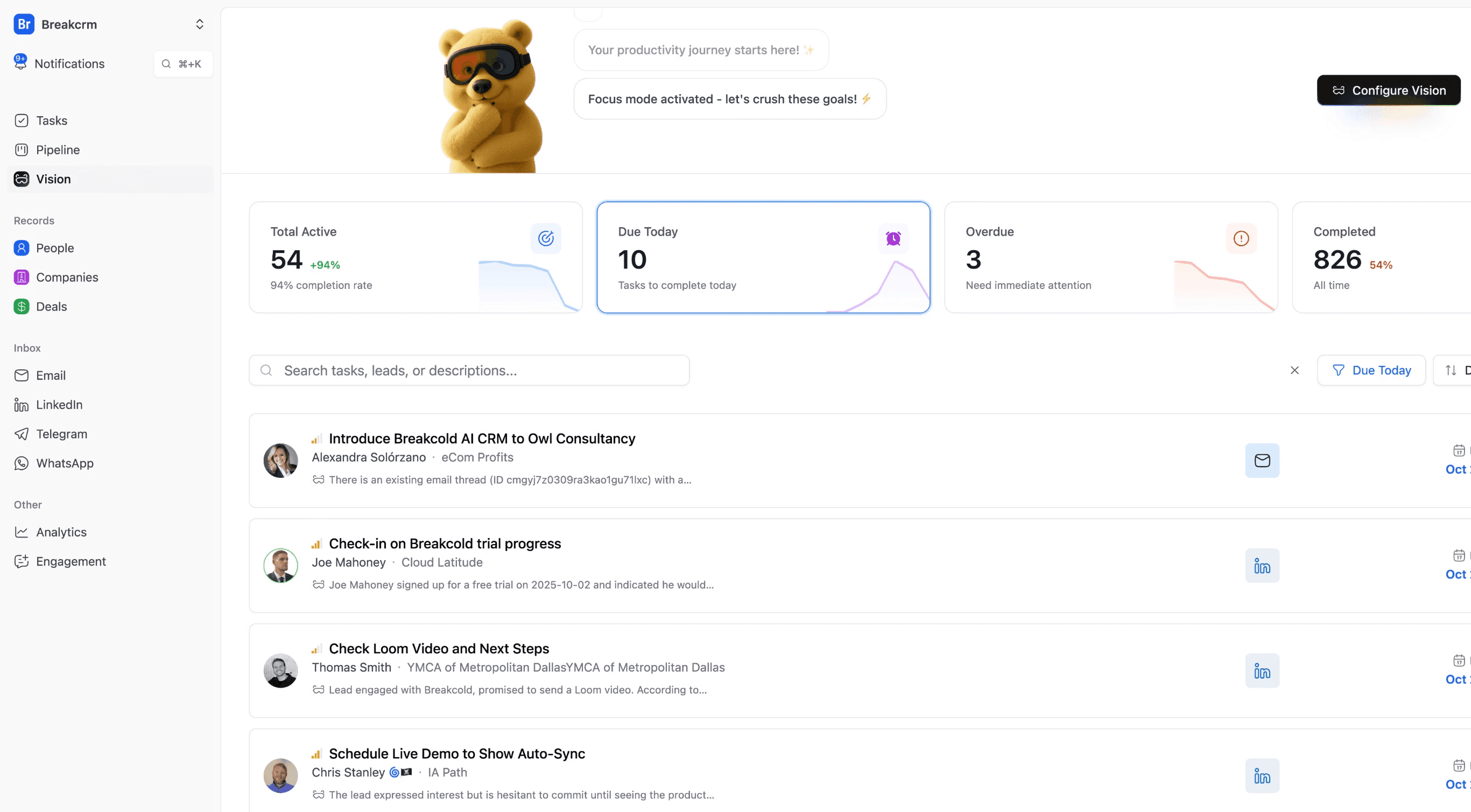
I don’t think about creating tasks anymore. They’re created for me. They put me in the right context, in the right conversation, and from there I just execute ⚡️.
Long story short, you still have some control over these tasks, but there’s no complicated setup. You simply choose what we call an AI CRM personality. Some people would call this an agent. Depending on what you pick, it influences how tasks are created: the frequency, the task names, how AI suggested messages look, and a lot more.
CRM contacts move automatically
But the best part is this: leads move automatically inside the CRM based on how your lists and pipeline stages are named 🔄.
This is not a classic CRM workflow feature.
This is basically an environment where you can give guidance to the AI on how to move your leads automatically inside the CRM 🧠.
For example, here in my outbound list, I only include leads that have a custom field called source, set to either email or anonymous visitor. Just by describing that in plain language, I’ve created my automation, which is honestly amazing ✨.
Examples
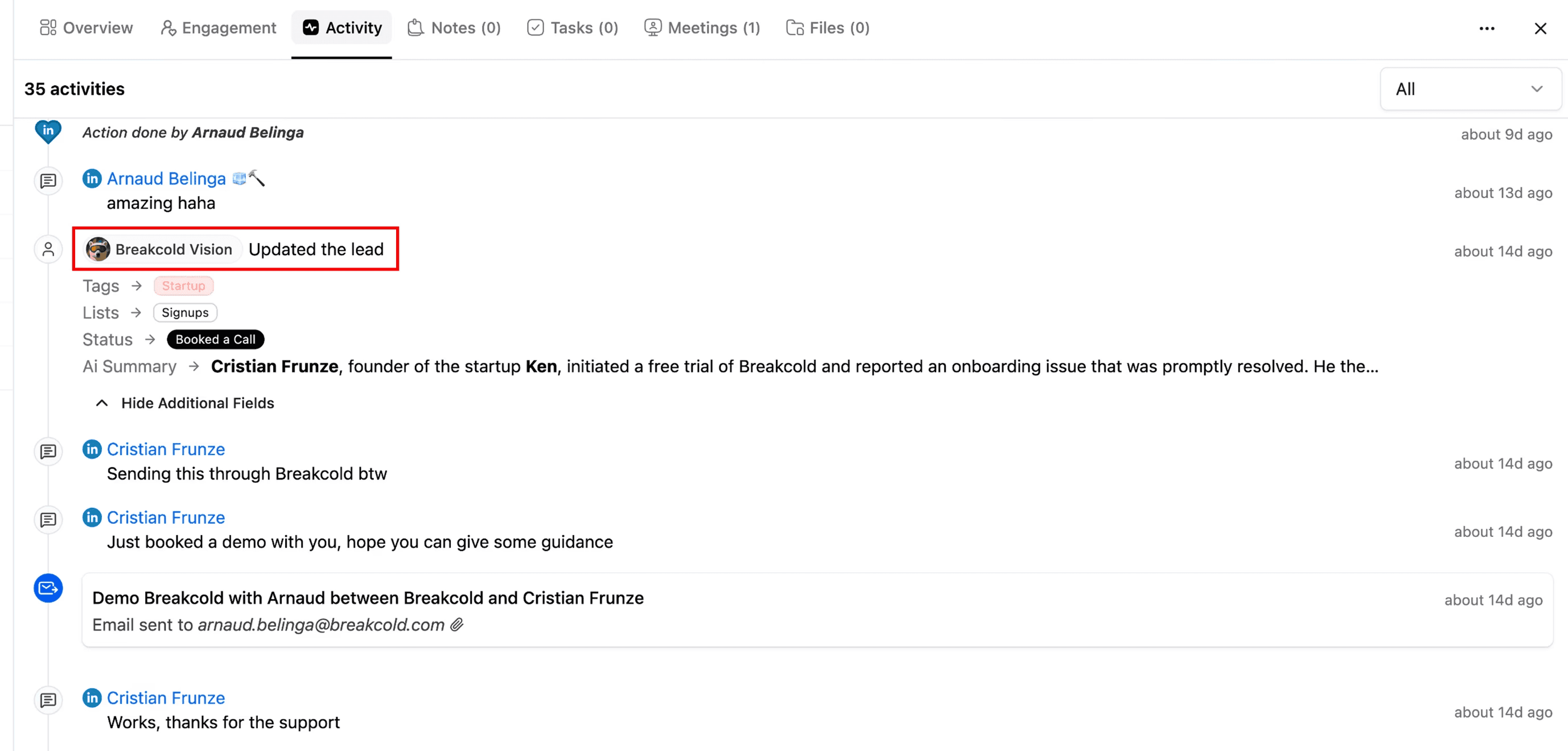
Now let me show you how this looks with a real lead 👀.
If I open the activity for Christian, you can see in this picture that the first time I added him to the CRM, he was automatically categorized into the New Free Trial list. Then we started a conversation, and the CRM detected his reply and automatically moved him to Conversation Started.
Later on, Christian booked a call. The CRM detected that as well and moved him to the Booked Call stage. I didn’t do anything. And that’s the magic ✨.
What this means is that my CRM analytics are always up to date 📊. And that’s one of the biggest problems with CRMs today: analytics are almost never accurate because people forget to update them.
From there, I can fully focus on having more conversations with leads.
You can also see that over the last 30 days, I’ve been relying more and more on the system to create tasks and move leads automatically. This allowed me to more than double the number of active conversations and increase the number of conversations started by 44%. That’s pretty insane, if you ask me.
And yes, this directly translates into closing more deals 🤝.
AI Summaries
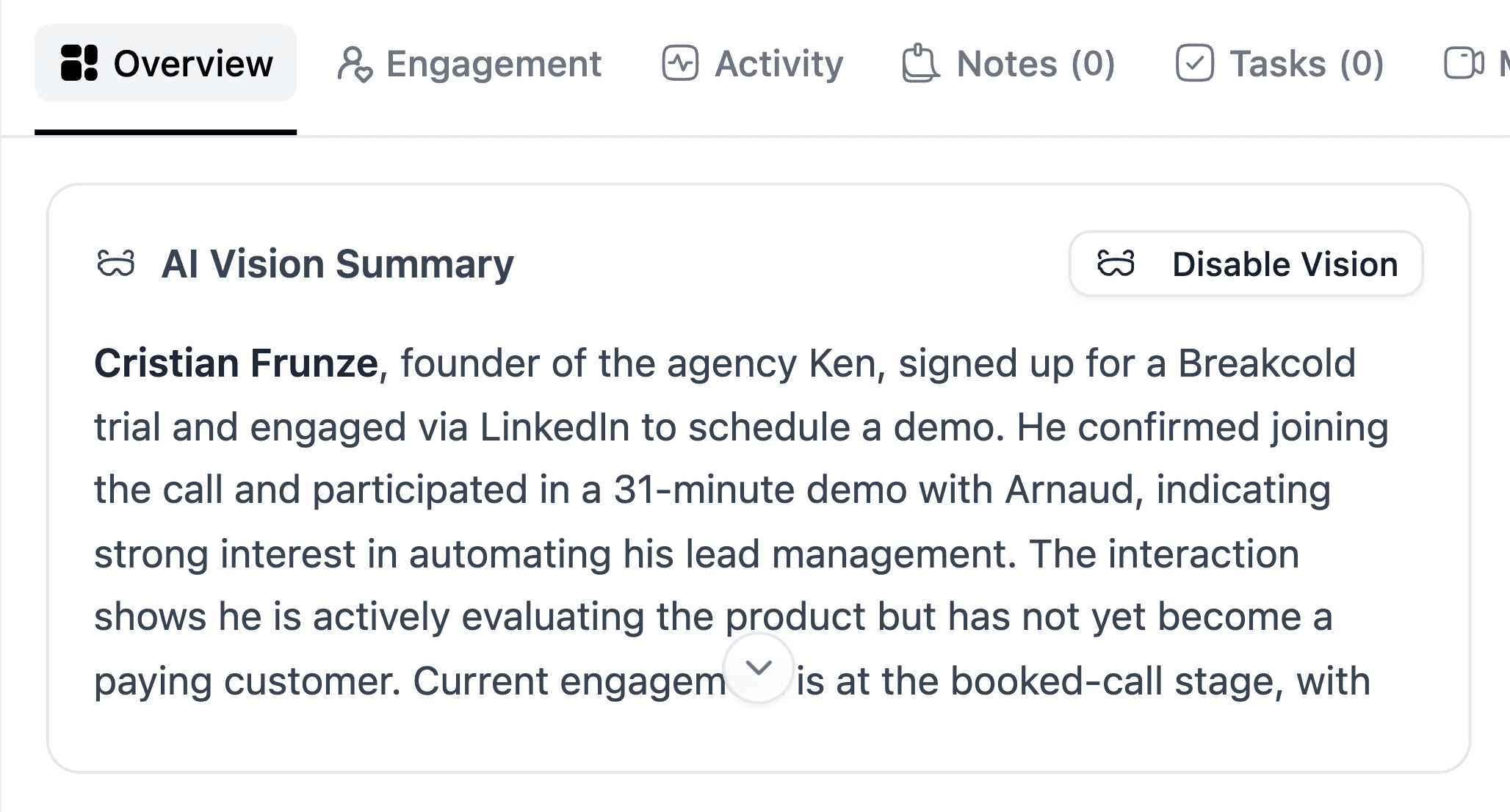
On top of that, you have other AI features 🤖. Every time you interact with a lead, a summary of the conversation is generated automatically. I love this because before jumping on a call, I just open the lead and, in less than 30 seconds, I have the full context. I know exactly what the meeting will be about without digging through email threads or LinkedIn conversations ⏱️.
You can also ask the AI questions directly. For example: “Do a SPIN selling analysis on Marco.” From there, you get a deeper analysis of the lead, which is incredibly useful 🧠.
It’s basically like ChatGPT, but inside your CRM and directly connected to your leads 🔗.
Conclusion
And honestly, that’s how I built my dream CRM ✨.
Everything else is what you’d expect from a CRM. You have pipelines, you can manage deals, you can do all the usual stuff. But the big difference is that Breakcold integrates with so many channels that all you have to do is show up on the dashboard and focus on active conversations on LinkedIn, email, Telegram, or WhatsApp 💬.
That’s pretty much the system in a nutshell 🧠.
Written by Arnaud Belinga