



Expandi.io Review - My FINAL VERDICT After 7 Hours
TL;DR: is Expandi.io worth it?
✅ Expandi.io is a cloud-based LinkedIn and multichannel outreach tool that runs 24/7 and mimics human behavior to reduce the risk of LinkedIn restrictions.
✅ Strengths: reliable cloud automation, a robust sequence builder, image and GIF personalization, and safety features like account warming.
✅ Weaknesses: an outdated interface, occasional bugs in Workspaces, and pricing that feels steep next to rivals.
✅ Pricing: $99/mo for the Business plan, with an Agency plan on contact-sales pricing that adds roles, client reporting and white-label options.
✅ Alternatives worth trialing include LinkedHelper, HeyReach, Waalaxy and Lemlist. Teams that want to manage the resulting conversations sometimes pair outreach with an AI Native CRM like Breakcold.
As of writing, LinkedIn boasts 1 billion members worldwide and over 67 million companies on the platform — making it the largest professional social network in the world. For the average salesperson, sifting through all those profiles would be a Herculean task, no matter how good they are at their job.
🥁 Drum roll, please... 🥁
That’s where LinkedIn prospecting tools like Expandi.io come into play. Streamlining outreach efforts is just the tip of the iceberg when it comes to what Expandi offers. In this review, we’ll dive into its key features, integrations, pricing, pros & cons, and even some alternatives to consider.
📖 Expandi.io Summary
Who Is Expandi.io (And Who Are They For)?
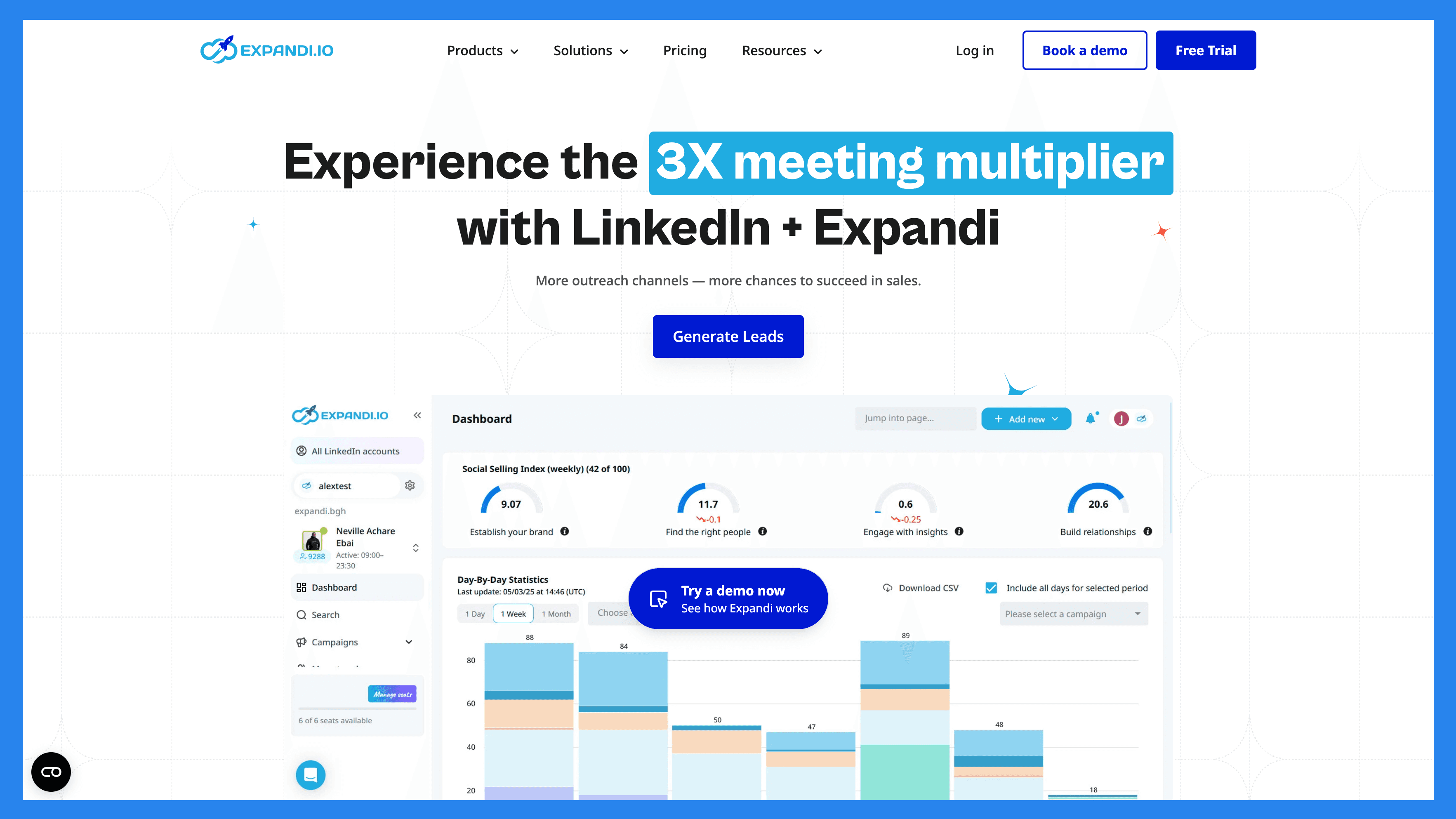
Expandi launched as a bootstrapped startup in 2019 with one goal in mind: to automate LinkedIn outreach. Since then, it has quickly outgrown its reputation as the new kid on the block, evolving into a multi-million dollar company used by over 12,500+ B2B businesses, startups, and agencies around the world.
Today, staying true to its name, Expandi has expanded its offerings and transformed into a multi-channel outreach tool designed to help salespeople, marketers, recruiters, and lead generation agencies automate outreach at scale.
What is their USP?
What sets Expandi.io apart from the competition is its focus on human-like automation.** **For context, most outreach tools rely on API-based solutions or Chrome extensions to function. Expandi, on the other hand, is a cloud-based platform, which allows for a more robust and scalable approach to outreach.
Because it's not limited by browser performance and can run in the background, Expandi is able to mimic human-like actions through a virtual assistant-style setup 24/7 (more on that later!).

How did Expandi.io become so popular?
Beyond its core offerings, Expandi goes the extra mile by providing a rich library of resources — from blogs and PDFs to YouTube videos — designed to help onboard new users and support experienced users in sharpening their skills.
Expandi understands that tech adoption can be a challenge at any level of an organization. In today’s digital world, building and maintaining a strong tech stack is no longer optional — it’s essential for success.
Thanks to this understanding, Expandi gained early popularity by not only offering a powerful tool, but also pairing it with an in-depth user manual in the form of their guided resources that made adoption smoother and more approachable for all.
🔑 Key Features and Functions
Here we break down the key features and functions of Expandi — but instead of our usual review-style listicle, we’re switching things up. Let’s walk through how to set up your very first outreach campaign!
LinkedIn Lead Generation
First things first, we need leads. Start by heading over to the ‘Search’ tab on the sidebar of your dashboard.
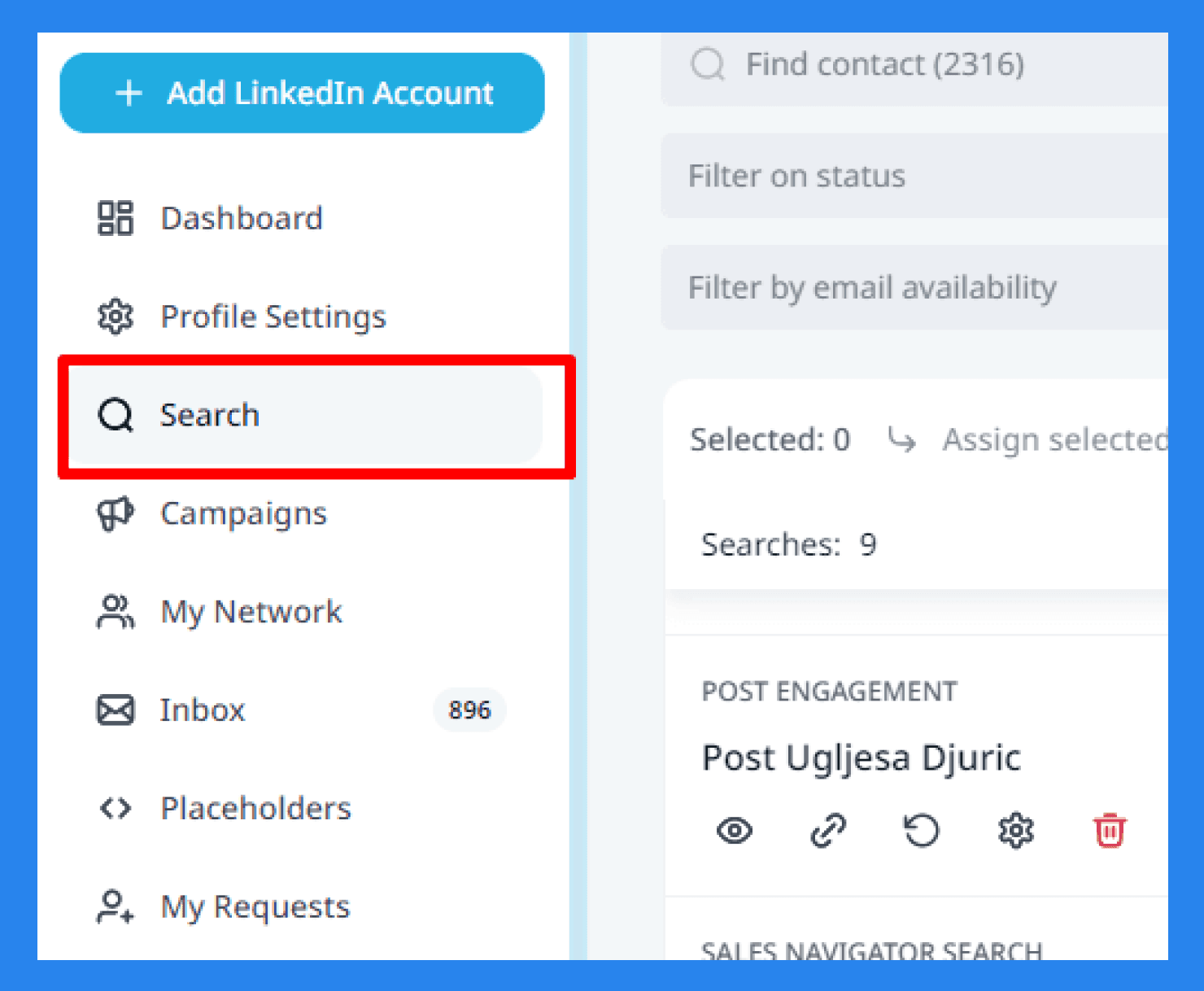
No matter how you discover your leads on LinkedIn, Expandi can take over the heavy lifting — offering multiple ways to import lead lists seamlessly:
Basic LinkedIn search results
Followers of a LinkedIn company page
LinkedIn Sales Navigator search results
LinkedIn Recruiter premium search uploads
CSV spreadsheet file imports
Users who engaged with specific LinkedIn posts
Members of LinkedIn groups
Attendees of LinkedIn events
‘People You May Know’ recommendations for automated connection requests
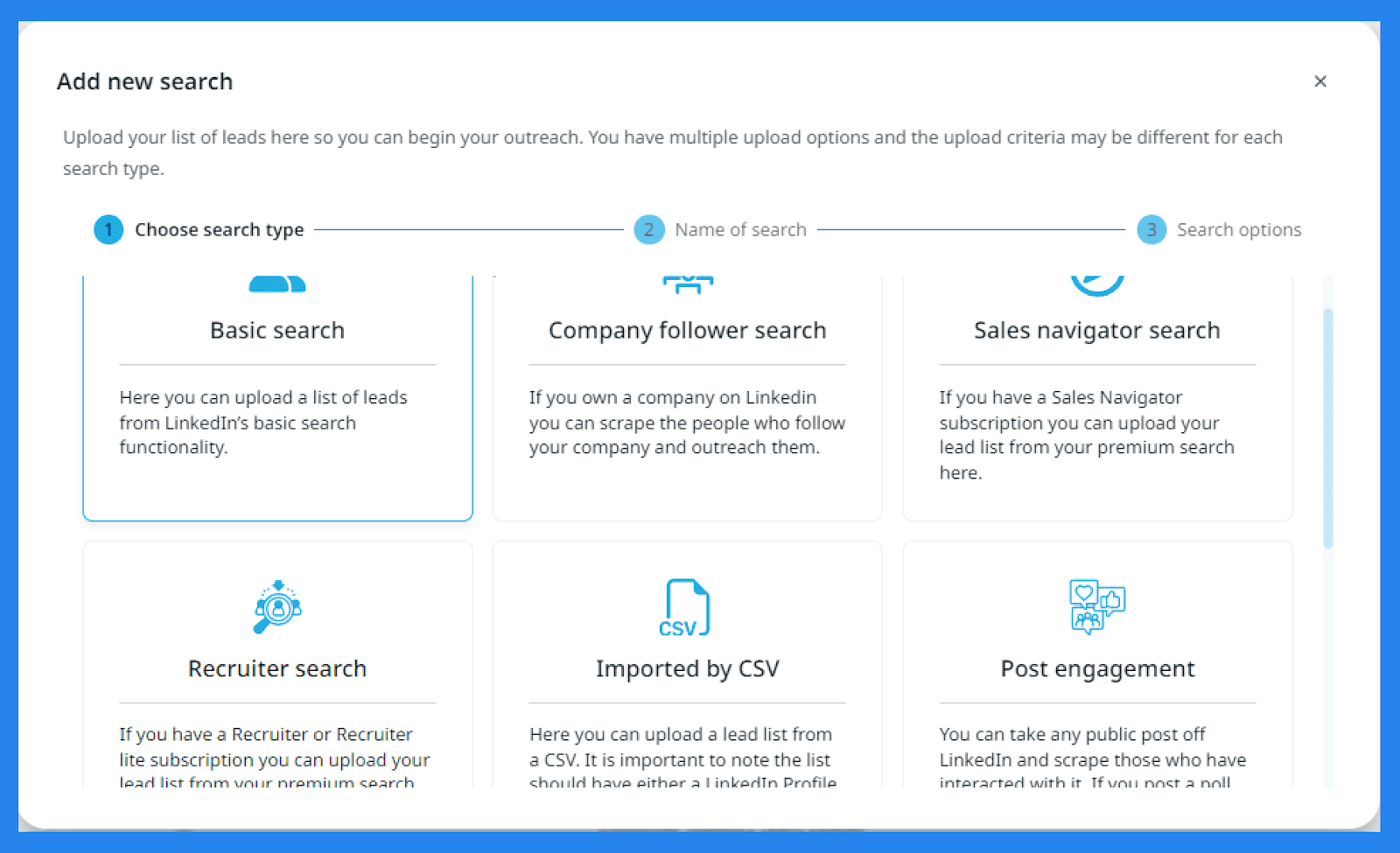
From there, your leads are automatically imported into Expandi, where you can assess the quality and validity of your lead data. If you’re working with a large prospect list, Expandi also offers a variety of filters to help you zero in on the leads that matter most.

Once you’ve filtered, managed, and organized your prospect list accordingly, that’s when the real fun can begin.
Smart Campaigns
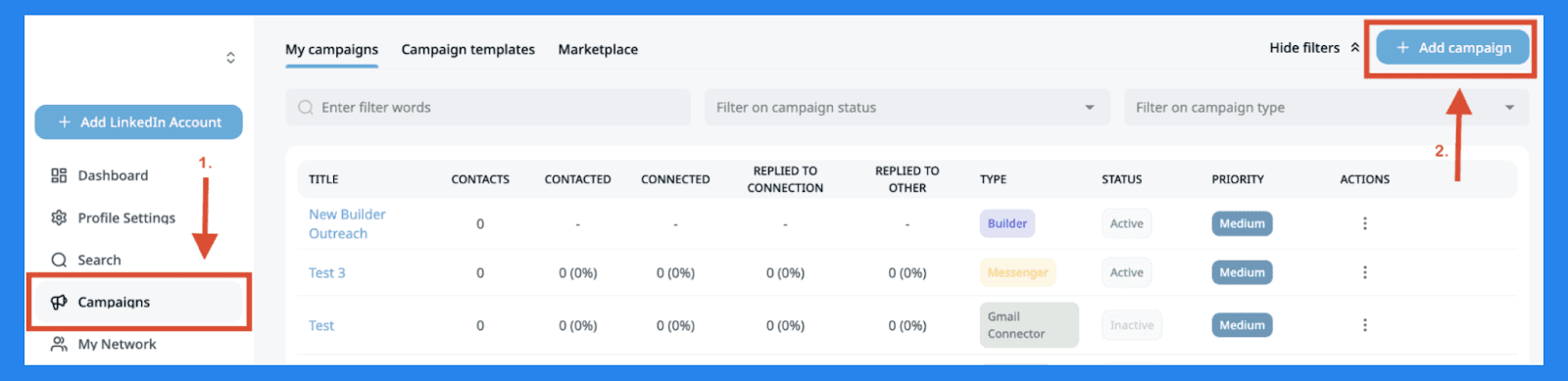
To set up a campaign, head over to the sidebar and select ‘Campaign’, then click on ‘+ Add Campaign’ in the top right corner of the dashboard.
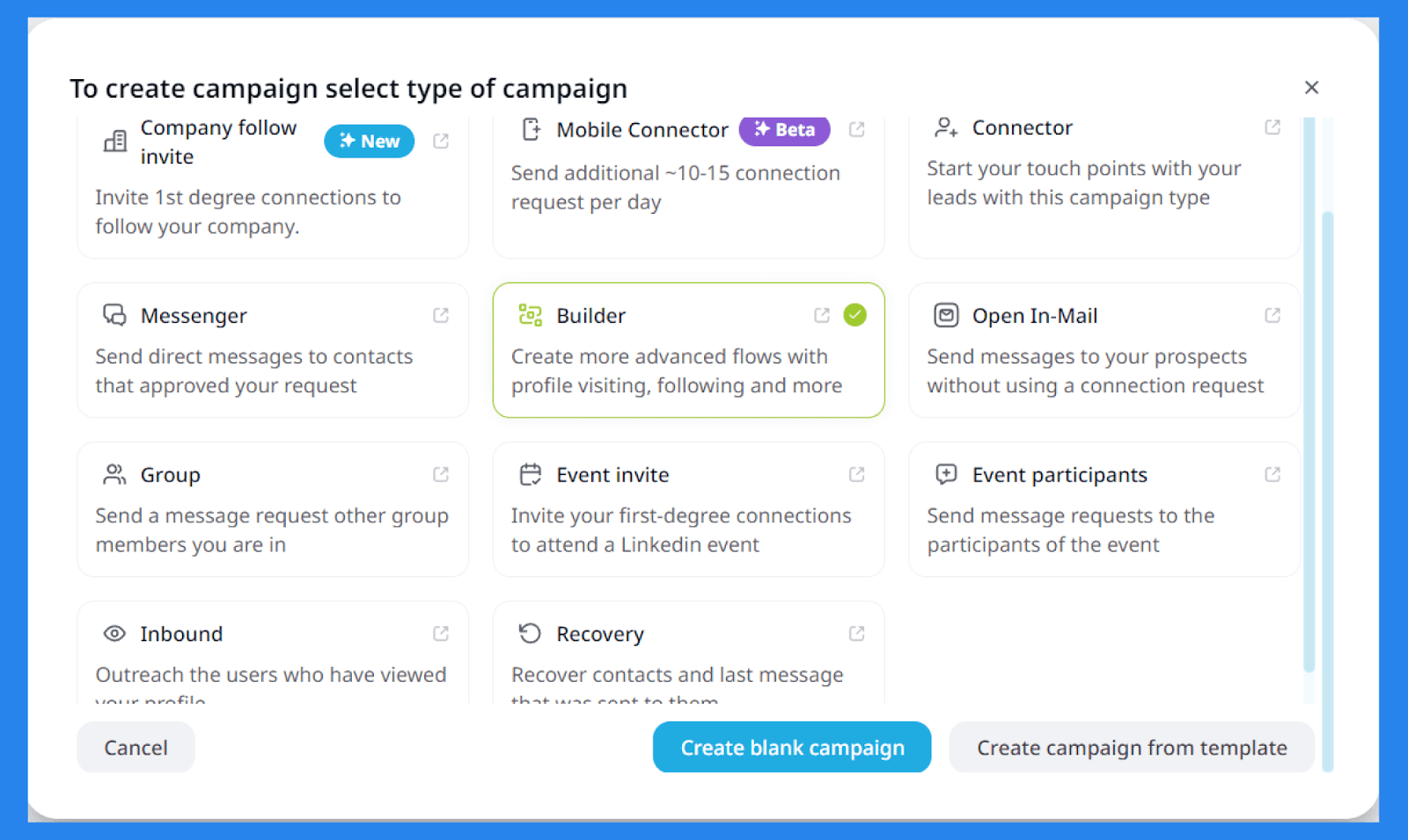
Using the prospect list you just created, Expandi lets you build an outreach campaign based on that data. Here are the different types of campaigns you can create:
Company Follow Invite: Invite 1st-degree connections to follow your LinkedIn company page.
Mobile Connector: Send an additional 10–15 connections per day to work around LinkedIn’s connection limits.
Connector: Send connection requests to 2nd and 3rd-degree connections.
Messenger: Start sending cold messages to contacts who have accepted your connection request.
Builder: Create custom, advanced outreach sequences. This gives you the most flexibility to tailor your outreach.
Open InMail: Send LinkedIn Open InMails to prospects you're not yet connected with.
Group: Message members of a LinkedIn group you're part of.
Event Invite: Invite 1st-degree LinkedIn connections to attend an event you're hosting.
Event Participants: Message people who attended a LinkedIn event — ideal for scraping attendee lists.
Inbound: Automatically reach out to people who have viewed your LinkedIn profile.
Recovery: Reconnect with contacts and recover the last message you sent to them.
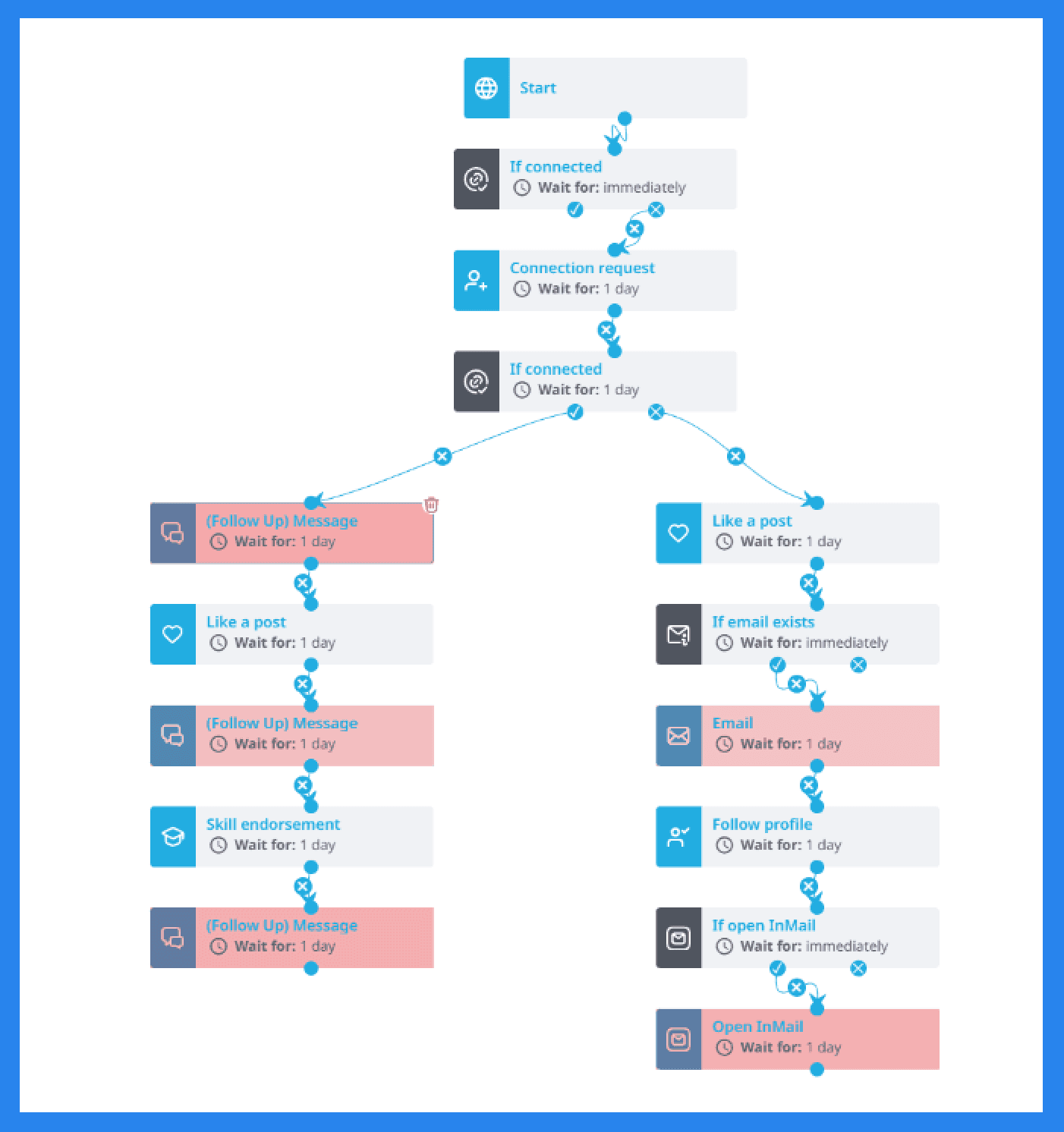
Let’s say you want to create a campaign focused on building connections on LinkedIn. Whether you build it from scratch or use one of Expandi’s ready-made templates, these campaigns have the ability to factor in prospect behavior, enabling fully automated workflows that feel intuitive and personalized.
The Actions and **Conditions **can set include:
Visit profile
Follow profile
Follow company
Invite to follow company
Endorse a skill
Send connection request
Send mobile connection request
Send follow-up message
Send email
Like a post
Like a company post
Conditions:
Custom condition
If connected
If followed you
If visited your profile
If email opened
If email bounced
If email clicked
If email exists
If Open InMail
If post liked
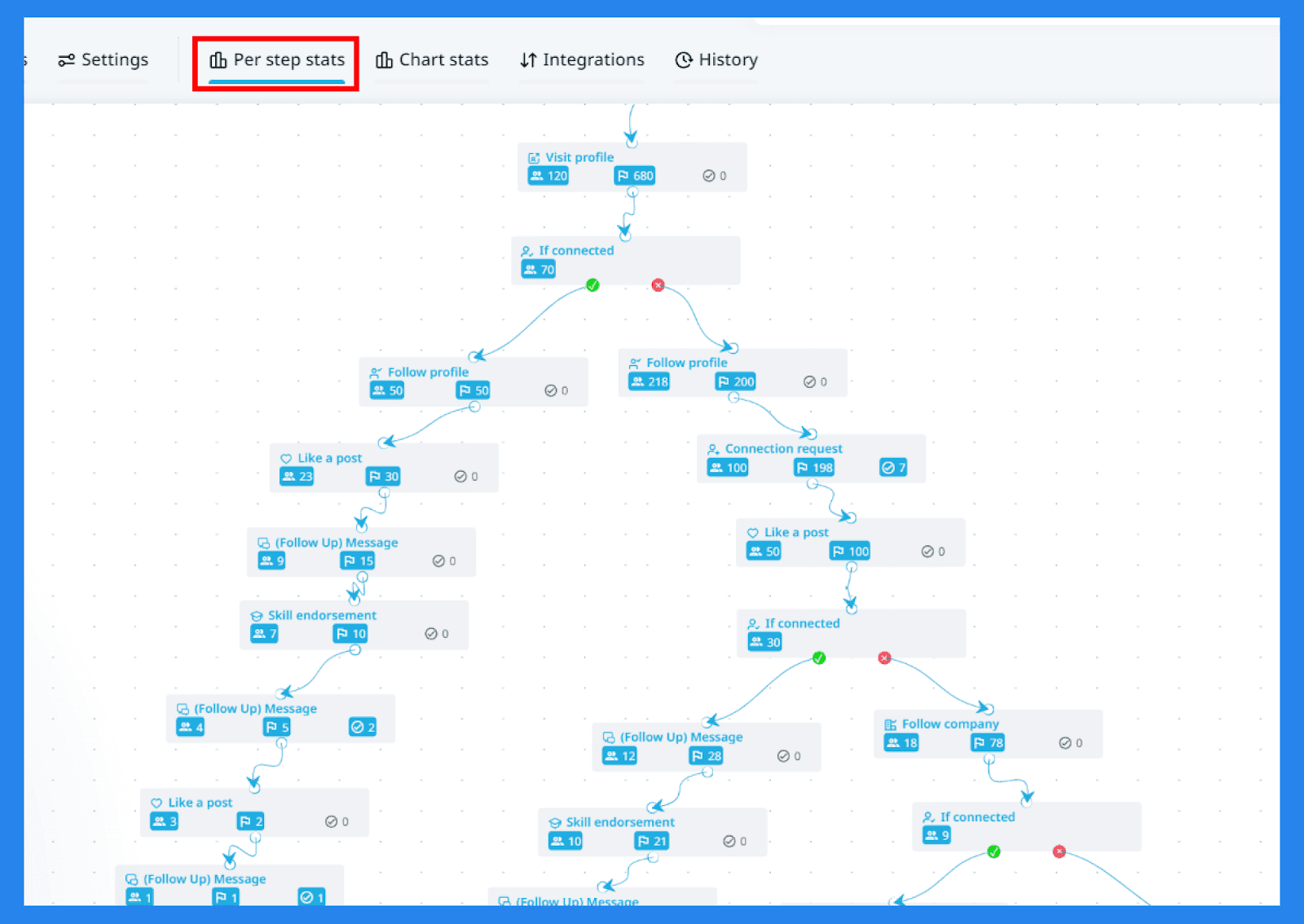
Expandi tracks your campaign’s performance in real-time, highlighting what’s working and what’s not. It’s the kind of data that helps you refine each step and zero in on your winning formula.
Image and GIF Personalization
Expandi understands that sales outreach can be an oh-so-cruel mistress — one minute you're vibing with a warm lead, the next you're ghosted, or worse... left on read. That’s why sales reps need every edge they can get. With Expandi, you have the freedom to hyper-personalize your outreach using GIFs and images, which (according to Expandi) can boost your reply rates up to 55%.
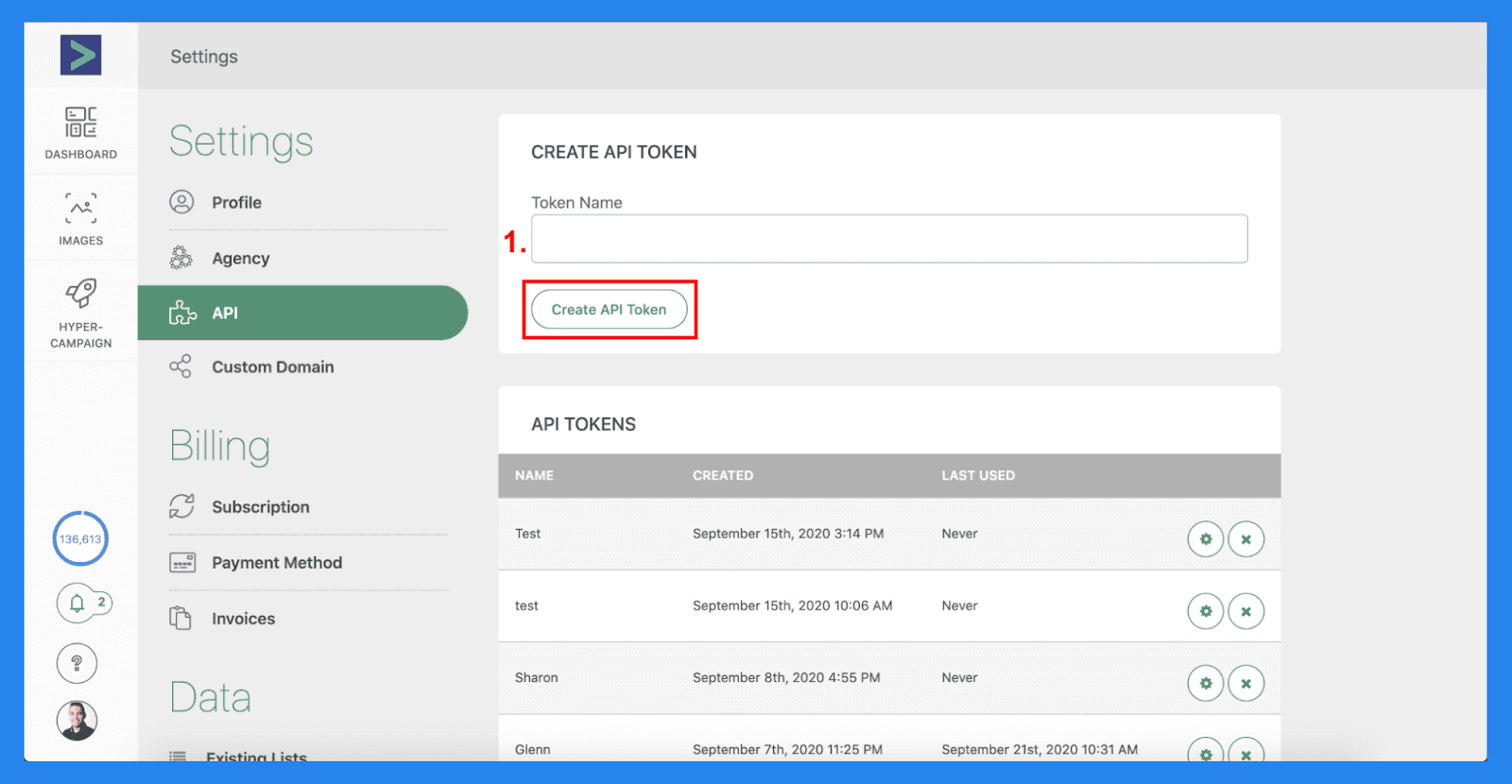
Expandi has partnered up with Hyperise to help you add dynamic tags for outreach. Simply, sign up for both platforms (sign up for the free trial to get started) and go to Hyperise API settings and create an API token and copy the ID.
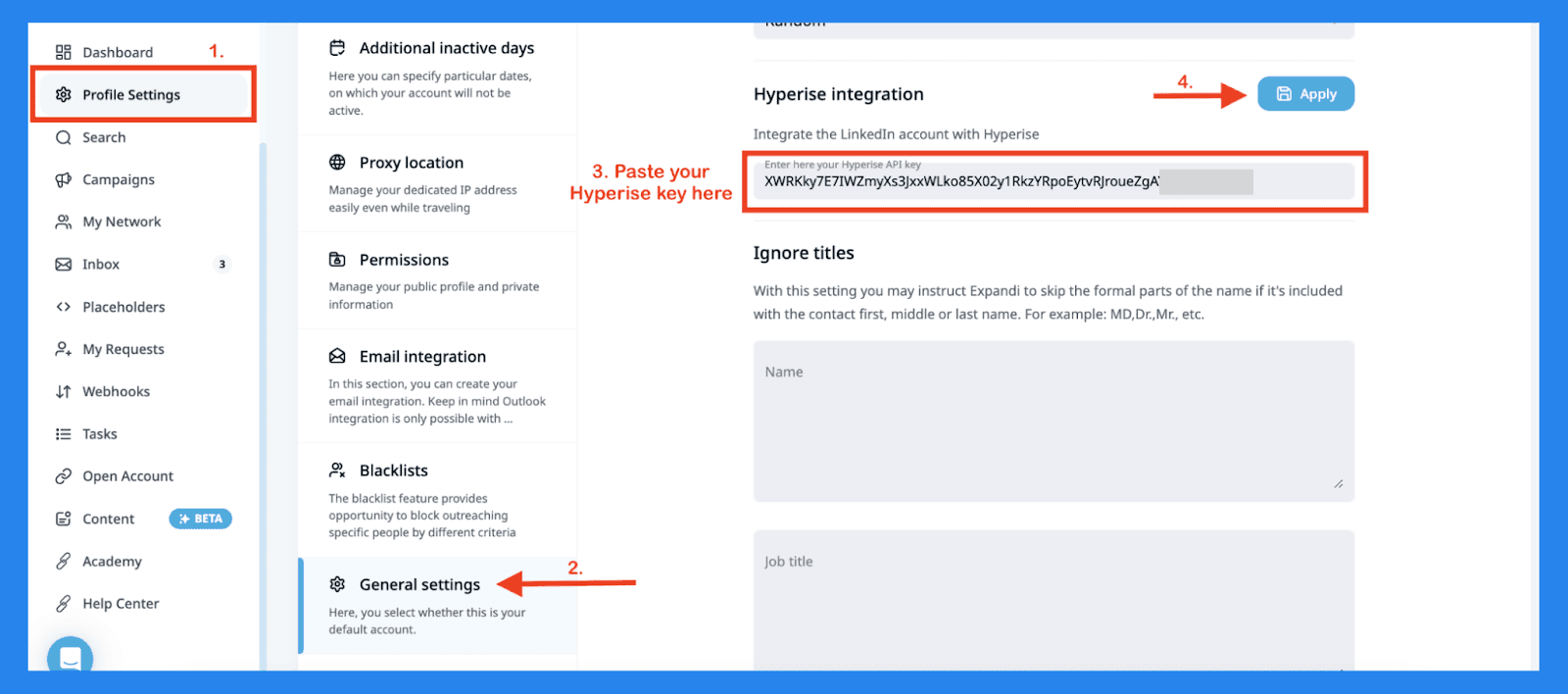
Go back to Expandi and paste in the API key in your general settings. Now select the specific campaign you want to personalize and press ‘Sync from Hyperise’.
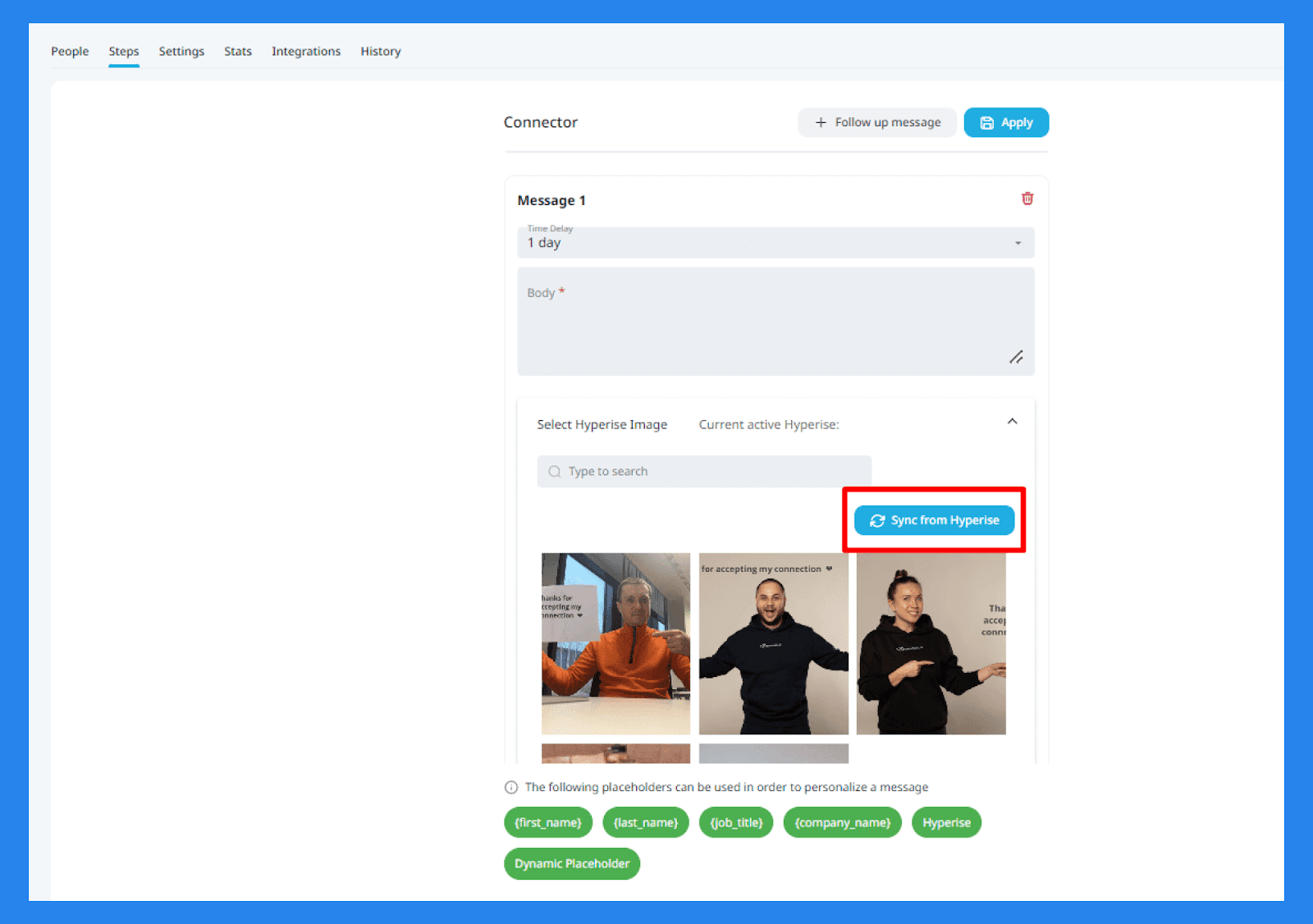
Select from hundreds of templates and stock images where you can apply dynamic text layers with placeholders to make your outreach just that little more personalized.
LinkedIn + Email Outreach
Now that you’re all set up, you can sit back and watch your hard work pay off — directly from Expandi’s Inbox. No need to toggle between Expandi and LinkedIn, as all your messages are neatly consolidated in one place. You’ll see a mix of messages sent and received through Expandi campaigns, along with any manual messages you may have sent in the past.
Also, thanks to an extensive range of filters, Expandi makes sure no conversation gets lost in the mix.
Workspaces
Think of Workspaces as a way to keep your entire team aligned — physically, digitally, and even metaphorically. Geared towards small sales teams and agencies, Workspaces are built to streamline collaboration while offering a safer, more efficient approach to account management.
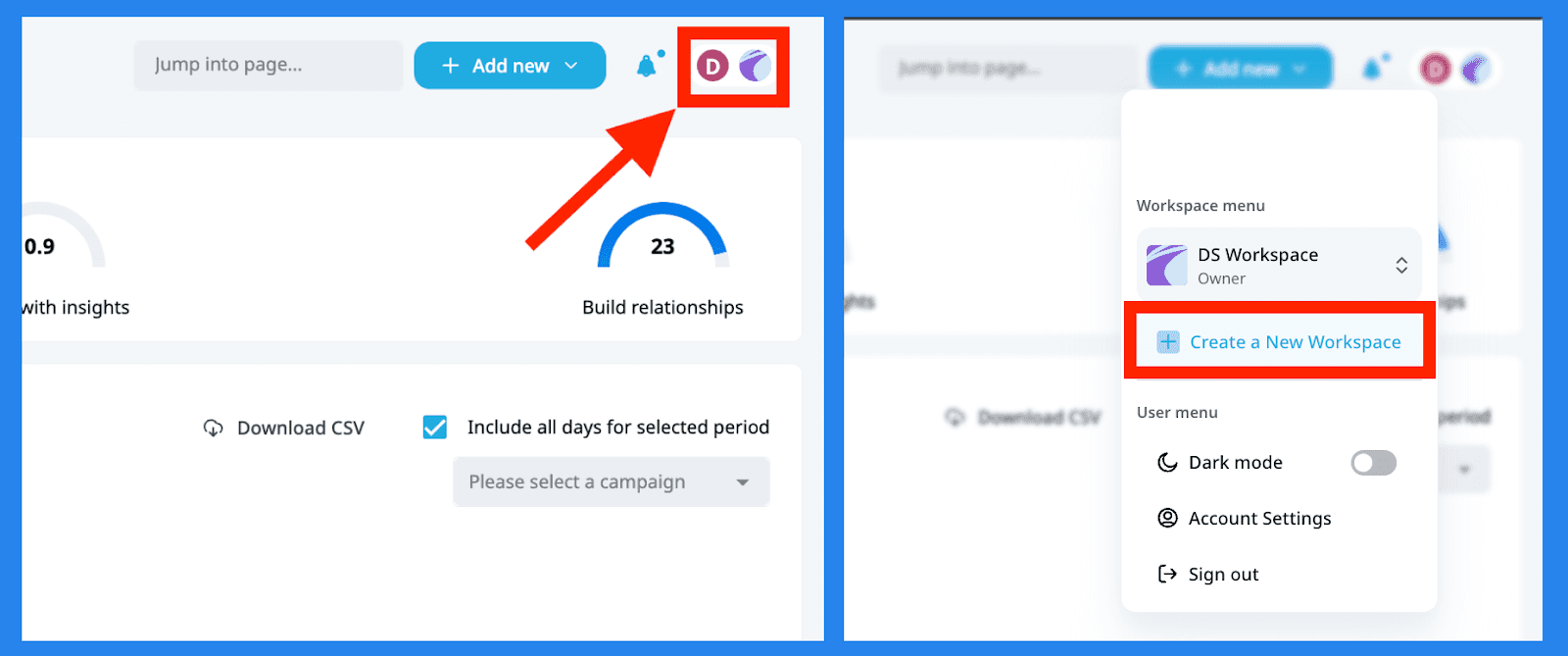
You can invite teammates in just a few clicks (at no extra cost) and:
Share LinkedIn account access
Give clients a front-row seat to their campaigns
Track and review performance as a team
Share access to entire Workspaces
Connect multiple or individual LinkedIn accounts
Just click 'Add New,' in the Workspace menu and invite your team, while customizing roles to match your workflow.
Security + LinkedIn Compliance
Expandi was/is designed with safety in mind above all else. Beyond being harder to detect, in general, as a cloud-based outreach tool. Expandi allows you to fine tune the platform to mimic human-like behaviour (or yours) so you don’t end up in any hot water.
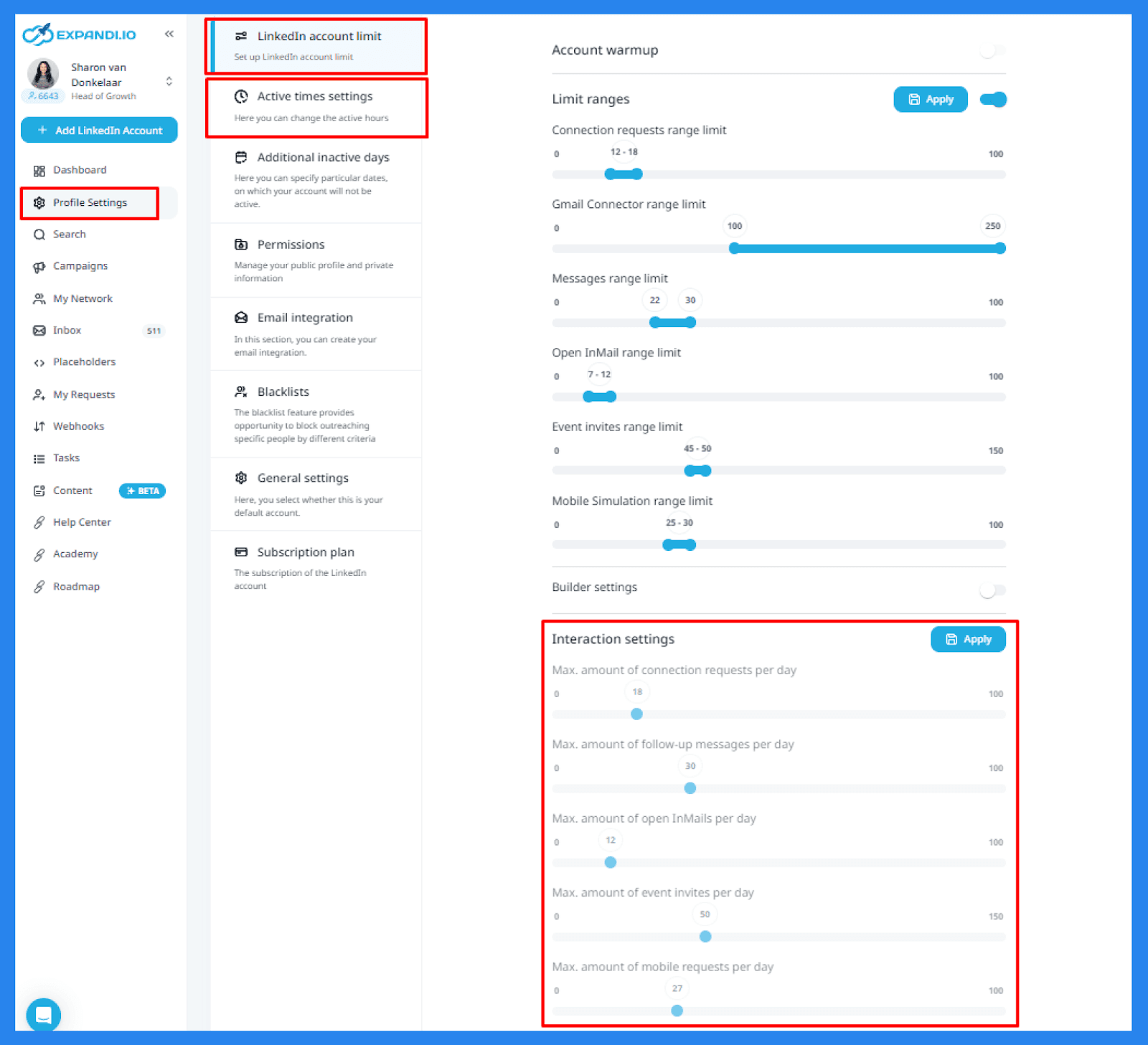
In your profile settings, you'll find that Expandi offers account warming capabilities along with interaction settings. These controls let you adjust Expandi’s behavior on a day-to-day basis, making sure LinkedIn registers you as a real person behind every message.
Expandi does also encourage you to not exceed LinkedIn’s weekly limits on connection requests and other actions.
⚙️ Expandi.io Integrations
*Cough* *Cough* Did someone mention that Breakcold has an integration with Expandi? 👀 No? 🙄 Strange... must've been the wind. But since we're on the topic, you can now seamlessly integrate the reliable prospecting powers of Expandi with the powerful social-selling capabilities of Breakcold! Check out our video to learn more.
💰 Expandi.io Pricing Plans
Money, money, money — is it a rich man's world when it comes to Expandi’s pricing plans?
Business | Agency |
|---|---|
$99/mo | Contact sales |
Account Safety Cloud-based software Dedicated country-based IP-address LinkedIn Profile Auto Warm-up Smart algorithms for limit ranges Mimicking Human Behavior 3x higher Outreach Conversions Campaign Types that Allow Bypassing LinkedIn Limits Unlimited Campaigns Number Campaign Prioritization Multichannel Outreach Engaging Actions Between Follow-ups Convenient Sequence Builder Image & GIF Personalization Video personalization Detailed Step-by-step Campaign Statistics Centralized dashboard Streamlined Outreach Efficiency Flexible scheduling Campaign Recovery Dynamic Placeholders Tags and Notes to Conversations Unlimited Number of Templates Duplication Prevention Integrations Blacklist feature | Everything In Business And: Flexible Roles & Permission Management Centralized campaign management Transparent reports for clients Easy template sharing Export campaign data options Open profile feature through the same IP Dedicated Customer Success Manager Specialized Customer Support Use Expandi under your own brand |
⭐ Pros and Cons + Ratings
Expandi.io Ratings | |
|---|---|
G2 - 4.2/5 (108) | Capterra - 4.4/5 (38) |
Pros | Cons |
Cloud-based (safer to use) Reliable 24/7 automation Robust sequence builder Personalized outreach | Buggy Workspace performance Less than stellar UX/UI Expensive compared to alternatives Confusing advanced features |
Expandi.io Alternatives 🔁
LinkedHelper
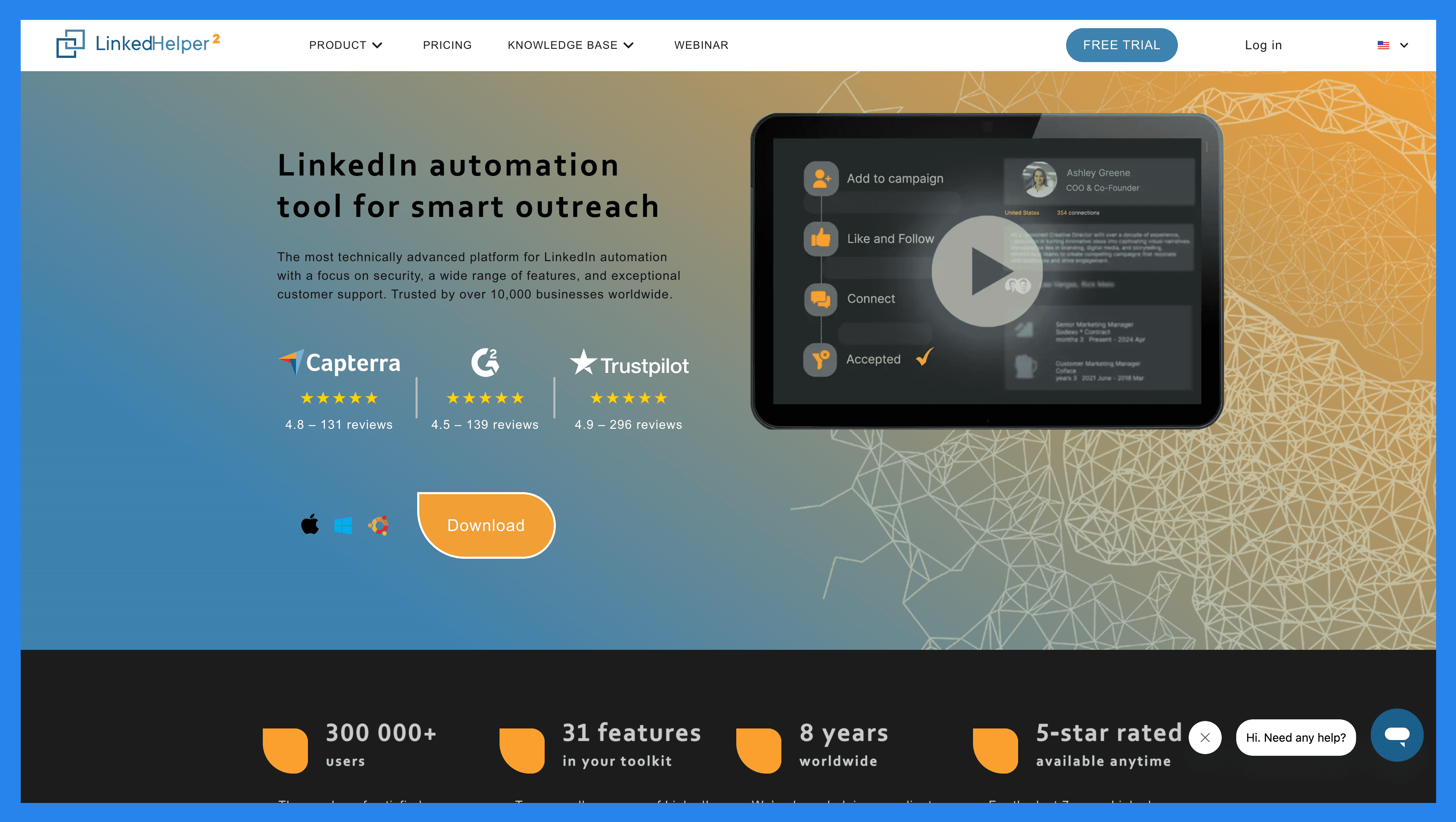
Overview: LinkedHelper 2 is a desktop application that functions as a LinkedIn outreach tool, automating essential sales engagement tasks such as sending connection requests, messaging prospects, visiting LinkedIn profiles, and more.
Key Features | |
|---|---|
LinkedIn automation Multi-source lead targeting Drip campaigns Linked Helper CRM | |
LinkedHelper Ratings | |
G2 – 4.6/5 (143) | Capterra - 4.9/5 (179) |
Pros | Cons |
Ease of use Built-In lead management (Mini CRM) Custom workflow builder Comprehensive LinkedIn automation | Non-cloud-based functions Not beginner-friendly Poor UX/UI No multi-channel outreach |
HeyReach
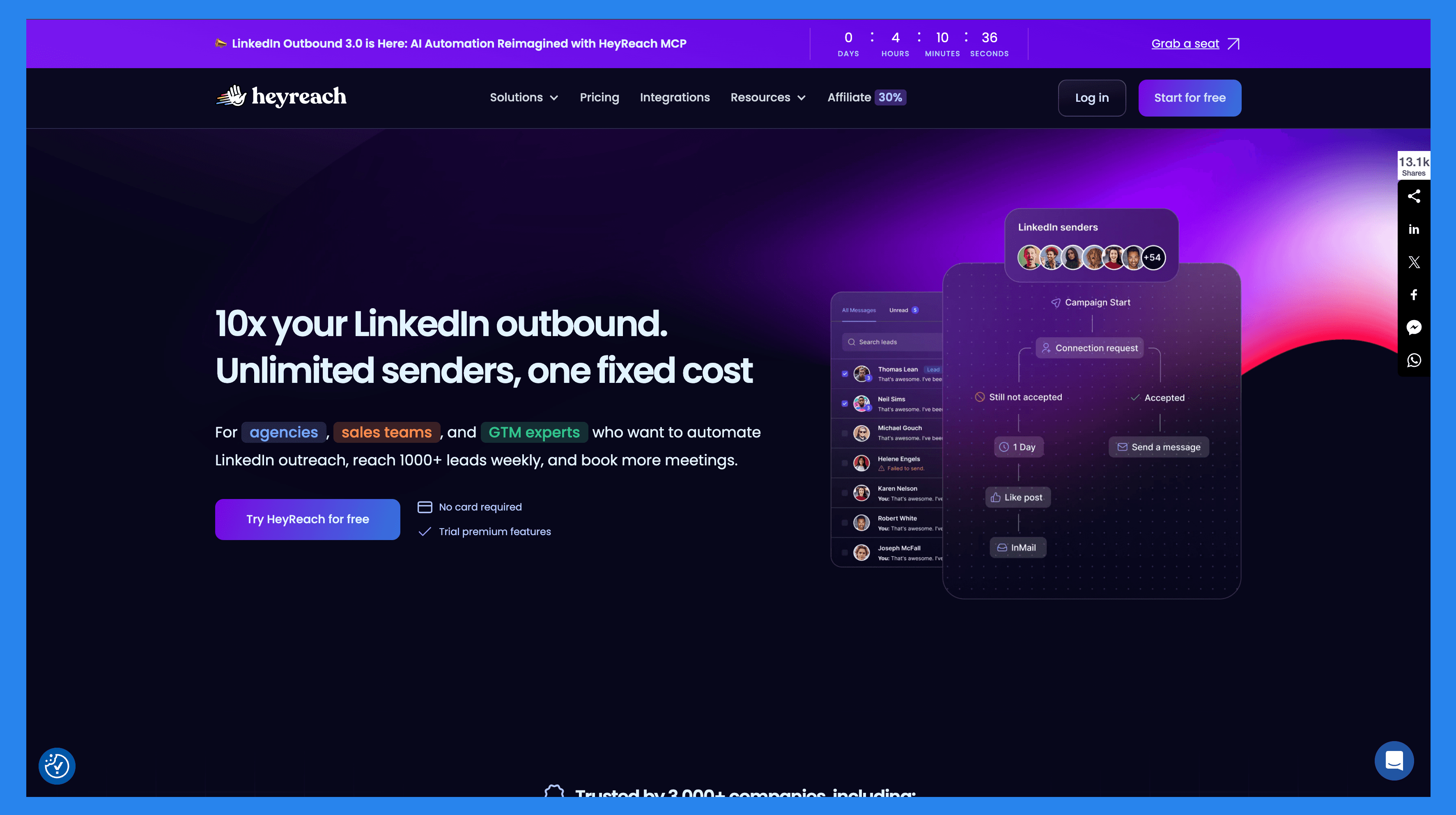
Overview: HeyReach is an outreach automation tool that specializes in lead generation – specifically for LinkedIn power-users. Designed to help agencies, sales teams, and GTM experts generate leads in a structured and scalable way – without breaking the rules or gaming the system.
Key Features | |
|---|---|
Multi-account outreach Seamless CRM integrations Unibox Auto-rotation of LinkedIn senders Lead generation powerhouse | |
HeyReach Ratings | |
G2 – 4.7/5 (47) | Capterra - 4.7/5 (2) |
Pros | Cons |
Helps you connect multiple accounts to the same campaign to scale your outreach. Helps users to reach out to decision-makers via LinkedIn on autopilot. Helps keep track of your leads by integrating your favorite CRMs. Helps you create complex outreach sequences. | Lacks multi-channel outreach. There is a learning-curve to fully master HeyReach. Buggy performance. Pricing plans can be aggressive and not as friendly for bootstrapped organizations. |
Waalaxy

Overview: Waalaxy is an all-in-one lead generation helping you transform LinkedIn into your #1 acquisition channel.
Key Features | |
|---|---|
LinkedIn action automation Cold email sequences AI-powered writing Unified inbox CRM integrations | |
Waalaxy Ratings | |
G2 – 4.6/5 (530) | Capterra - 4.4/5 (252) |
Pros | Cons |
Multichannel outreach Easy campaign setup Powerful enrichment tool Native integrations | Expensive/confusing plans Busy UI Limited analytics Learning-curve for first-time users |
Lemlist
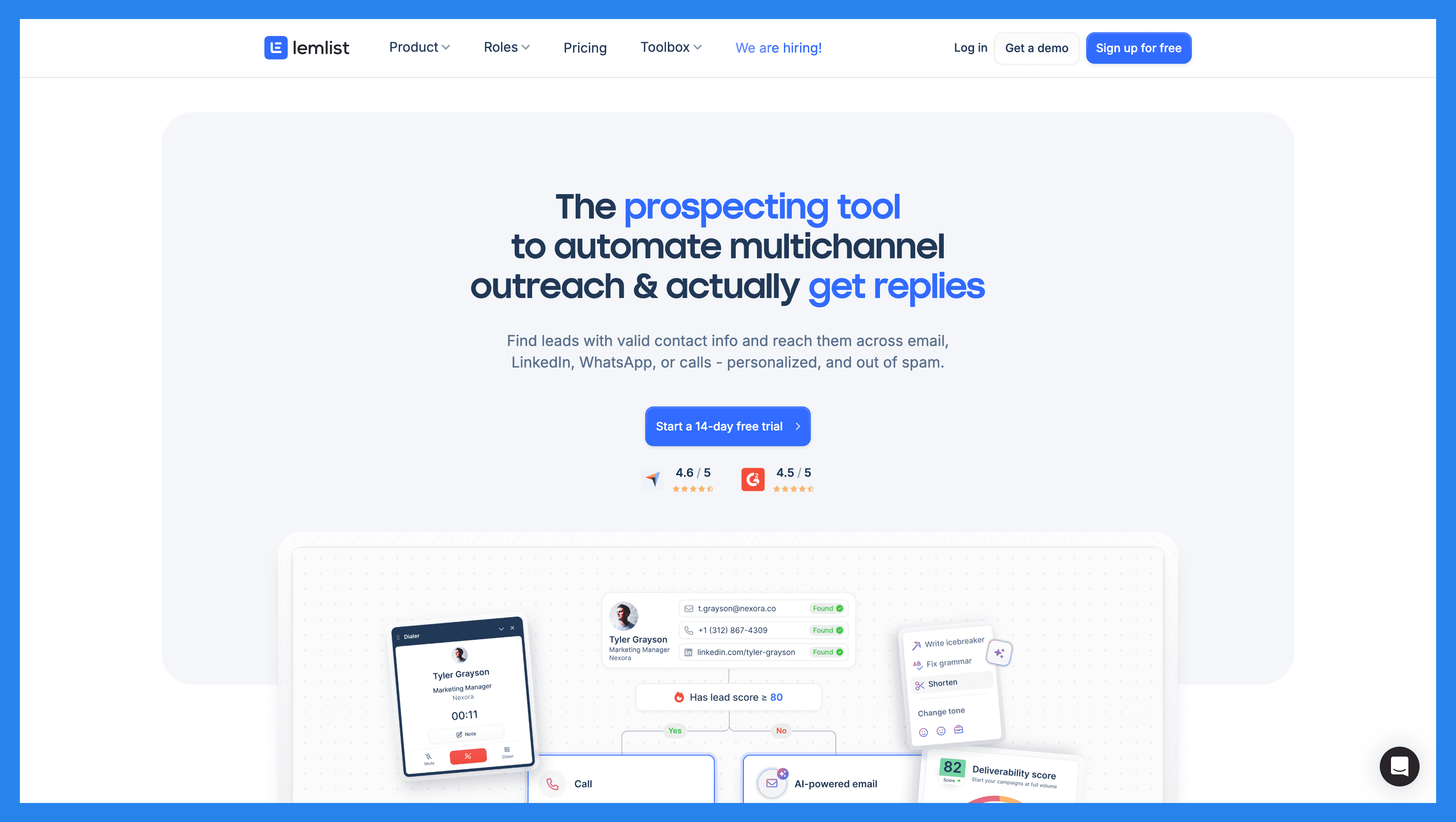
Overview: lemlist is an advanced sales engagement and multi-channel outreach automation tool with an emphasis on conversion and personalization. Primarily used by sales leaders, outbound sales teams, and agency owners**/heads of sales** within small to medium-sized businesses (SMBs).
Key Features | |
|---|---|
Unified inbox Advanced multichannel sequences Multi-source lead enrichment In-app calling Email warming and deliverability | |
Lemlist Ratings | |
G2 - 4.5/5 (274) | Capterra - 4.6/5 (388) |
Pros | Cons |
Powerful lead enrichment Multichannel outreach Easy to use + resource rich library Powerful AI features | Pricey if you want all the best features Limited reporting/analytics Steep learning curve for first-time users |
💭 Final Thoughts + Takeaways
We’ve reached the part of the article where I share my honest thoughts and opinions. On paper, Expandi looks fantastic and has the accolades to back it up, but I can’t help but admit that my spider sense is tingling.
Expandi is by no means a diSaaSter — nor is it (Sa)aStounding (hehe) — but personally, I feel you can get more bang for your buck with other platforms. Sure, Expandi is a reliable sales engagement tool with some powerful lead enrichment features, but an outdated UI, buggy performance (especially in Workspaces), and an unclear pricing structure leave me with reservations. That said, I’m more than happy to be proven wrong.
Everyone has their own outreach strategy/stack that works best for them AND I’m sure there are plenty of people out there that have found success with Expandi. At the end of the day, my opinion is just one of many. The only REAL way to figure out if Expandi is a good fit for your business is to give it a go! Be sure to read the fine-print and double check what you're signing up for.
Frequently asked questions

Written by
Arnaud Belinga · Co-Founder & CEO at Breakcold
Arnaud is the Co-Founder & CEO of Breakcold, the AI Native CRM for sales teams of 5 to 30+ people.