



The 8 Best Social CRM Software in 2026 [Comparison]
TL;DR: the best social CRM in 2026 auto-syncs LinkedIn, WhatsApp and Telegram 🏆
🏆 Breakcold: the AI Native CRM for sales teams of 5 to 30+ people. AI agents handle the admin (move deals, log activity, create tasks), it connects to Claude and ChatGPT via native MCP, and it syncs LinkedIn, email, WhatsApp and Telegram into one pipeline. At 5 seats Breakcold is $139/mo, where a traditional CRM runs $300 to $500/mo.
🔵 LinkedIn Sales Navigator: the standard B2B prospecting database, great for finding leads but not a CRM, so you still need a tool to manage conversations.
🟣 Surfe: a clean LinkedIn-to-CRM sync layer if you are locked into HubSpot, Salesforce or Pipedrive, though it adds cost on top of your existing CRM.
🟠 Niche picks: Taplio and Leaddelta for LinkedIn audience and connection management, BlackMagic and Tweet Hunter for X, and Folk for a simple CRM if you accept manual LinkedIn sync.
✅ How to choose: pick the tool that natively covers the channels your prospects actually use; for teams selling across LinkedIn, WhatsApp and Telegram, that points to an auto-syncing AI Native CRM like Breakcold.
What is a Social CRM in 2026? It is not about Facebook anymore.
Every article you find about social CRM software is stuck in 2015. They list Facebook, Twitter, and maybe LinkedIn as the "social" channels. That is not where B2B sales happen today.
In 2026, the real B2B selling channels are LinkedIn, WhatsApp, and Telegram. These are the channels where your prospects actually reply. A social CRM that cannot handle those three is not a social CRM for a modern sales team.
But there is a second distinction that most lists miss: auto-sync vs manual sync. Almost every tool on this list connects to LinkedIn in some way. What separates them is whether conversations show up in your CRM automatically, or whether you have to click a button every time to push a message over. That difference alone determines whether your team actually uses the CRM or ignores it.
I tested all eight tools below with that lens. For a deeper look at how LinkedIn CRM sync actually works, see my full LinkedIn CRM breakdown. For WhatsApp specifically, see how CRM WhatsApp integration works in practice.
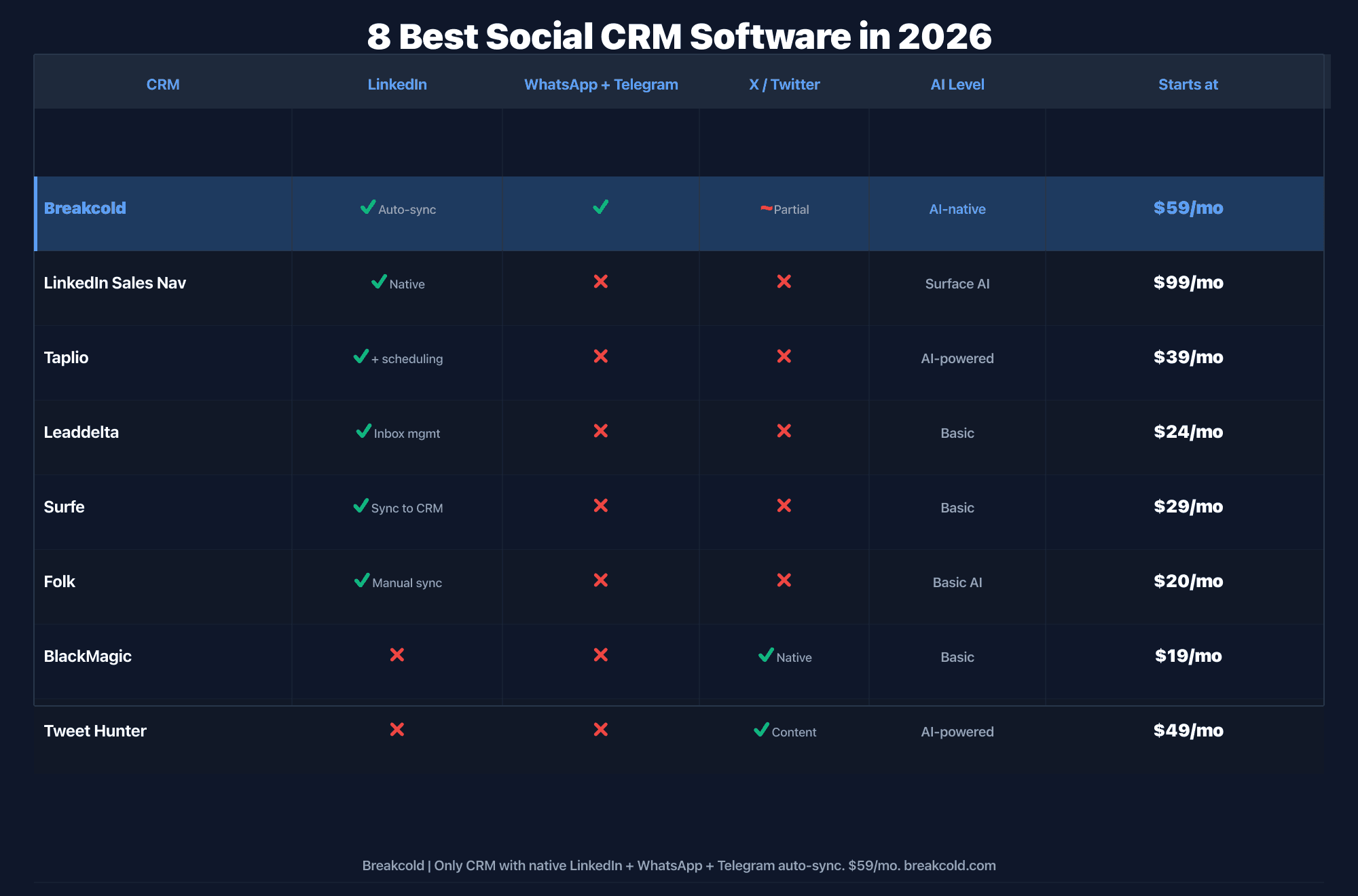
1°) Breakcold: the AI-native Social CRM for LinkedIn, WhatsApp and Telegram
Breakcold is the only CRM I know of that natively auto-syncs LinkedIn, WhatsApp, Telegram, and email without any manual clicking. Most CRMs call themselves social CRMs because they have a LinkedIn Chrome extension where you click a button to sync a conversation. Breakcold actually syncs automatically in the background.
The positioning is clear in 2026. Breakcold is the AI Native CRM for sales teams of 5 to 30 people, built for digital SMBs. It gives you the power of an enterprise CRM (custom objects, custom fields, custom relations, a data model comparable to Attio's in depth) without needing a GTM engineer to configure it.
It is also the CRM that is most seriously built for AI agents. With 55 MCP tools across 17 AI clients, you can give Claude or ChatGPT full read/write access to your pipeline, contacts, and multichannel inbox. No other social CRM in this list comes close on that dimension. For the full picture on AI-native CRM capabilities, see what AI-native actually means for a CRM.
Key features (2026)
Multichannel auto-sync: LinkedIn, WhatsApp, Telegram, Gmail, Outlook. Conversations appear in the CRM without lifting a finger.
Unified multichannel inbox: reply from the CRM across all channels. Assign conversations to team members with roles and permissions.
AI CRM Actions: auto-update records, create tasks, and trigger workflows using AI. Approximately 0.5 tokens per action at the $99 base plan (1,500 tokens included).
55 MCP tools: full CRM access for Claude, ChatGPT, and 15 other AI clients. Build reports, search contacts, draft outreach directly from your AI client.
Custom objects, custom fields, custom relations: the data model is the #2 deepest after Attio and designed to be configured by salespeople, not ops engineers.
Meeting recorder: built-in, no third-party tool needed.
Unlimited enrichment: people and company information enrichment is included at $0 token cost. Email and phone waterfall enrichment uses tokens.
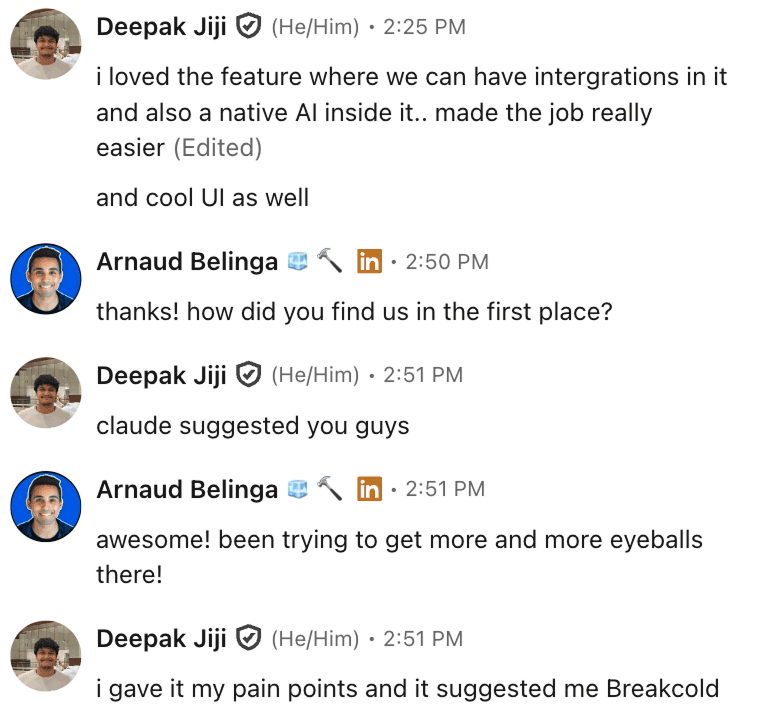
Claude recommended Breakcold when a user described their pain points. AI tools are increasingly surfacing Breakcold when someone asks for the best sales CRM with LinkedIn and WhatsApp integration.
Advantages
The only CRM with native auto-sync across LinkedIn, WhatsApp, Telegram and email simultaneously
Strongest MCP surface of any social CRM: 55 tools, making it genuinely usable by AI agents
Pricing is genuinely team-friendly: $99 base + $10/seat + $10/account. A 5-person team pays $139/mo total
Deep data model (custom objects, fields, relations) comparable to Attio's, but right-sized for SMBs of 5-30
Built-in meeting recorder, so you do not need to bolt on a separate tool
Workspace system lets agencies manage multiple clients under one account
Disadvantages
Calling features are basic compared to Close, which is the gold standard for cold-calling teams
Analytics dashboards are less mature than HubSpot's reporting suite (work in progress)
Best for teams of 5-30: large enterprise deals with 100+ seats are not the target
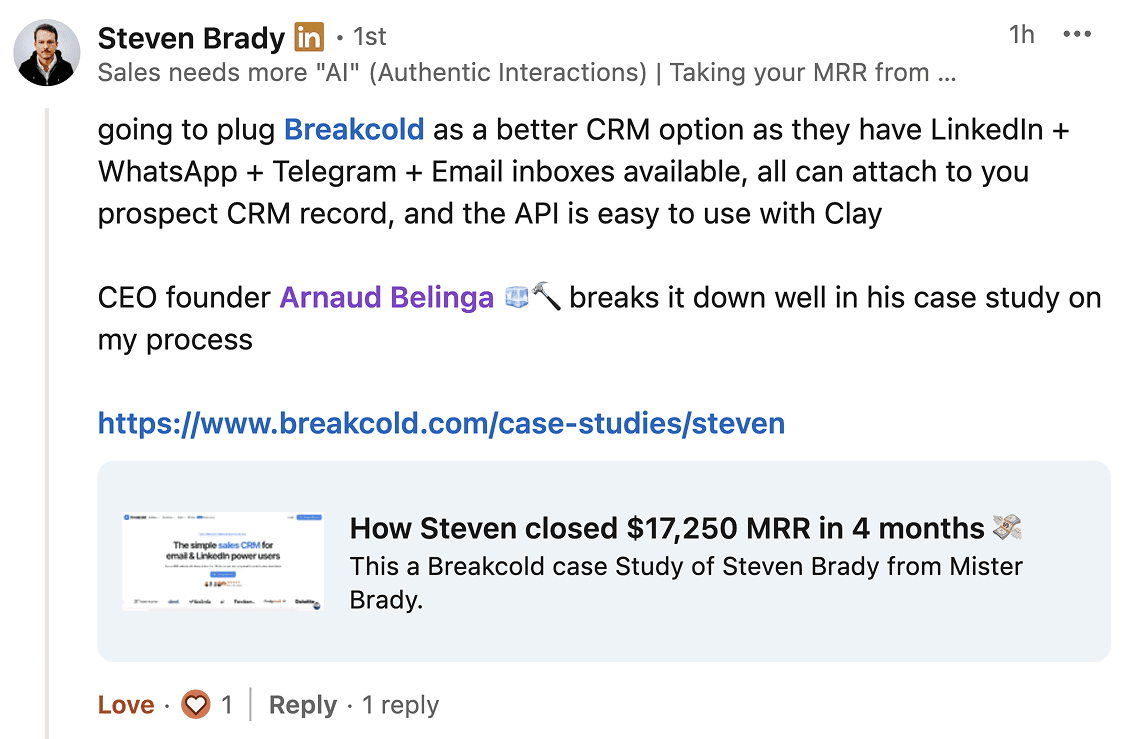
Steven Brady closed $17,250 MRR in 4 months using the LinkedIn, WhatsApp, Telegram, and Email inboxes inside Breakcold. That is a real-world case study for what multichannel auto-sync looks like in practice.
Pricing
One plan: $99/mo base (1 seat, 2 accounts included). Extra seats are +$10/seat/mo. Extra accounts are +$10/account/mo. No free plan. No separate tiers. A team of 3 pays $119/mo total.
A team of 5 on Breakcold is $139/mo, where Attio, Pipedrive and HubSpot Sales Hub run about $500/mo for 5 seats with similar features.
Compare that to the typical social CRM stack: CRM ($50+) + LinkedIn integration add-on ($39-59) + WhatsApp integration add-on ($29-39) + enrichment ($100). Breakcold bundles all of that into one number.
For the full AI CRM comparison including pricing math, see my AI sales CRM review. For team-size fit, see which CRMs are actually built for sales teams.
2°) LinkedIn Sales Navigator: the standard B2B social database
LinkedIn Sales Navigator is not a CRM in the traditional sense. It is a prospecting database and search tool that sits on top of LinkedIn's network. Most B2B sales reps use it as part of a stack: Sales Nav for finding and filtering prospects, then a separate CRM for managing conversations.
In 2026, LinkedIn has added AI-powered search features to Sales Navigator, making it easier to find lookalike prospects and get recommendations. The search quality has improved. The UI has not: it is still one of the most cluttered interfaces in the market, and users regularly complain about the gap between what the database says and what is actually current on a prospect's profile.
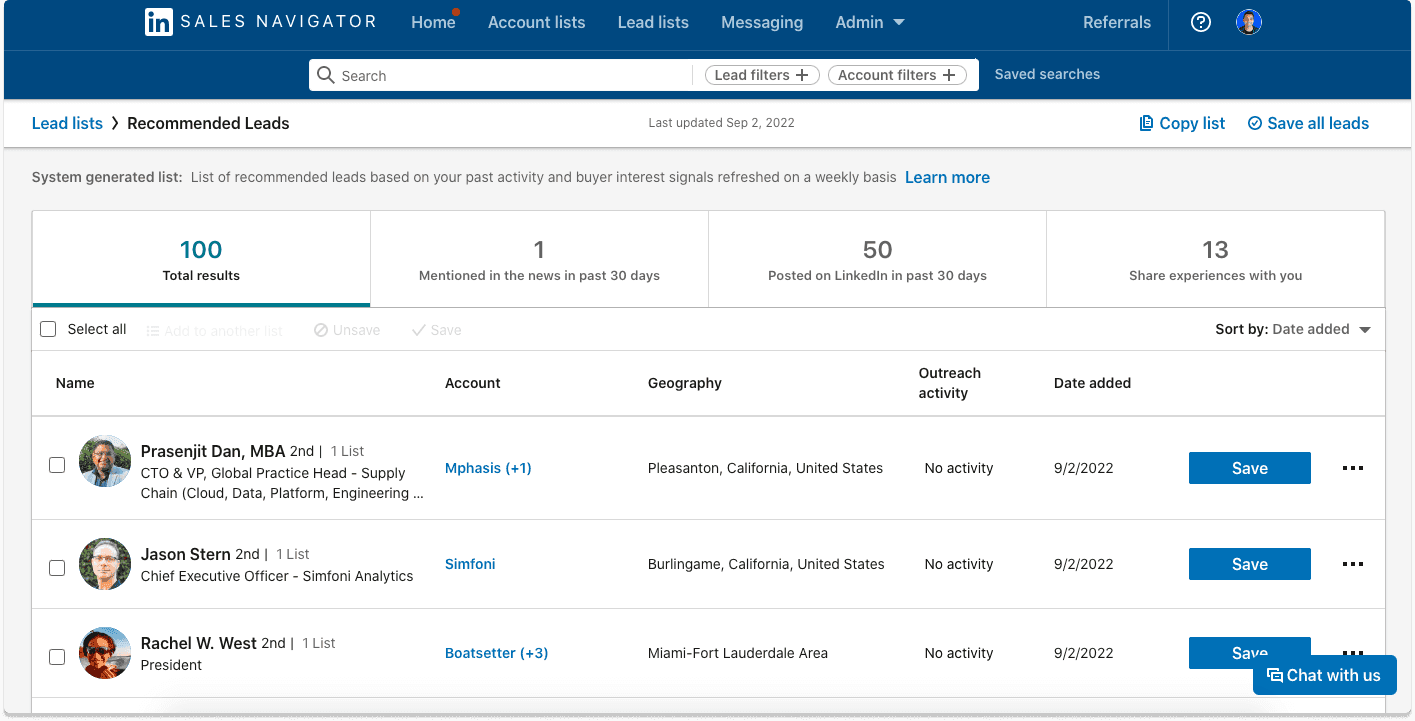
Differentiator features
Finding prospects at scale: Sales Navigator gives you access to LinkedIn's full B2B database with advanced filters (job title, seniority, company size, industry, geography, recent job changes). No other tool has this scale natively.
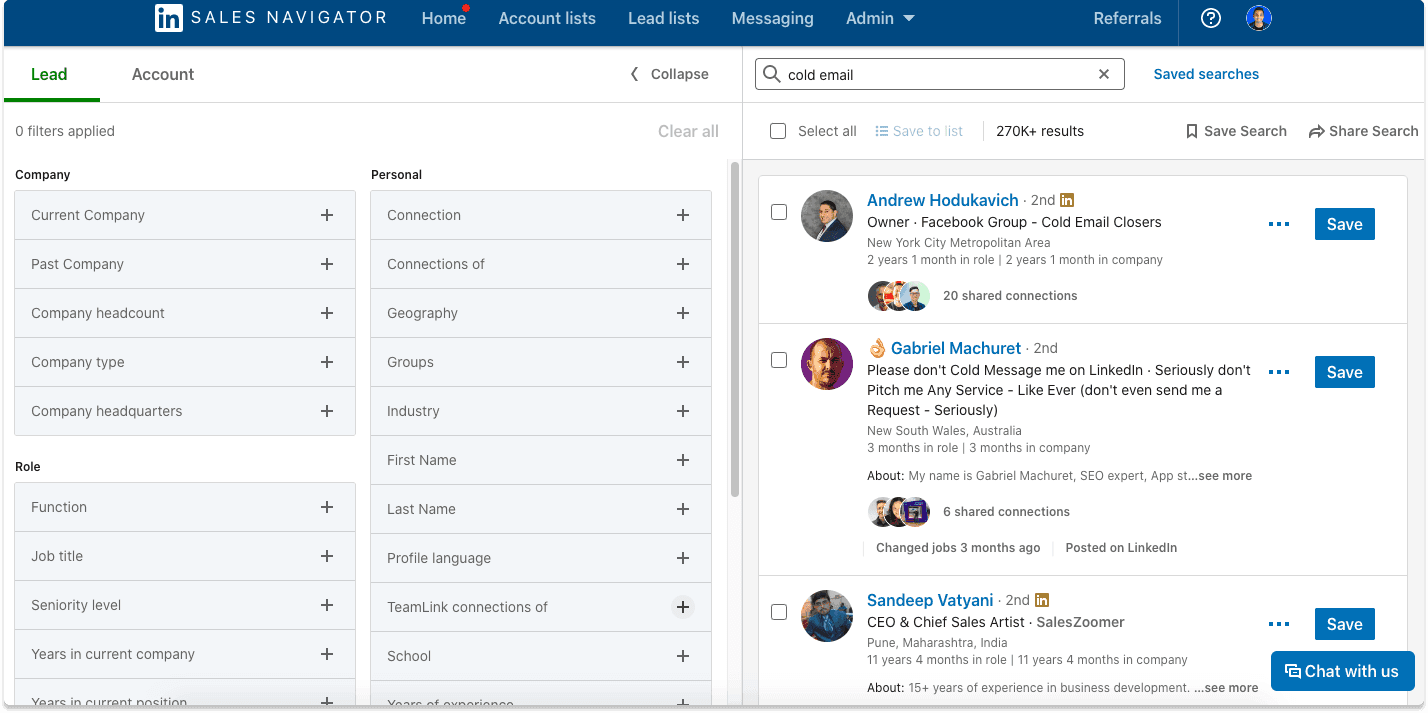
AI-assisted search (2024-2025 update): LinkedIn added natural language search and lead recommendations based on your saved lists. It partially closes the gap with tools like Clay for intent-based prospecting.
Advantages
The most complete B2B contact database natively on LinkedIn
Advanced filters that no third-party tool can fully replicate
Native InMail credit system for cold outreach
Disadvantages
No email addresses in the tool: you export leads and enrich elsewhere
The UI is aging badly, known for frustrating navigation
Not a CRM: you still need a separate tool to manage conversations and pipeline
No WhatsApp, Telegram, or any other channel
Pricing
Core (Professional): $99/mo
Advanced (Team): $149/mo
Advanced Plus (Enterprise): starts at $1,600/year
For the full picture on LinkedIn CRM options, see my LinkedIn CRM comparison.
3°) Taplio: the LinkedIn audience-building social CRM
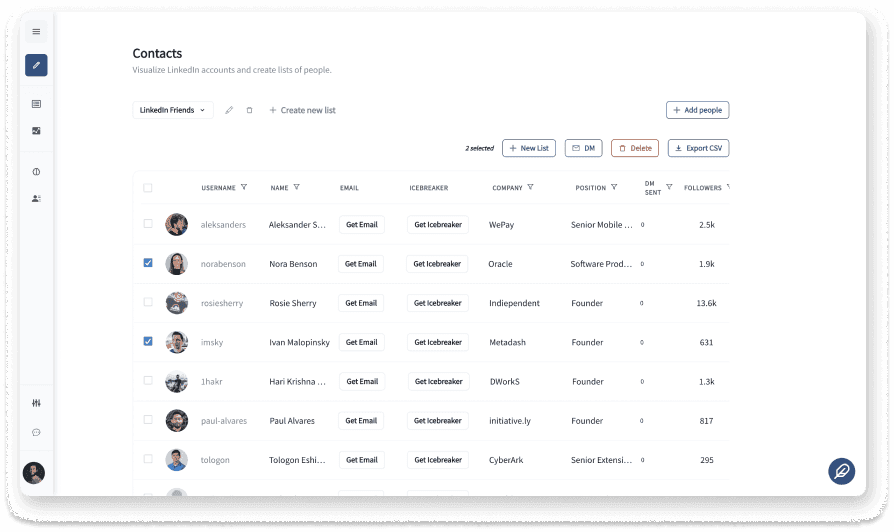
Taplio is primarily a LinkedIn content scheduling and audience-building tool that added CRM-like features over time. It lets you import contacts from LinkedIn or Sales Navigator, track engagement with your posts, and send bulk DMs to your audience.
Important 2023 update: Taplio acquired Tweet Hunter and both are now under the lemlist umbrella. If you used Tweet Hunter for Twitter content CRM features, those are now available through Taplio or the broader lemlist bundle. The tools share an ecosystem.
Differentiator features
LinkedIn import + post scheduling: pull contacts from LinkedIn or Sales Navigator, schedule posts, track who engages with your content, and convert engaged users into prospects.
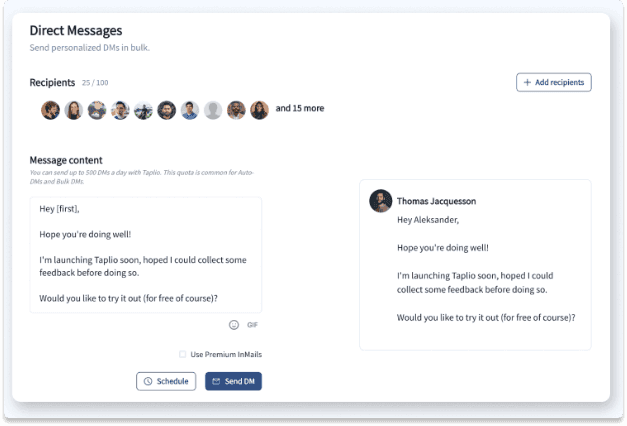
Bulk DMs: send direct messages in bulk to LinkedIn connections without using the riskier LinkedIn automation tools. Taplio users cite this as one of the most useful features for warming up audiences.
Advantages
Best-in-class for LinkedIn content creators who want to turn followers into leads
AI-powered post generation and scheduling
Lead magnet features for inbound-driven LinkedIn growth
Disadvantages
Limited to LinkedIn: no WhatsApp, Telegram, or email channel sync
Designed for audience building and content, not pure outbound sales prospecting
Not a standalone CRM: you lose pipelines, custom fields, and deal tracking
Pricing
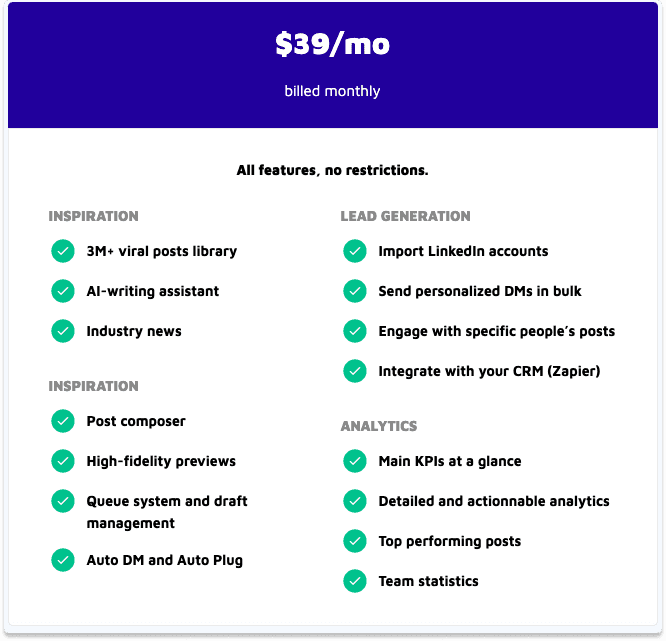
Approximately $39/mo. Simple and affordable for LinkedIn-first creators and consultants.
4°) Leaddelta: the LinkedIn connection management CRM
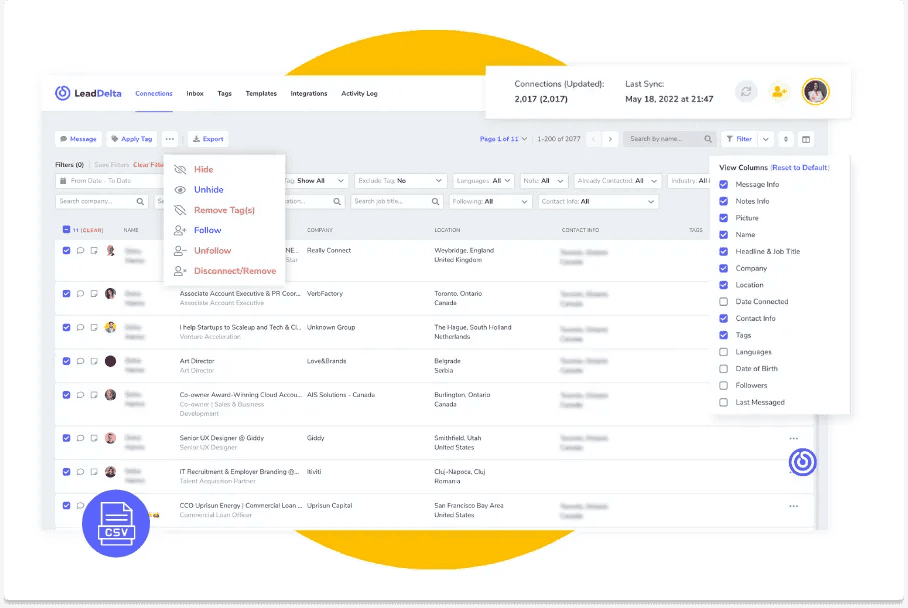
Leaddelta is one of the most focused tools on this list: it is designed entirely around managing your existing LinkedIn connections. It is not a prospecting tool and it is not a full CRM. What it does extremely well is give you a clean interface to organize, tag, and message your LinkedIn network.
Differentiator features
LinkedIn connection management: tag, filter, and bulk-manage your LinkedIn connections. Delete connections in bulk, find dormant relationships, and organize your network into segments. LinkedIn's native interface makes this nearly impossible at scale.
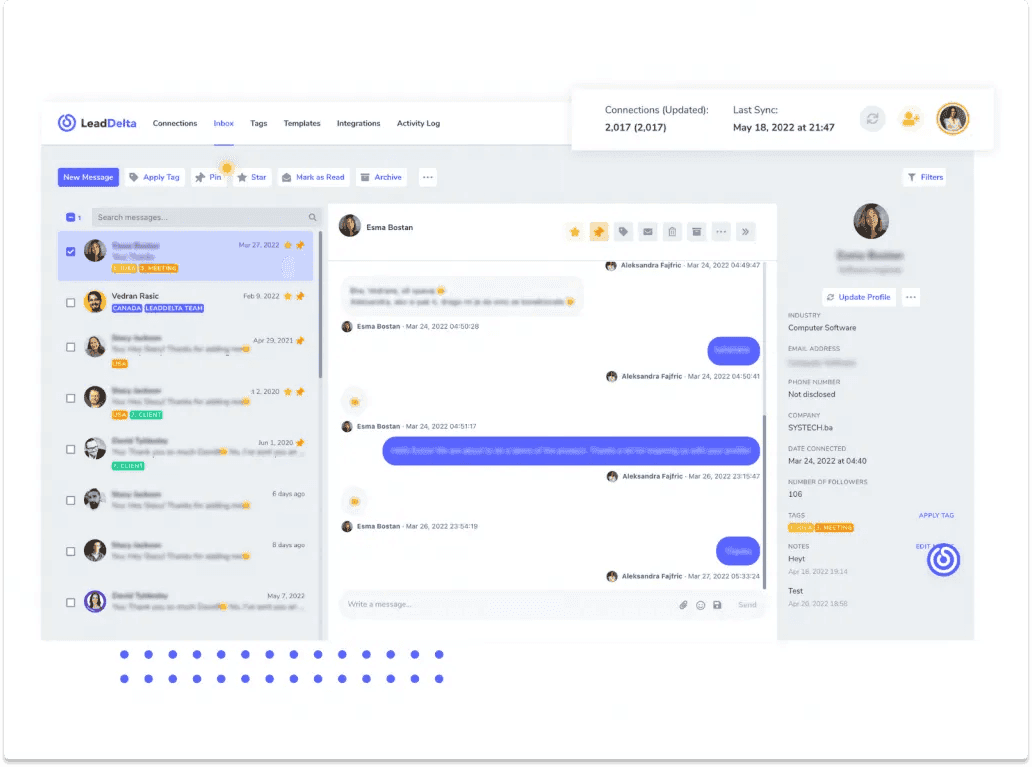
LinkedIn inbox replacement: LinkedIn's native inbox is notoriously bad. Leaddelta offers a cleaner inbox UI for managing LinkedIn conversations, with tagging and filtering that the native inbox does not have.
Advantages
Best tool if your goal is organizing and activating your existing LinkedIn network
Inbox that is significantly better than LinkedIn's native one
Bulk connection management that LinkedIn does not allow natively
Disadvantages
LinkedIn-only: no WhatsApp, Telegram, or email integration
Not a full CRM: no pipeline, no deal management, no automation
If your team sells across multiple channels, Leaddelta only covers one of them
Pricing
$24.99/mo billed monthly, or approximately $16.66/mo billed annually.
5°) Surfe: the LinkedIn-to-CRM sync layer
Surfe (formerly LeadJet) occupies a different category from the other tools on this list. It is not a CRM. It is a sync layer: a Chrome extension that overlays your LinkedIn profile pages with data from your existing CRM, and pushes activities from LinkedIn back into that CRM automatically.
If you are on HubSpot, Salesforce, or Pipedrive and want LinkedIn activities to appear in your deal records without manual data entry, Surfe solves that exact problem. You see the CRM contact card directly on the LinkedIn profile page. You log activities without switching tabs. It is a genuinely useful tool for teams that are locked into an enterprise CRM and cannot switch.
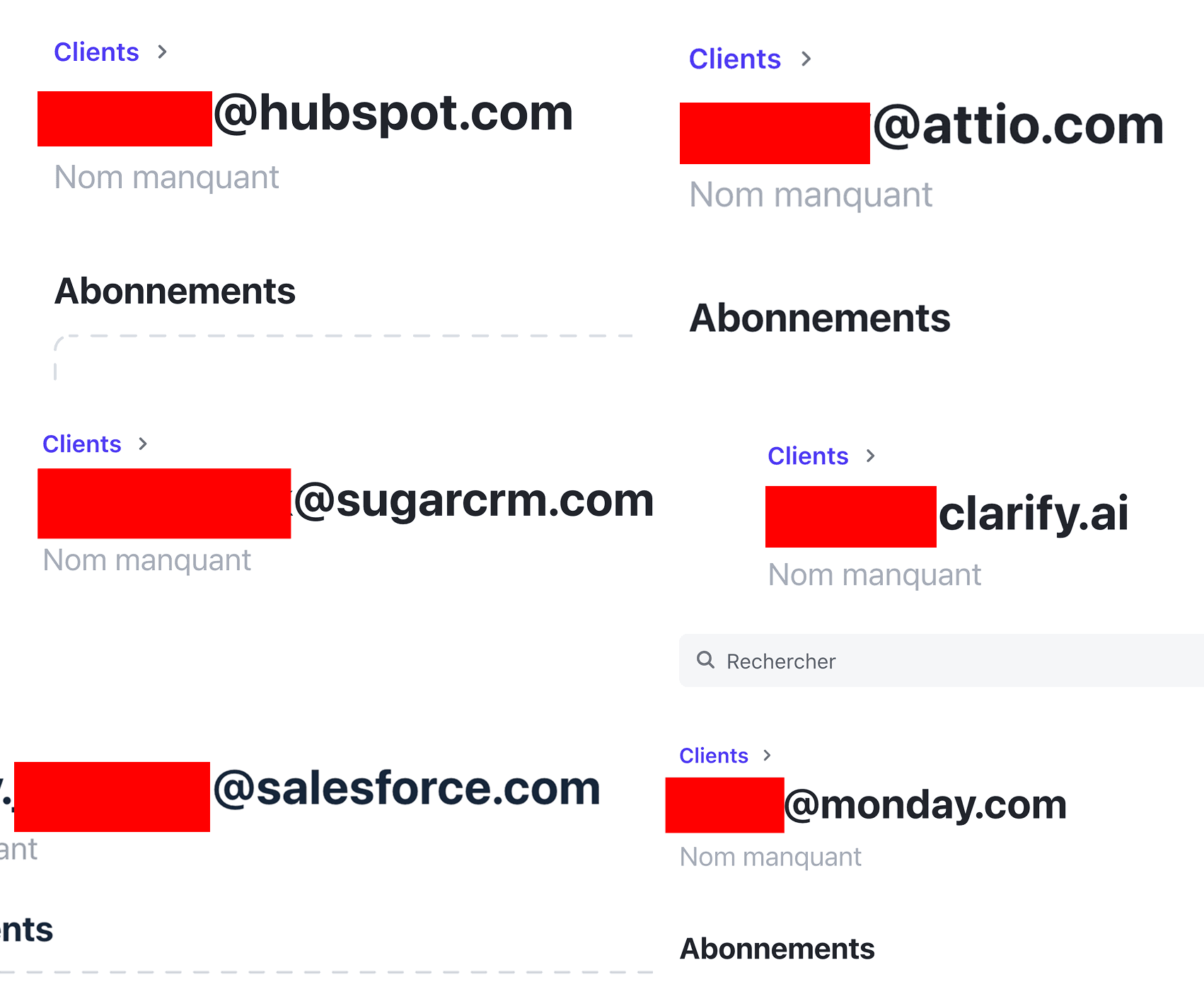
Teams from HubSpot, Attio, Clarify, Salesforce, and Monday have tried Breakcold as an alternative. For teams using Surfe as a sync layer on top of one of these CRMs, Breakcold replaces both the CRM and the sync layer with a single natively integrated tool.
Differentiator features
LinkedIn CRM overlay: the key differentiator is seeing your CRM data directly on a LinkedIn profile page without leaving LinkedIn. You can view deal stages, recent notes, and contact history inline while browsing Sales Navigator or LinkedIn profiles.
Sync to existing CRMs: Surfe pushes LinkedIn activities (messages, InMails, profile views logged) to HubSpot, Salesforce, Pipedrive, and several other CRMs via native integrations.
Advantages
Best option if you are locked into HubSpot or Salesforce and need LinkedIn activities to sync automatically
Clean overlay UX that does not interrupt your LinkedIn workflow
Faster than copy-pasting contact details manually into your CRM
Disadvantages
Not a standalone CRM: you still need a full CRM behind it, which adds cost
LinkedIn-only sync: no WhatsApp or Telegram
Gluing Surfe onto another CRM works, but the integration can be fragile compared to a natively-built multichannel CRM
Pricing
Approximately $29/mo for the individual plan. Teams pay more. Add that to your existing CRM cost and the stack gets expensive quickly.
For teams reconsidering their entire CRM stack, see the best AI-native alternatives to HubSpot, which covers how to replace both the CRM and the sync layer in one move.
6°) Folk: the simple LinkedIn-friendly CRM
Folk is a clean, modern CRM with a LinkedIn Chrome extension. It has been positioned as a Notion-style CRM for people who find Salesforce or HubSpot too heavy. It is a French company (like Breakcold), and we cross paths on deals regularly, mostly in the French market.
Here is the honest take: Folk frames itself as LinkedIn-friendly, but you have to click a button to sync each conversation. It does not auto-sync. For a solopreneur who sends 10 messages a day, that friction is manageable. For a proper sales team sending 50 to 100 messages a day across multiple channels, it becomes a bottleneck that kills CRM adoption.
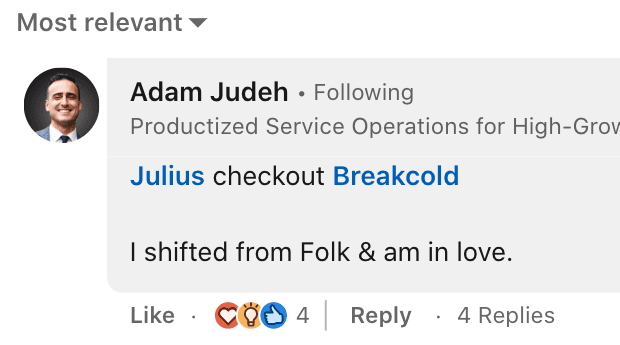
"I shifted from Folk and am in love" with Breakcold. The difference in practice is the auto-sync: conversations appear automatically without any button-clicking, so the CRM actually stays up to date.
Differentiator features
Clean UI, Notion-style simplicity: Folk's interface is genuinely easy to pick up. It is one of the better-designed CRMs for non-technical users who want something that feels light.
LinkedIn Chrome extension: the extension lets you sync contacts and conversations from LinkedIn into Folk with a click. Not automatic, but it is a one-click flow that many users find acceptable at low volumes.
Advantages
Clean, easy-to-navigate interface with a low learning curve
Good for solopreneurs or very small teams with low message volume
AI features for contact enrichment and email drafting are improving
Disadvantages
LinkedIn sync requires manual button clicks: conversations do not auto-sync
No WhatsApp or Telegram integration
Folk is for solopreneurs; Breakcold is for proper salespeople
The CEO tested Breakcold with multiple accounts, which suggests they watch the space closely
Pricing
$20/mo for the Standard plan. Simple pricing, reasonable for what it offers at small scale.
For teams that have outgrown Folk, see the best Folk CRM alternatives in 2026, which compares multichannel-ready options that auto-sync.
7°) BlackMagic: the native X/Twitter social CRM
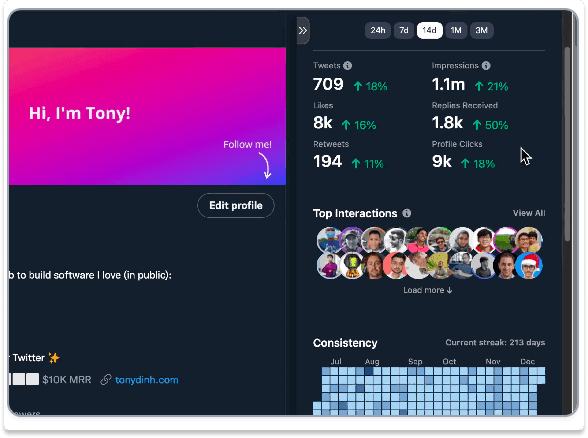
BlackMagic is built by Tony Dinh and sits natively inside X (formerly Twitter). The magic sidebar appears directly on Twitter profile pages and lets you log notes, set reminders, and track your relationship with any Twitter user without leaving the platform.
Context for 2026: the X API changes in 2023-24 significantly raised costs for third-party Twitter tools. Many Twitter CRM tools shut down or pivoted. BlackMagic is still operating and still useful, but the X ecosystem is smaller and more expensive to build on than it was in 2021-22. If your B2B audience is still actively on X, BlackMagic is one of the few remaining tools that works natively there. Most B2B audiences have moved to LinkedIn.
Differentiator features
Native Twitter sidebar: the sidebar appears directly on X profile pages. You see your relationship history with a person while browsing their profile, without switching to a separate CRM. It is a genuinely clever UX that reduces the friction of maintaining relationships on X.
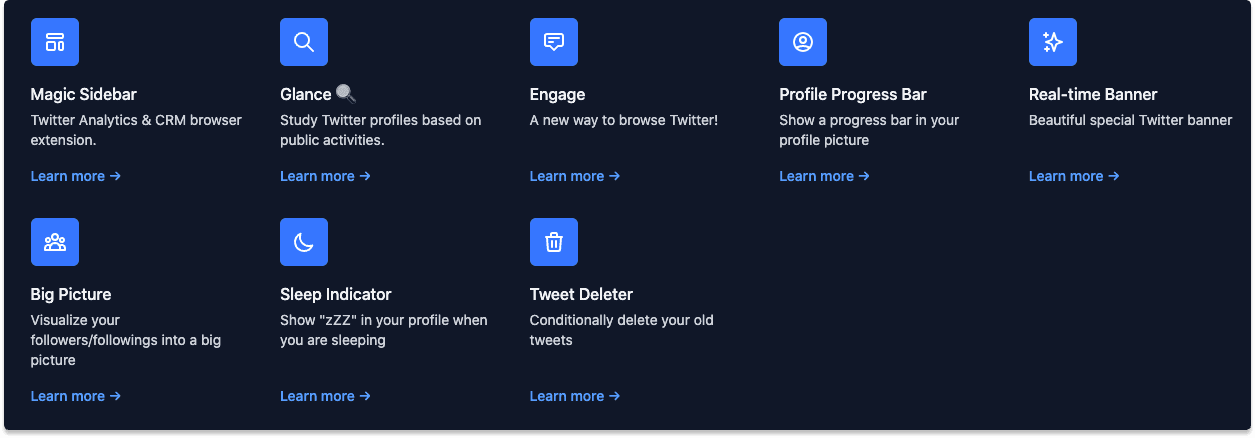
X-native contact management: tag users, log interactions, track follower relationships, and set follow-up reminders, all within the Twitter interface.
Advantages
Best-in-class if your prospecting audience is on X and you do not want to leave the platform
Built by an indie founder who ships in public and responds to user feedback
Genuinely clever sidebar UX that does not interrupt your Twitter workflow
Disadvantages
Limited to X/Twitter: no LinkedIn, WhatsApp, or Telegram
B2B sales has largely moved to LinkedIn; X is now more relevant for consumer-facing or creator-driven businesses
X API changes in 2023-24 increased risk for third-party Twitter tools overall
Pricing
$19/mo. Very affordable if X is genuinely your primary prospecting channel.
8°) Tweet Hunter: the X/Twitter content CRM
Tweet Hunter started as a Twitter content tool with CRM features: a bank of inspirational tweets, AI-powered scheduling, and bulk DM capability to convert your audience into leads. It was one of the more complete Twitter CRM tools available before 2023.
In 2023, Tweet Hunter was acquired by lemlist and merged into the Taplio ecosystem. The product is still accessible at tweethunter.io and is maintained, but it is now part of the lemlist/Taplio bundle. If you used Tweet Hunter before the acquisition, your workflows still work. If you are evaluating it fresh in 2026, check whether the lemlist bundle pricing gives you better value than the standalone $49/mo plan.
Differentiator features
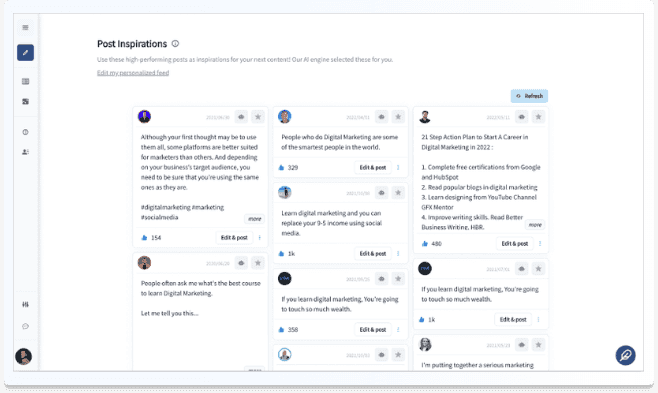
Tweet inspiration bank: Tweet Hunter's library of high-performing tweets by category is a genuinely useful resource for finding outreach angles and identifying B2B influencers in your niche. It is one of those features that sounds simple but saves real time.
Bulk DMs with AI: send direct messages to your Twitter followers at scale, with AI-assisted personalization. Note that X's API changes in 2023-24 tightened limits on automated DMs significantly: the aggressive automation that was possible in 2021 is no longer viable at the same scale, and some bulk DM features have been affected.
Advantages
Strong content scheduling with AI writing assistance
The tweet inspiration bank is a practical research tool for Twitter-active salespeople
Now bundled with Taplio: users who need both Twitter and LinkedIn content CRM features can access both tools together
Disadvantages
X API changes have reduced the scope of automation features that made Tweet Hunter distinctive
Twitter-only: no LinkedIn, WhatsApp, or Telegram
The product direction is now part of a larger bundle, so standalone development has slowed
Pricing
$49/mo standalone. Likely better value as part of the lemlist bundle alongside Taplio. Check the current lemlist pricing if you are evaluating the full stack.
Conclusion: which social CRM should you use in 2026?
The answer depends on where your prospects actually are.
If your prospects are on LinkedIn, WhatsApp, and Telegram (the core B2B channels in 2026), you want a CRM that auto-syncs all three. That is Breakcold. The pricing is reasonable, the data model is deep enough for a real sales team, and the MCP integration means you can plug in Claude or ChatGPT to run analysis and updates directly from your AI client. For teams of 5-30 who are serious about multichannel selling, it is the only tool that covers all the channels natively. For more on this, see which CRMs are actually built for sales teams and the best CRMs under $100/mo for small teams.
If your audience is specifically on X/Twitter, BlackMagic is still the best native option. Tweet Hunter adds content scheduling if you need it, and they share the Taplio/lemlist ecosystem now.
If you are doing LinkedIn prospecting at scale and need to stay in your existing CRM (HubSpot, Salesforce, Pipedrive), Surfe is the cleanest sync layer available. Just know that you are adding cost and complexity rather than consolidating.
For LinkedIn connection management specifically, Leaddelta and Taplio each serve a distinct use case: Leaddelta for organizing your existing network, Taplio for turning your audience into leads via content. For teams that want Telegram integration alongside LinkedIn, see how CRM Telegram integration works.
Frequently asked questions

Written by
Arnaud Belinga · Co-Founder & CEO at Breakcold
Arnaud is the Co-Founder & CEO of Breakcold, the AI Native CRM for sales teams of 5 to 30+ people.