



AI CRM Tutorial: How to Use a “Self-Updating CRM”
TL;DR: how to use a self-updating AI CRM
🏆 Breakcold: the AI Native CRM for sales teams of 5 to 30+ people. AI agents handle the admin (move deals, log activity, create tasks), it connects to Claude and ChatGPT via native MCP, and it syncs LinkedIn, email, WhatsApp and Telegram into one pipeline. At 5 seats Breakcold is $139/mo, where a traditional CRM runs $300 to $500/mo.
✅ Vision is the AI engine: it auto-moves contacts across lists, stages and tags, auto-creates follow-up tasks, keeps lead summaries current, and lets you ask questions about your pipeline.
✅ Tasks come from a personality: choose a default agent or build a custom one that controls how often tasks are created, how they are named and what messages they suggest.
✅ Guidance vs rules: guidance is soft advice the AI can interpret, rules are strict constraints for absolute control.
✅ The Playground is the setup weapon: test a lead, see how the AI would move it and why, adjust prompts in plain English, and automate everything in 5 to 15 minutes with no code.
For the last three months, I haven’t touched my CRM.
No manual lead updates.
No “move to stage” admin.
No “create follow-up task” nonsense.
And honestly? It’s been a blast.
Because the second you stop doing CRM chores all day, you get your time (and brain) back. In my case, it was so effective that I increased my number of new conversations started by 40%… and I basically doubled my ability to run real conversations with warm leads.
That’s the entire point of an AI CRM.
Not “cool AI features.”
Time back. More convos. More sales.
Loading YouTube sends it your IP address and may enable cookies. This applies to this content only.
But here’s the thing: even though our customers love the product, a lot of them still don’t fully understand how our AI system works (what we call Vision).
So in this AI CRM tutorial, I’ll show you step-by-step how to leverage Vision, Breakcold's AI properly to:
automatically move contacts in your CRM
automatically create follow-up tasks
generate AI summaries of leads
and ask questions to AI about your pipeline (call prep, objections, closing strategy, etc.)
This article might be a bit long and honestly a bit boring.
But I swear: if you apply this properly, it’ll become one of the best investments of your life as a sales person/founder because it gives you what everyone wants:
more time + more deals, with less chaos.
Let’s go.
What Is Vision? (The Brain of Breakcold AI CRM)
The first question I always get (on calls and in support) is:
“Ok but what exactly is Vision?”
Vision is basically the AI engine that runs inside your CRM. It does a few core things:
1) It moves contacts automatically
Vision updates automatically:
the list where the contact should belong
the sales pipeline stage (status)
and the tags assigned to that contact
So you don’t have to manually drag/drop leads or keep your CRM “clean.”
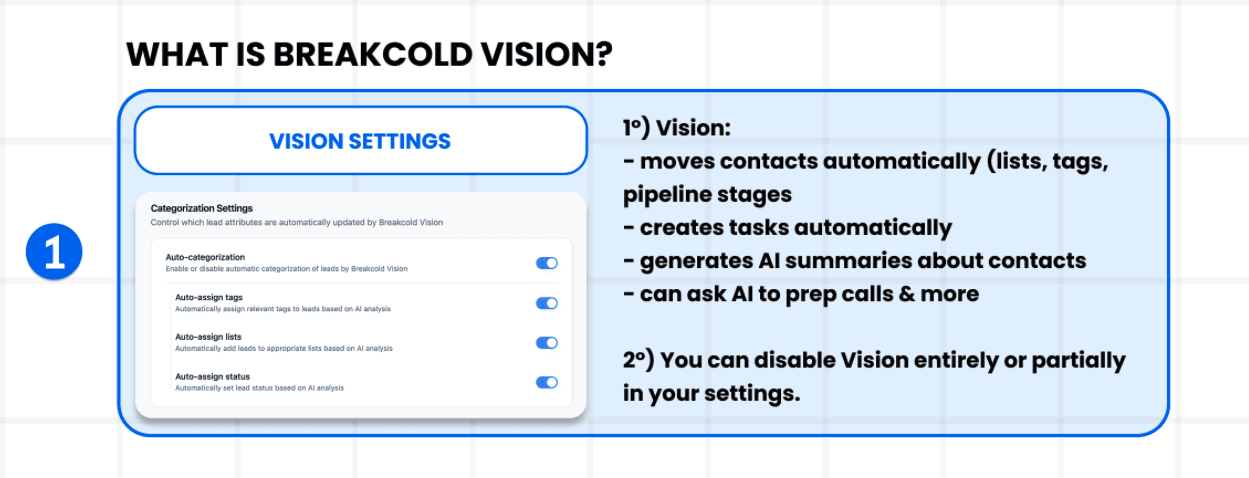
2) It creates CRM tasks automatically
Vision can create follow-up tasks so hyou don’t miss deals because of lack of consistency.
This is huge because most people aren’t losing clients due to marketing.
They lose deals because of:
forgetting to follow up
losing track
not knowing who to ping
getting overwhelmed
procrastinating
“I’ll do it later” (you never do)
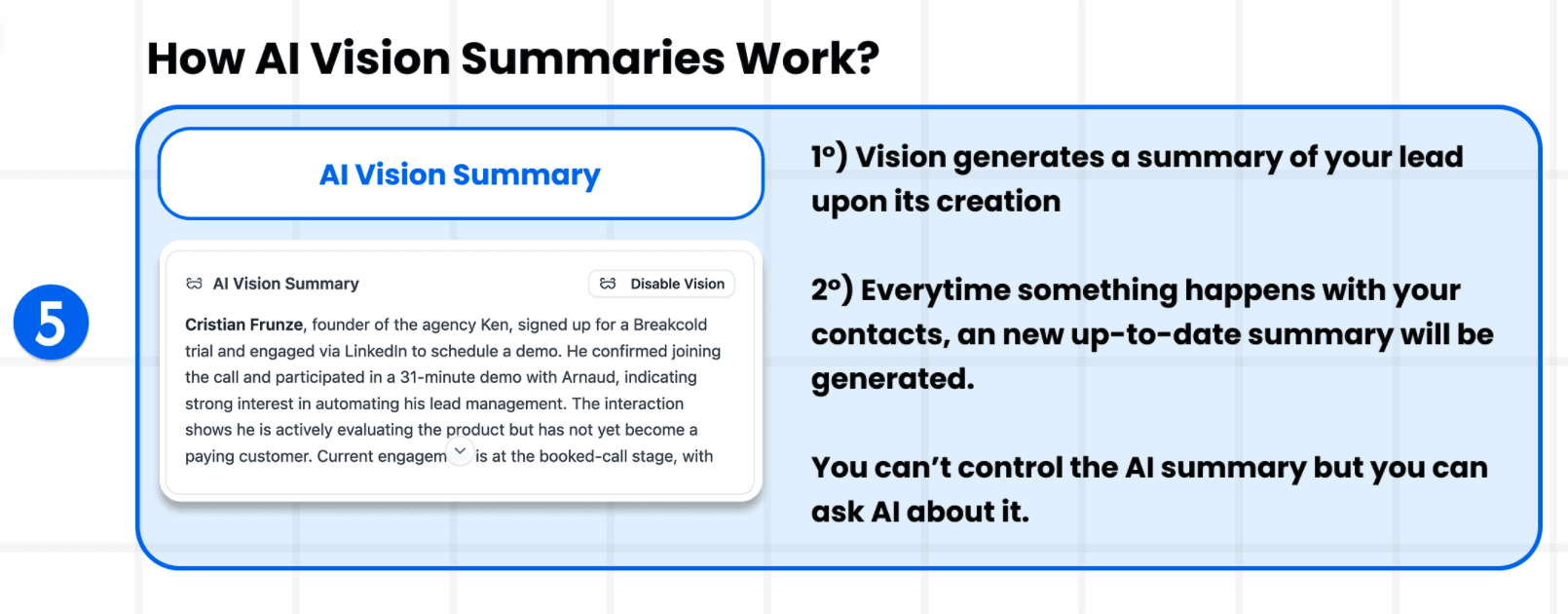
3) It generates AI summaries of leads
Every time something happens with a lead (email, LinkedIn message, meeting transcript, notes…), Vision refreshes a summary.
So you always have context.
Even if you’re late to a call (we’ve all been there).
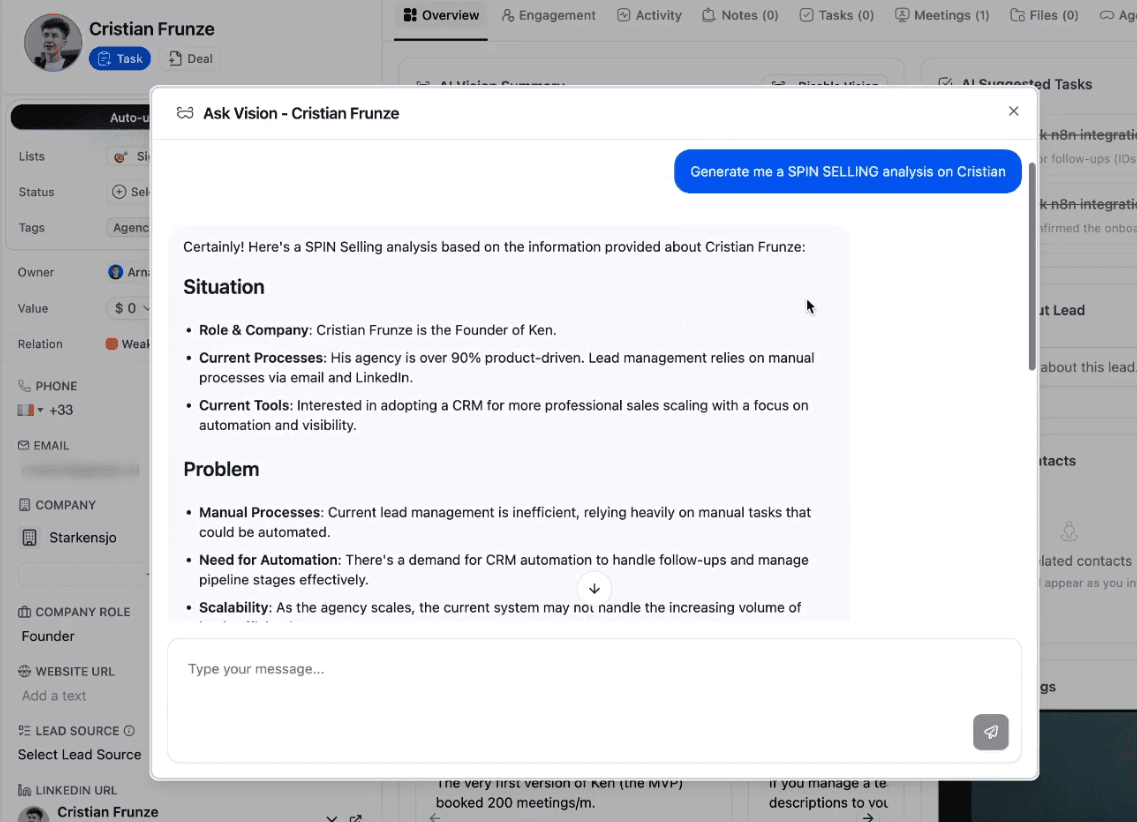
4) You can ask AI questions about leads (“Ask Vision”)
This is like ChatGPT but for your CRM.
You can ask stuff like:
“What are the key objections this lead raised?”
“Summarize the last 2 meetings.”
“What should I say to re-engage them?”
“Analyze this deal using SPIN Selling.”
And then you can go deeper with follow-up questions.
The 3 Main Purposes of an AI CRM (The Vision Framework)
Vision exists for three reasons:
1) Auto-create follow-up tasks
So you never miss a follow-up again.
The goal is:
you open your dashboard
the CRM tells you what to do
you click
you land directly in the right thread (email / LinkedIn / WhatsApp / Telegram)
you execute
No thinking. No admin. No “where was I again?”
Just execution.
2) Auto-move leads in CRM (Lists + Stages + Tags)
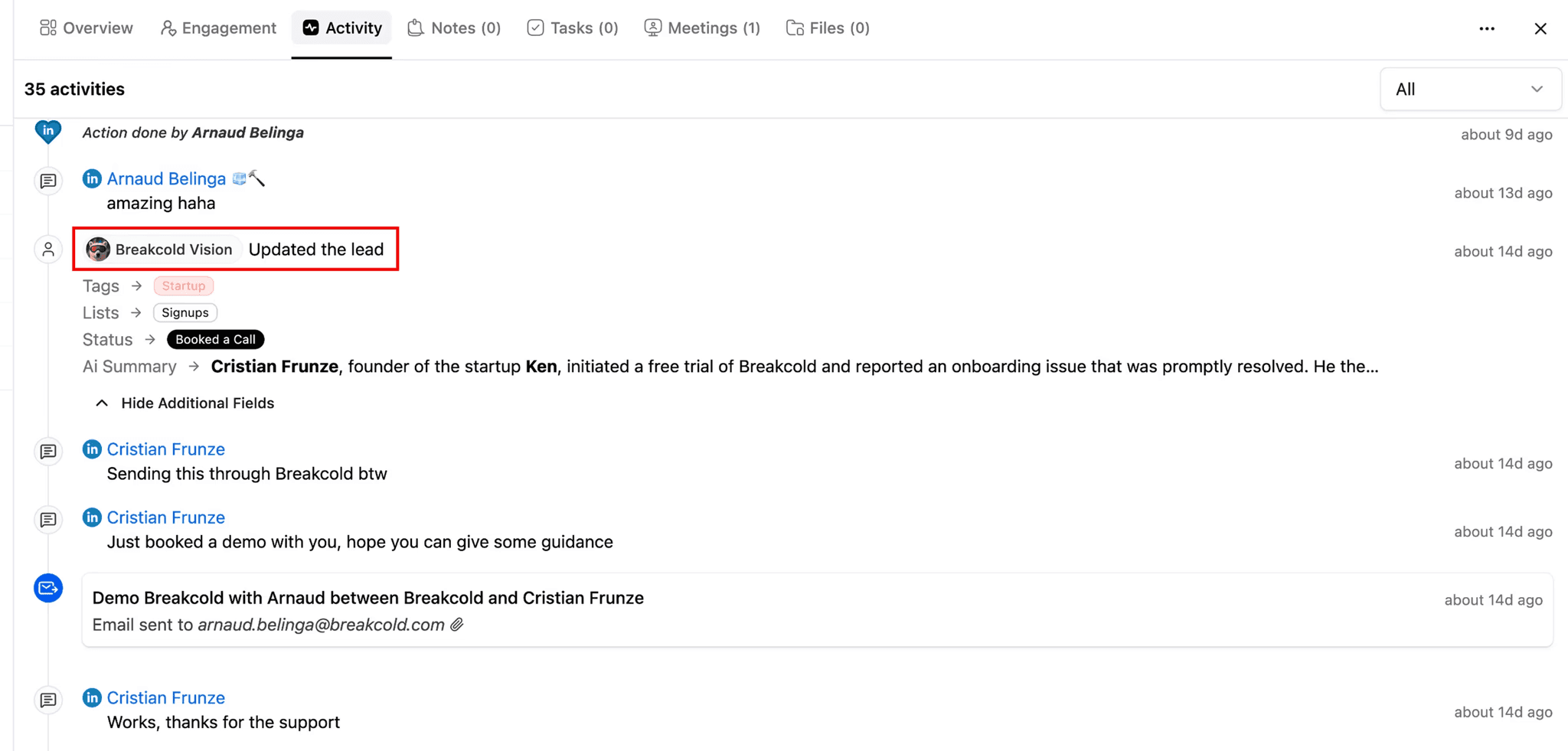
Depending on what happens with leads (replies, meetings, booking links, etc.), Vision automatically updates:
lists
pipeline stages
tags
Example:
the CRM detects a conversation started
it moves lead to Conversation Started
then it detects Calendly booking
it moves lead to Booked a Call
You did nothing.
So your analytics are always accurate.
3) Provide AI summaries and deal intelligence
Vision keeps summaries always up-to-date, and lets you ask questions to the AI using:
email threads
LinkedIn DMs
meeting transcripts (ex: Fireflies sync)
notes
This is the “AI copilot” part.
How Vision Creates Tasks Automatically (And Why It’s Not Magic)
One of the most confusing parts for people is task generation.
So let’s make it super clear.
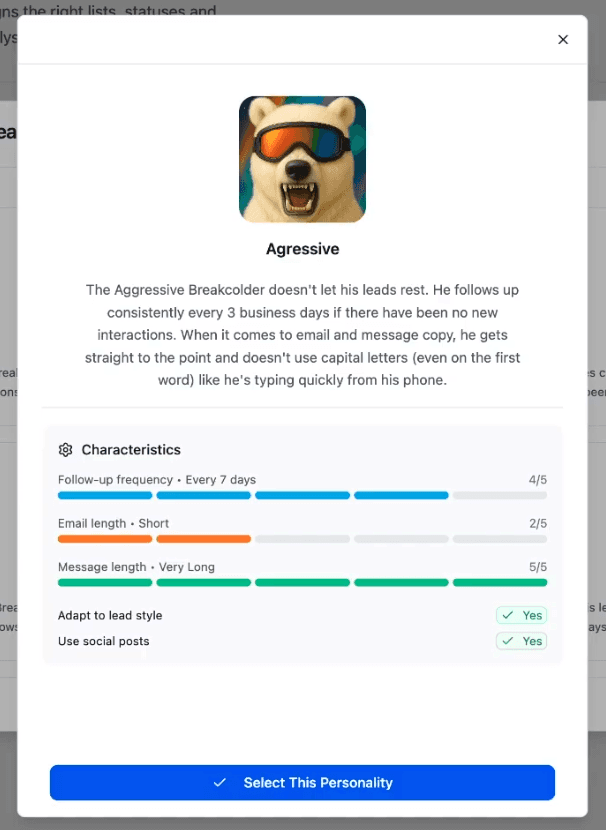
Vision uses a “CRM Personality” (aka AI CRM Agent) to generate tasks
A Vision personality determines:
how often tasks are created (every 3 days, 7 days…)
how tasks are named
the reasoning
the action plan
the AI suggested messages (email / LinkedIn / WhatsApp)
You can either:
use a default personality template
create your own custom personality (recommended if you want control)
Default Personalities vs Custom Personalities
Option 1: Use a default personality/agent (zero setup)
If you want something simple:
go to Vision settings
choose another personality
pick “Aggressive”, “Corporate”, etc.
done
These default ones are designed to work without thinking.
Option 2: Create your own personality (more control)
Personally I created my own, because by default, templates create tasks for EVERYTHING.
Even if you never messaged the lead.
I didn’t want that.
So I created a custom personality like:
follow up every 3 business days
only create tasks if there’s already a conversation thread
except for churn-risk customers
That way, my dashboard isn’t polluted.
AI Guidance vs AI Rules (THIS Changes Everything)
Another common confusion is:
“What’s the difference between guidance and AI rules?”
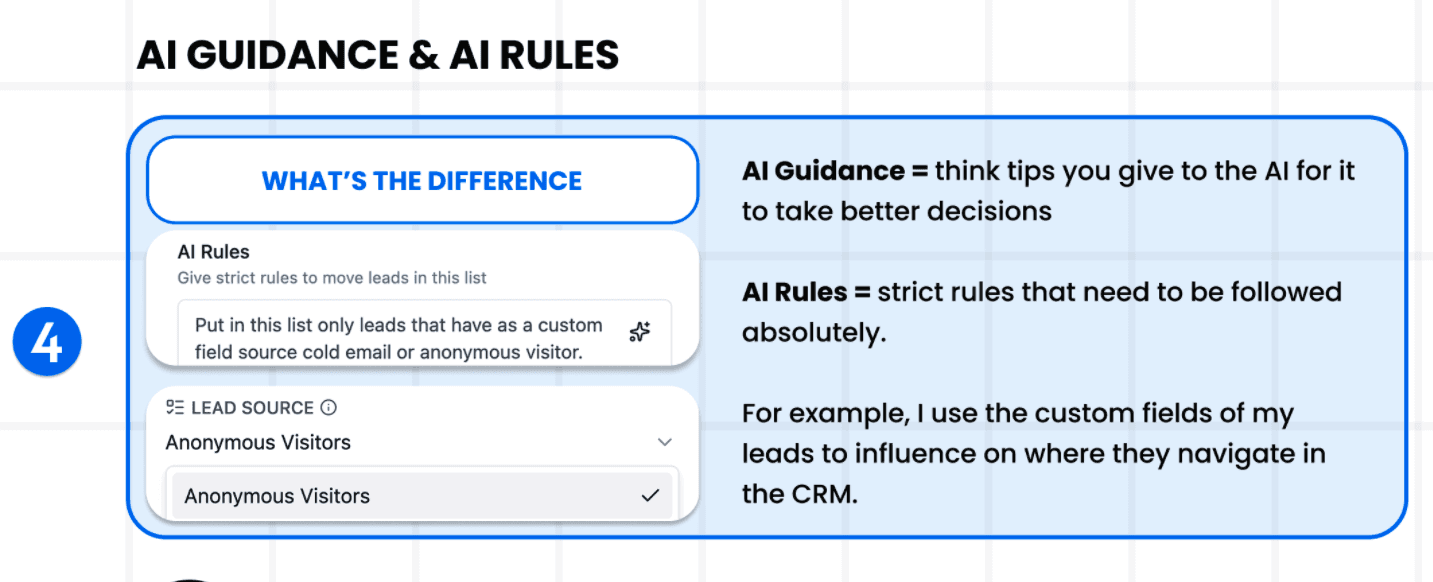
AI Guidance = soft hints
Guidance is basically advice you give to the AI.
Example:
“This list is for inbound leads.”
“Put people here if they replied positively.”
It’s flexible. The AI can interpret.
AI Rules = strict constraints
Rules must be followed.
Example:
“Only put leads in this list if custom field
sourceisemailoranonymous visitor.”“Never create follow-up tasks if there is zero conversation thread.”
This is how you get absolute control.
How Leads Move Automatically in the CRM (The Real Setup)
This is where the AI CRM becomes insane.
The “secret” is simple: naming
Contacts move automatically based on:
how you name your lists
how you name your pipeline stages
how you name your tags
Example:
If your stage is called “Booked a Call”, Vision knows what to do.
If a Calendly email appears, Vision detects it, and moves the lead.
No setup required.
But… sometimes the AI doesn’t move leads exactly the way you want.
So you have 2 options:
disable parts of Vision
or instruct it properly (best option)
The Playground: Your AI CRM Setup Weapon
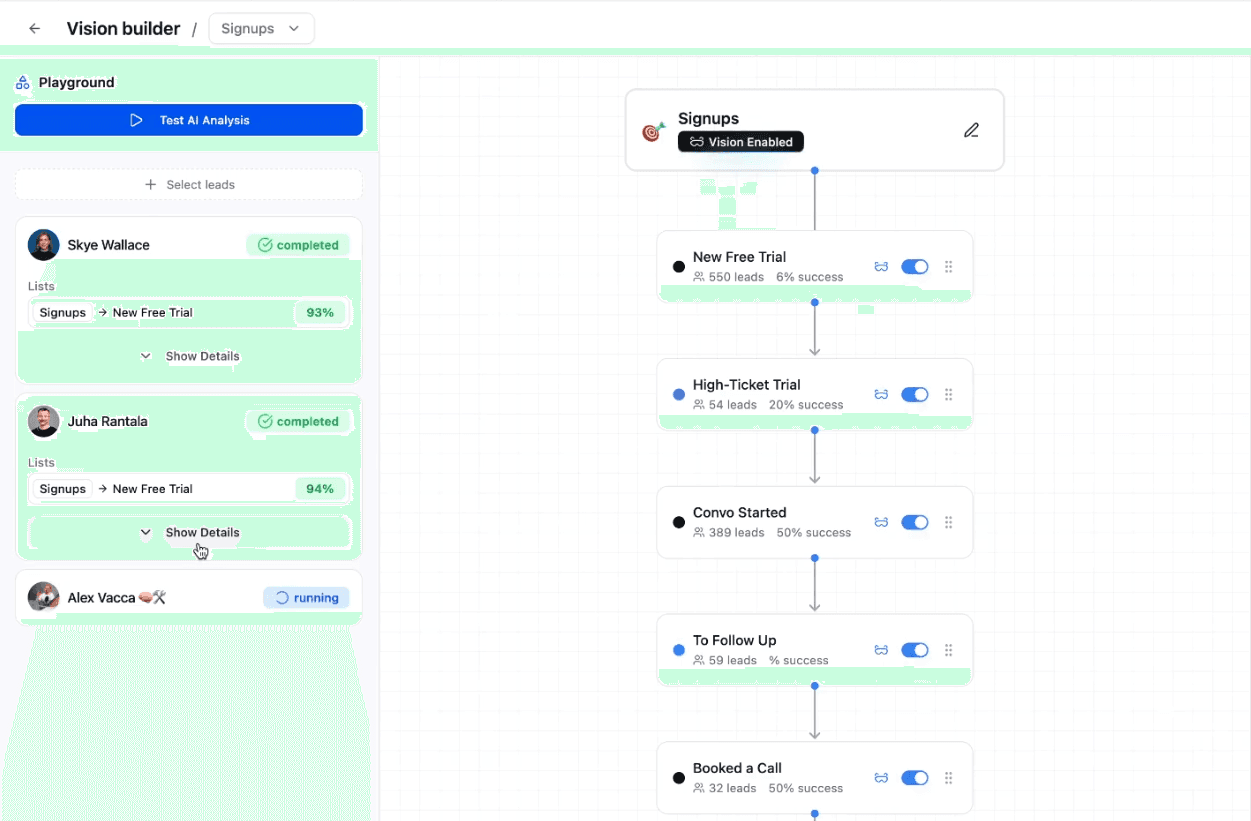
The most important tool people miss is the Playground.
Inside Vision config, you can:
search for a lead
run analysis
see where Vision would move them
see the AI’s reasoning
This is how you “train” your CRM.
And I’m not joking when I say:
in 5 to 15 minutes you can fully automate everything.
Because it’s not coding.
It’s just natural language.
You test, see reasoning, adjust prompts, test again.
Done.
My Best Tips to Make Vision Work Perfectly
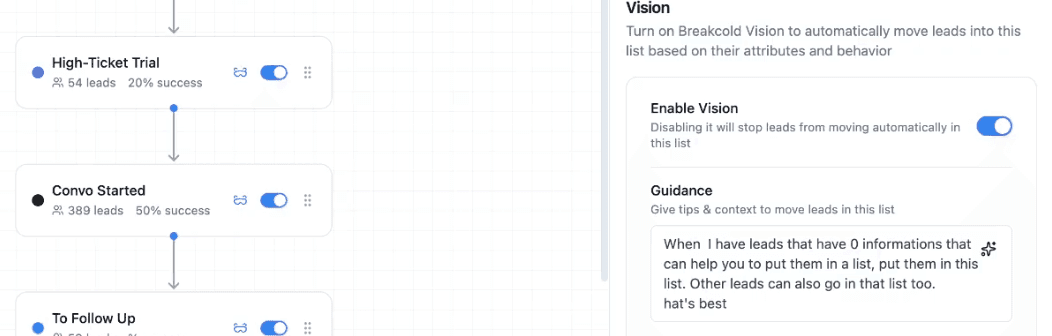
Tip 1: Don’t over-prompt
Counterintuitive, but true.
Often, the best guidance is literally:
“I let you judge what’s best.”
Because the AI understands the names of your lists/stages better than you think.
Over-instructing can actually make results worse.
Tip 2: Focus on lists first
Vision first decides:
“Which list should this lead belong to?”
Once the list is correct, the sales stage is easy.
So spend your effort prompting lists, not stages.
Tip 3: Use custom fields to create powerful workflows
This is where you can do insane things like:
“Put leads here only if custom field source = email”
“Move customer to Retention M2 if subscribed date is older than 2 months”
This creates an AI CRM that behaves like a workflow engine… without writing automation rules everywhere.
What If You Don’t Like How Vision Moves Leads?
Then disable parts of it.
In Vision settings, you can disable:
auto-assign tags
auto movement
task creation
etc.
About tags: name them like a human would
Tags work well if they’re simple:
US / UK / EU
startup / agency / solopreneur
Then the AI can infer from lead data and conversation context.
But if your tags are weird or super internal, the AI won’t “guess” what you meant.
In that case: disable auto-tagging.
AI Summaries: Your Call Prep Cheat Code
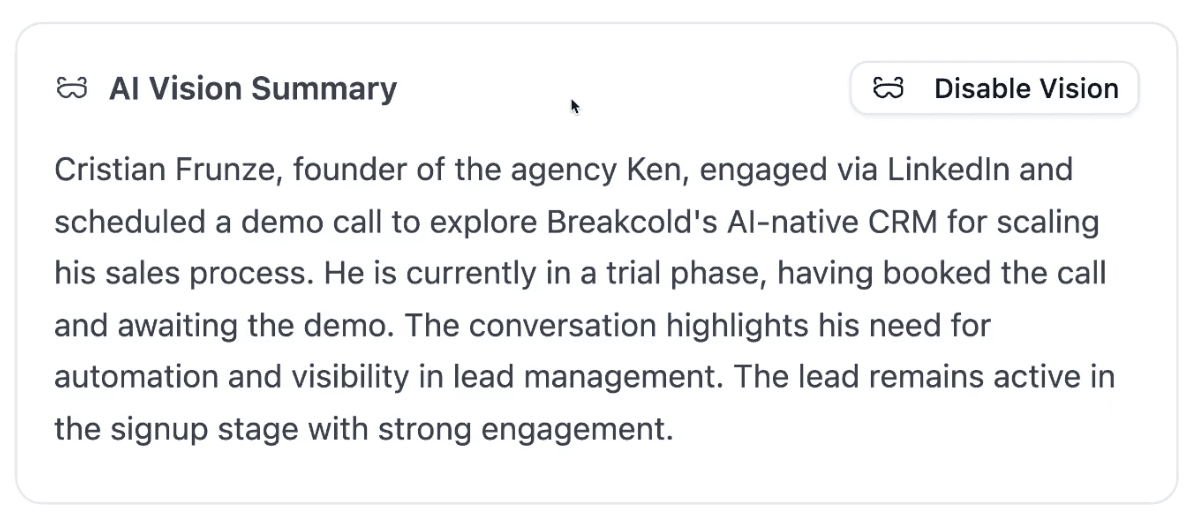
Each AI lead gets a Vision summary.
It updates automatically based on:
new conversations
meetings
notes
lead field updates
My workflow is simple:
I press Cmd+K
type lead name or email
open lead
read summary
jump on call
That’s it.
It makes you look extremely prepared, even if you’re late.
Ask Vision: ChatGPT for Your CRM (With One Big Limit)
Ask Vision lets you ask questions about a lead using everything inside the CRM.
Examples:
“Summarize the last call.”
“What are the lead’s pain points?”
“What should I follow up with?”
“Analyze the deal using SPIN Selling.”
“Where was I weak during the call?”
The Daily AI CRM Workflow (The Whole Point)
If you implement this correctly, your daily routine becomes:
open dashboard
do tasks Vision created
jump into inboxes (email / LinkedIn / WhatsApp)
focus only on active conversations
sell
No CRM updates.
No pipeline admin.
No “who should I follow up?”
Your job becomes what it should have always been:
create conversations → build momentum → close deals.
Final Notes: What Vision Can’t Do Yet (But Will Soon)
Some users try to do stuff like:
“Wait 2 days in this stage, then automatically send an email.”
That’s not available yet.
Vision V1 is about:
automation of movement
automation of follow-up tasks
AI summaries + Q&A
Workflow automation (timed sequences, auto-sending, etc.) will come later.
But even right now, you can already automate 80% of the admin work that kills sales productivity.
Conclusion
If you take only one thing from this tutorial, it’s this:
An AI CRM isn’t supposed to be a fancy dashboard.
It’s supposed to remove admin work so you can do more of the only thing that matters:
conversations.
More convos = more deals.
And if Vision is set up properly, you will literally start selling more… without “working more.”
Because you finally stop wasting time doing the CRM’s job.
If you want, I can also restructure this article into:
a full YouTube script (with hooks + storytelling)
a shorter blog post version (1200 words)
or a “Vision Cheat Sheet” formatted like a downloadable PDF outline
Frequently asked questions

Written by
Arnaud Belinga · Co-Founder & CEO at Breakcold
Arnaud is the Co-Founder & CEO of Breakcold, the AI Native CRM for sales teams of 5 to 30+ people.