



Clay AI Review - My HONEST Take After 7 Hours
TL;DR: Clay is the most powerful data enrichment platform, if you have the budget and the technical skill to run it
✅ What it is: a sales intelligence and enrichment platform that resolves LinkedIn URLs and domains into verified emails, phones and firmographics using 100+ providers, with real-time intent data.
✅ Standout features: waterfall enrichment, AI-powered lead scoring, the AI Formula Generator, and Claygent, its web research agent.
✅ Pricing: free plan plus paid tiers from $149/mo (Starter) up to $800/mo (Pro) and custom Enterprise, with credits consumed per action.
✅ The catch: a steep learning curve and aggressive pricing that can put it out of reach for bootstrapped teams or reps without technical skills.
✅ Alternatives: Freckle for simpler, cheaper enrichment, Trigify for social listening, and a CRM like Breakcold to hold the conversations and pipeline that Clay feeds.
Loading YouTube sends it your IP address and may enable cookies. This applies to this content only.
Data, on any level, can play a defining role in overall business success. It drives decision-making, fuels marketing strategies, and can help teams identify opportunities for growth. But finding good data — let alone data that’s accurate, relevant, and actionable — is easier said than done. For many sales reps, the time spent scouring and procuring prospect data can leave you wanting to pull out your hair and then some. Some prospects have little to no digital footprint while others leave behind outdated info on their socials. All-in-all, your ICP doesn’t make it easy.
That’s where Clay, an AI-driven sales intelligence platform equipped with robust data-driven insights and powerful prospecting automation, steps in. In this review we explore the key features, use cases, pros and cons, case studies and potential alternatives to Clay.

📖 Clay AI Summary
Who Are They (and Who Are They For)?
Compared to CRM giants like Salesforce and HubSpot, Clay is a relatively new player in the industry. Founded in 2017 by Kareem Amin, Nicolae Rusan, and Varun Anand, Clay initially set out to simplify computer programming before pivoting to sales automation in 2021.
Today, you’ll find that Clay is designed for growth teams, sales development representatives (SDRs), and enterprises looking to streamline prospecting and data enrichment.
What Is Their USP?
As the name suggests, Clay is a bit of a shapeshifter in the SaaS world. While they position themselves as a sales intelligence platform redefining how professionals manage relationships, that’s just scratching the surface. By leveraging over 100 external enrichment tools, Clay not only helps identify the most relevant prospects but also enriches existing data with an impressive AI-powered algorithm.
🔑 Key Features and Use Cases
Waterfall Enrichment + Intent Data
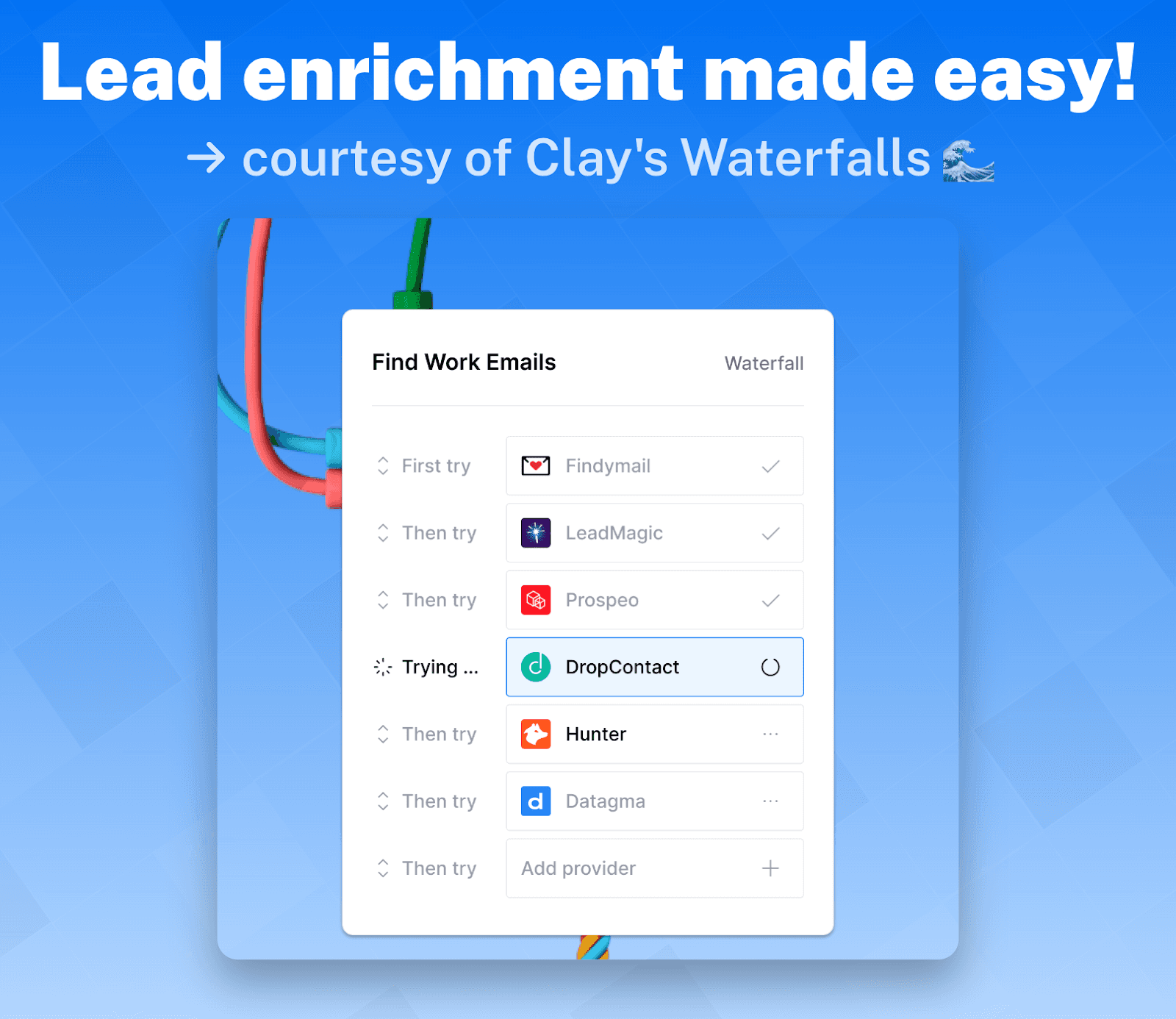
One of Clay's standout features, Waterfall Enrichment, is a data enrichment method that pulls information from **multiple platforms **(that includes first-party and third-party data sources) in any specific order you set. This eliminates the need for multiple data provider subscriptions, manual input, and constant tab switching.
Thanks to an extensive range of search filters, Clay ensures only the most relevant data reaches you. For example, you can put in a search for leads based on location, company size, experience, or even social following.
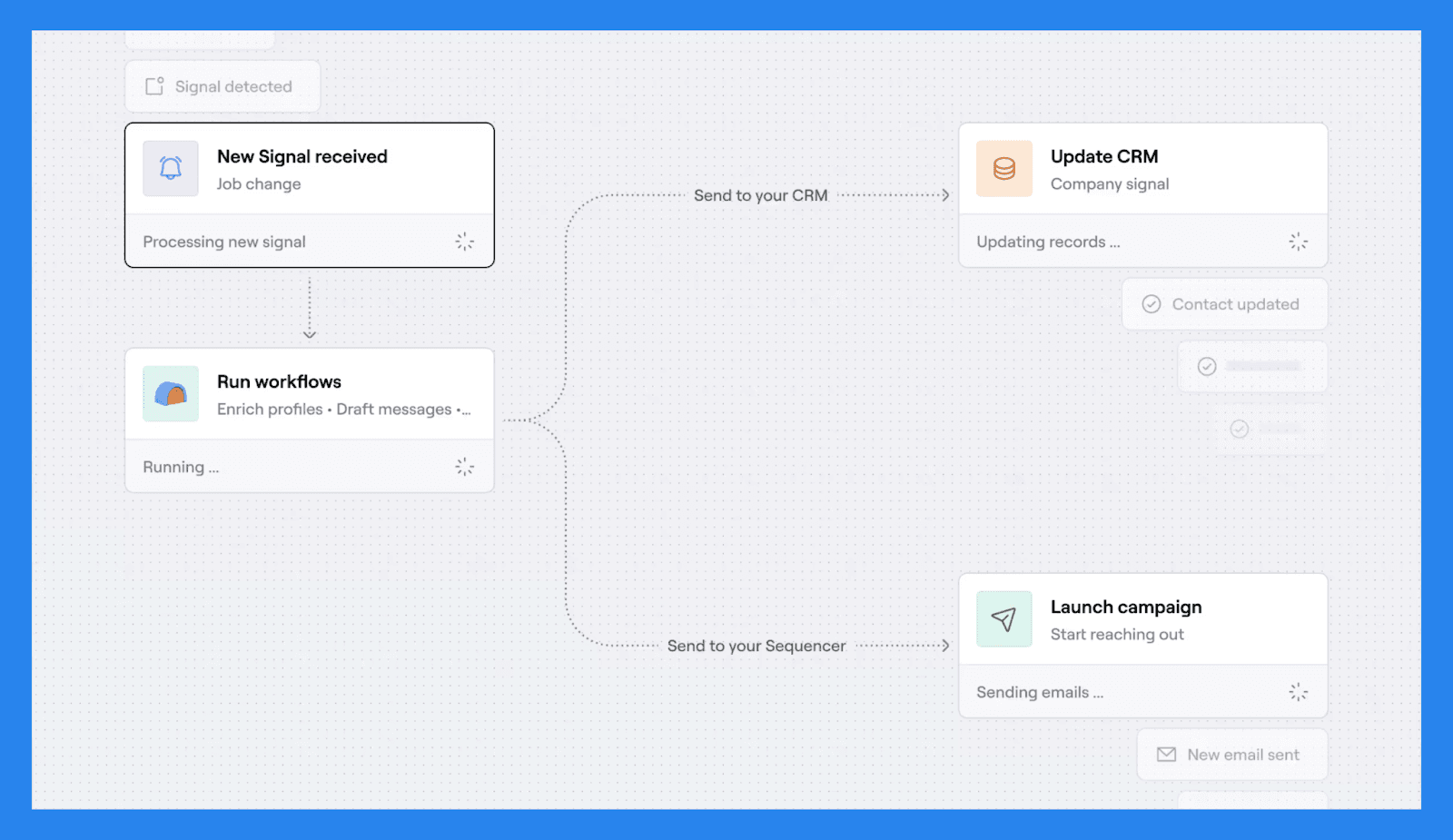
But Clay doesn’t stop there — it also tracks real-time intent data, the golden nuggets that sales reps, like expert gold panners, covet. By monitoring job changes, promotions, new hires, and more, Clay helps sales reps identify the perfect moments to engage with prospects.
Now it needs to be said that scouring over 100 different data providers sounds almost too good to be true. And in some ways, it is. To access these providers, you first need to go through Clay’s unified marketplace, where credits serve as the primary currency. The number of credits consumed varies depending on the type of enrichment:
Basic contact verification: 1 credit
Company information lookup: 2 credits
Advanced firmographic data: 3-5 credits
Full profile enrichment: 5-10 credits
Waterfall Enrichment + Intent Data Use Case:
Here we provide an example of how you can enrich your data, waterfall-style, and find your prospects emails.
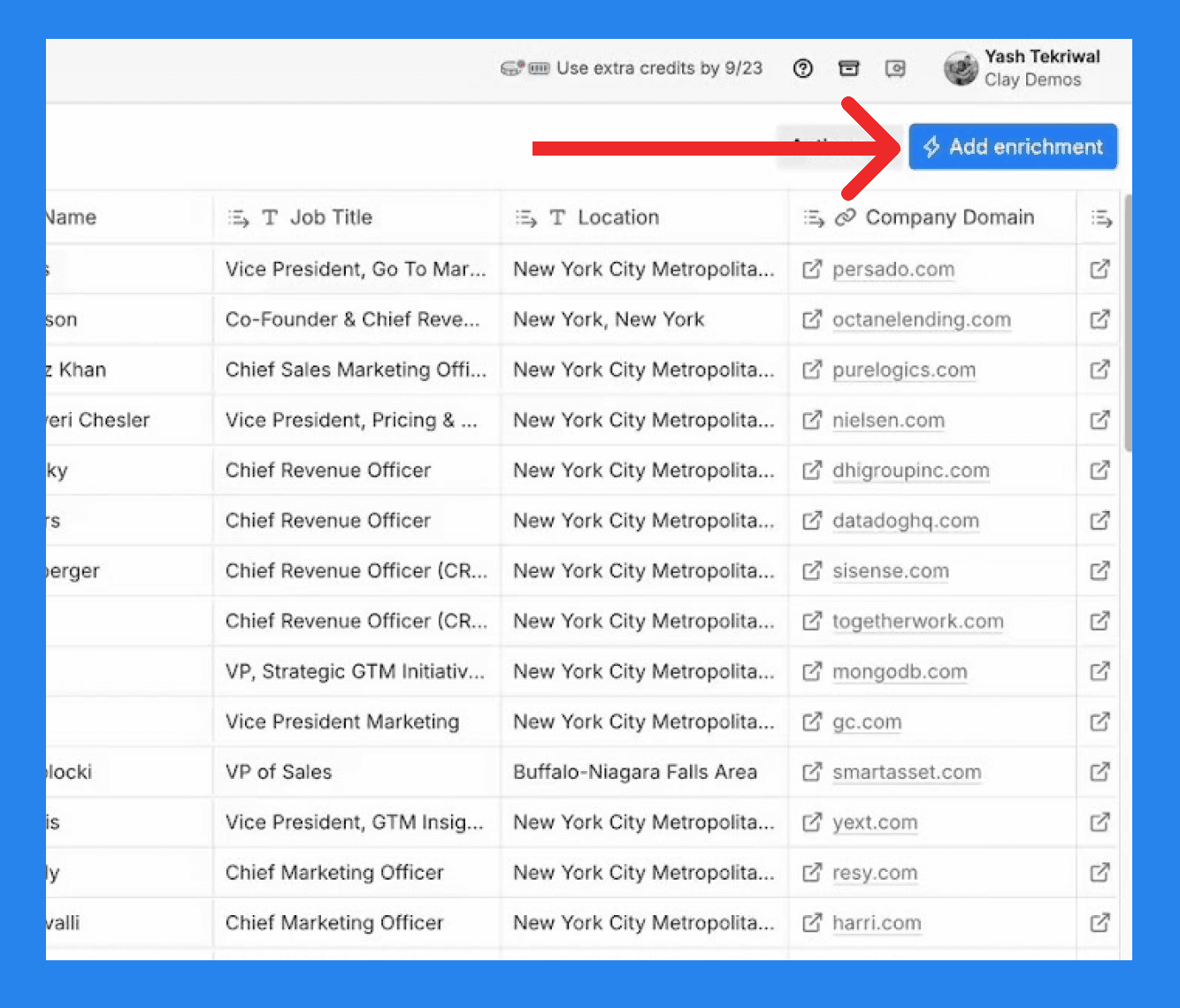
Firstly, we make your way to your prospect list and click on the blue button in the top right labelled ‘Add enrichment’.
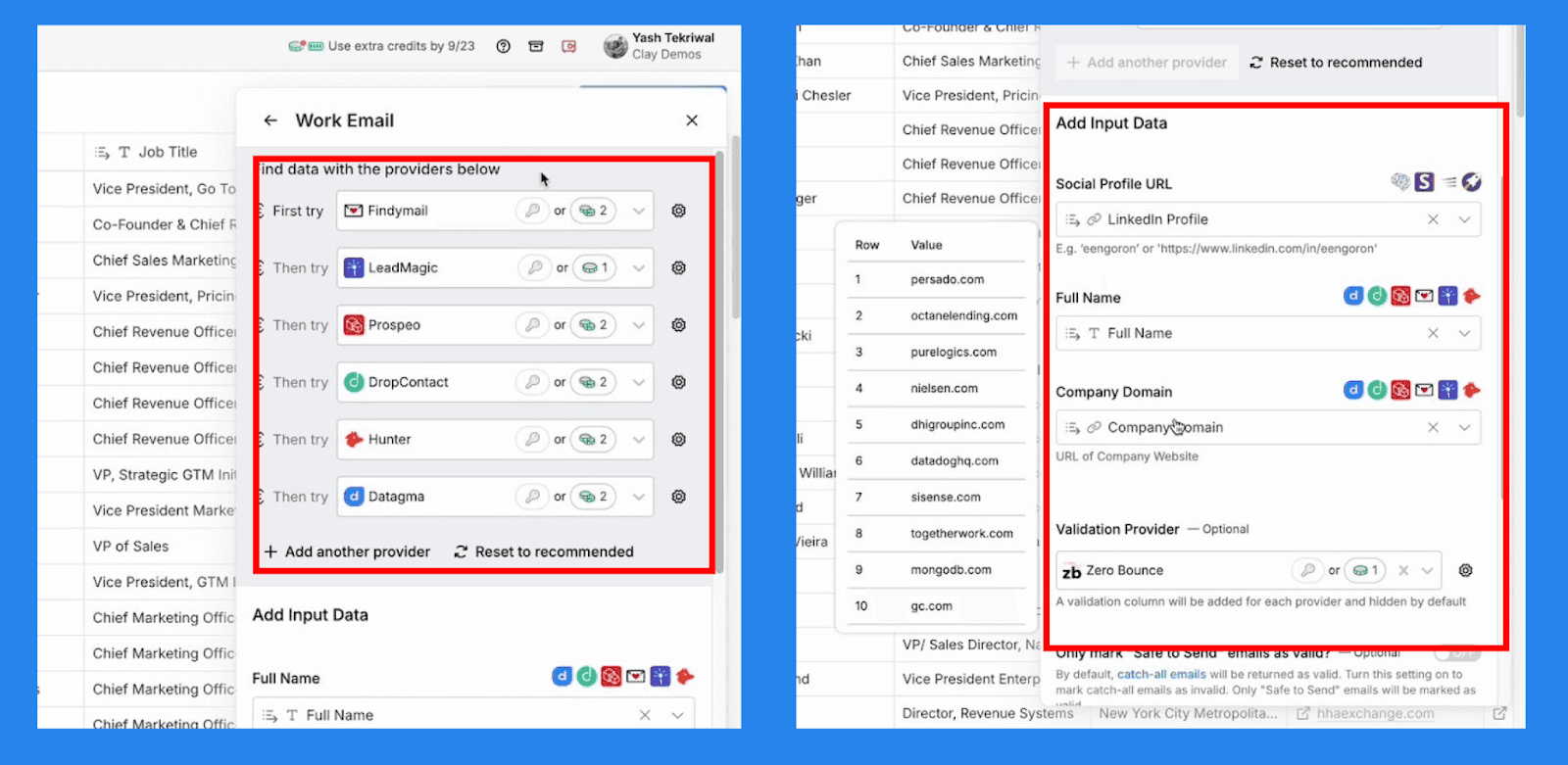
A drop down menu will appear where you’ll have to search up ‘Work Emails’. From here you’ll see a menu display like the example above. Clay will, by default, provide six data platforms but you are given the freedom to add more providers should you wish.
It is important to note that before you can successfully enrich and manipulate data in Clay, you need key data, or corner pieces, as Clay calls it.
For company data, your corner pieces are:
Company Domain
Company LinkedIn Profile URL
For people data, your corner pieces are:
Personal LinkedIn Profile URL
Full Name
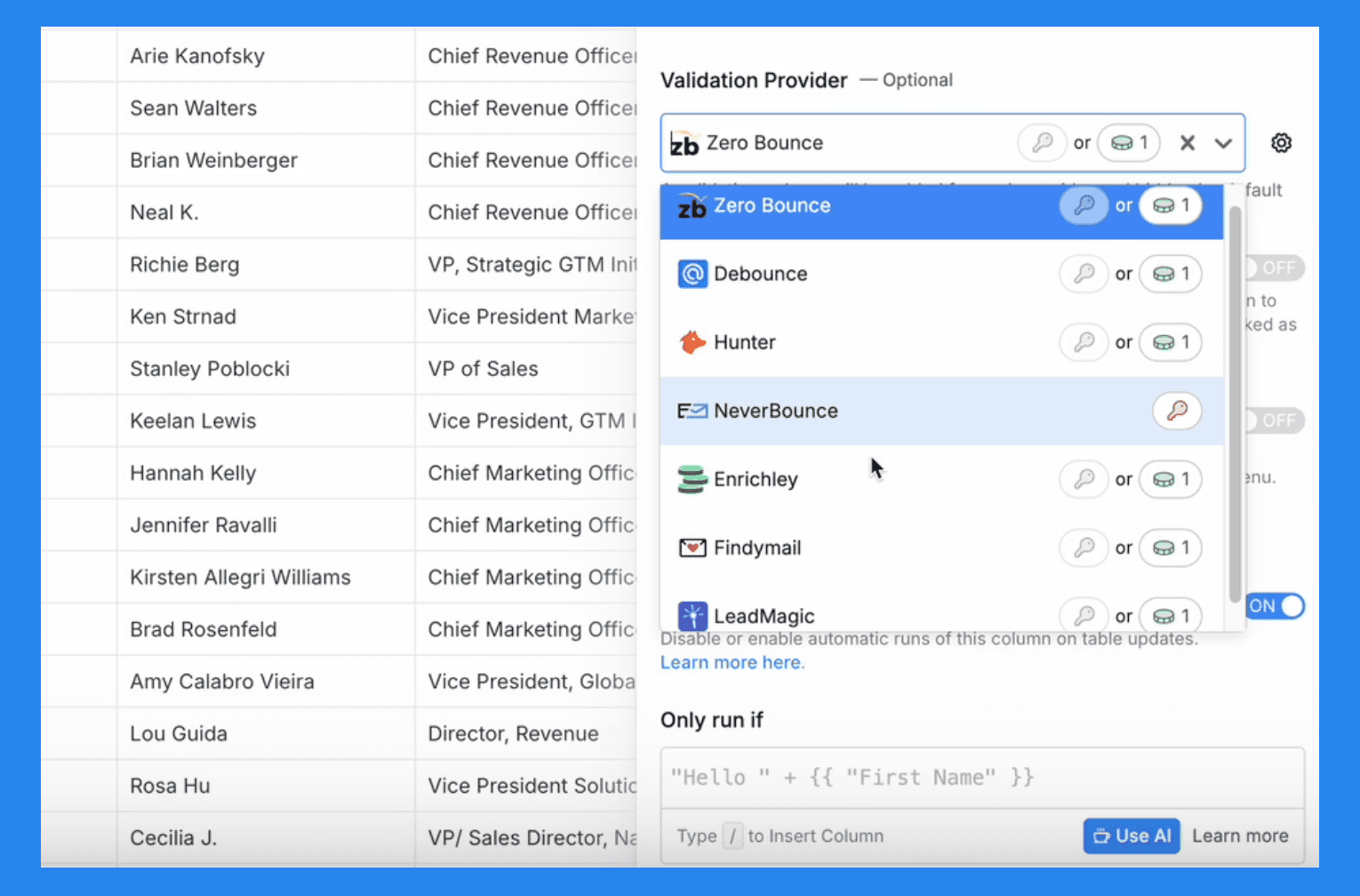
Finally, Clay provides a validation provider to ensure the data that comes through is verified and reliable. You can choose other providers depending on your personal preferences.
Account & Lead Scoring
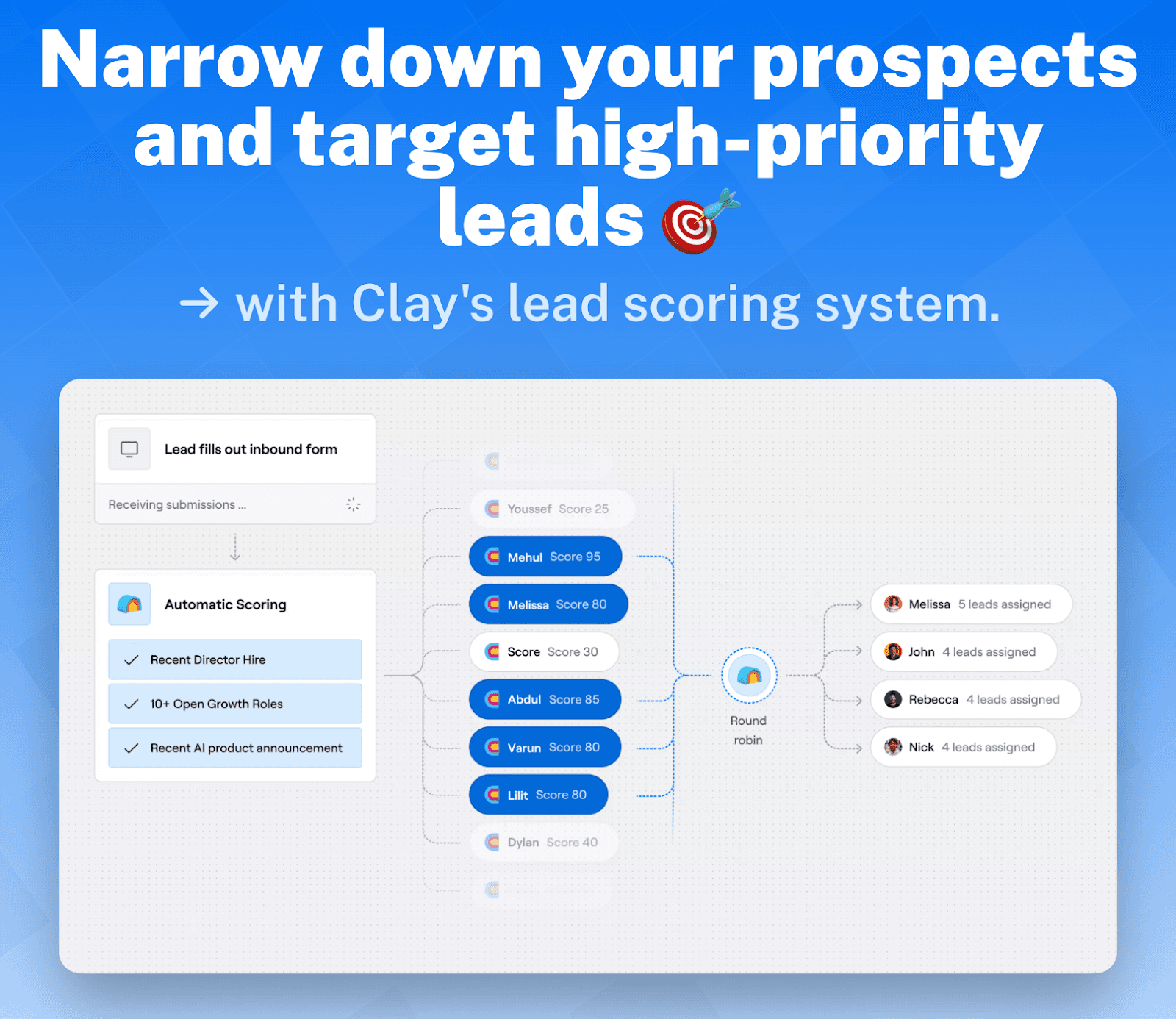
Compiling your prospect list is only the first hurdle of many when it comes to sales engagement. Sure, a prospect list narrows down your search but not every lead will be your golden ticket to Willy Wonka’s Chocolate Factory – that's where Clay’s AI-powered lead scoring tool steps in. By establishing your own custom lead scores, the prospects that are filtered into your list are automatically scored on variables that best match your ICP’s characteristics.
Some examples of variables can include:
Demographic Information: Score leads based on personal attributes like age, location, or job title.
Company Information: Score leads based on attributes of their company, such as size, industry, or B2B/B2C orientation.
Online Behavior: Score leads based on their interactions with your website, such as pages visited or forms filled.
Email Engagement: Score leads based on their interactions with emails, including open and click-through rates.
Social Engagement: Score leads based on their interaction with your brand on social media platforms.
Spam Detection: Assign negative scores to leads exhibiting spam-like behavior in form submissions or using certain types of email addresses.
This tool will keep track of prospects in real-time and regularly update their scores depending on the actions/decisions they make. Ultimately, Clay’s lead scoring system helps sales teams better understand who are their high-priority prospects and who they should target first.
Account & Lead Scoring Use Case:
Let’s say you want to score leads based on their company size. Make your way over to your lead score column and press ‘Edit column’
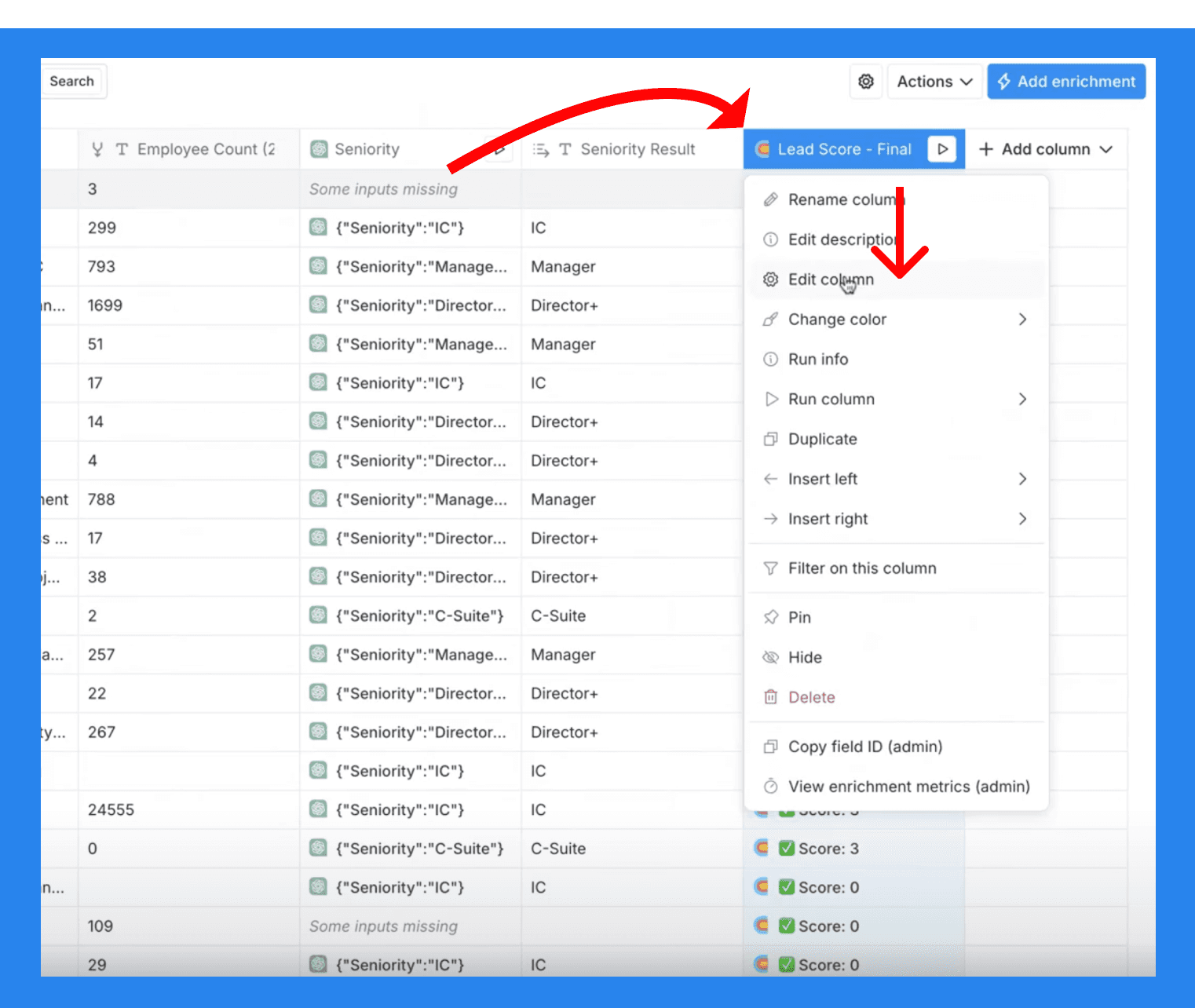
This is where you can fine-tune the each scoring variables as shown below. The important fields you need to take note of are:
# of Scoring Criteria: This field lets you choose how many scoring variables you want to add to your prospect list.
Comparison Type: This field allows you to choose comparison types like between, equals, or contains.
Keywords: This is how you instruct Clay to sift through your prospect list and pull the data you need. These will also represent the categories of each score.
**Scores: **This is where you assign the scores to each keyword/category. Each score will correspond to the following keyword above if they are listed in the same order.
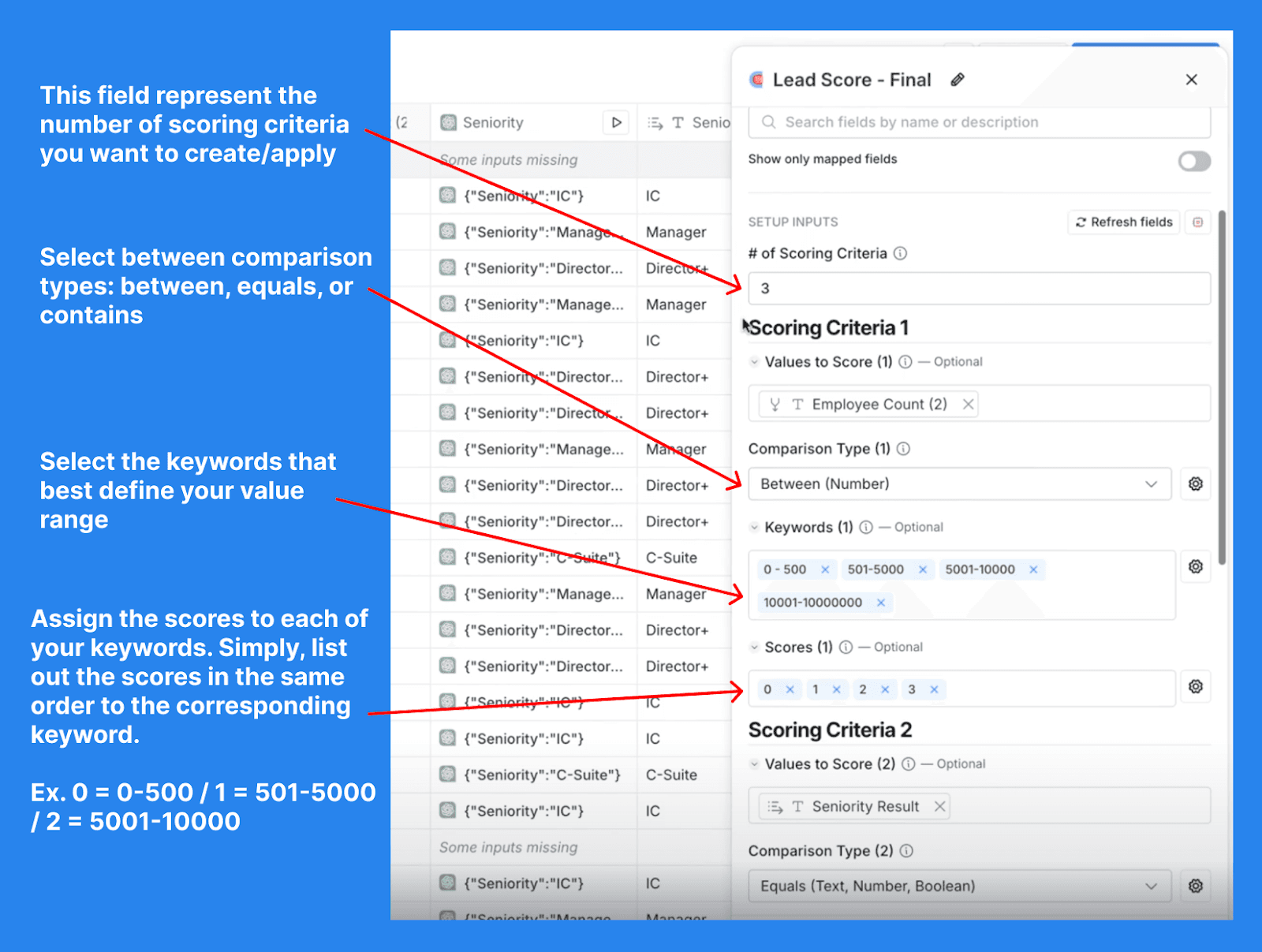
So, in the case of scoring leads based off of their employee count, you set the comparison type to ‘Between’, highlight the value range in the ‘Keywords’ field, and finally assign the score for each keyword by listing out your scores in the same order.
You then rinse and repeat the process for the different scoring criteria, adjusting the different values to help you set up your ideal scoring system.
AI Formula Generator
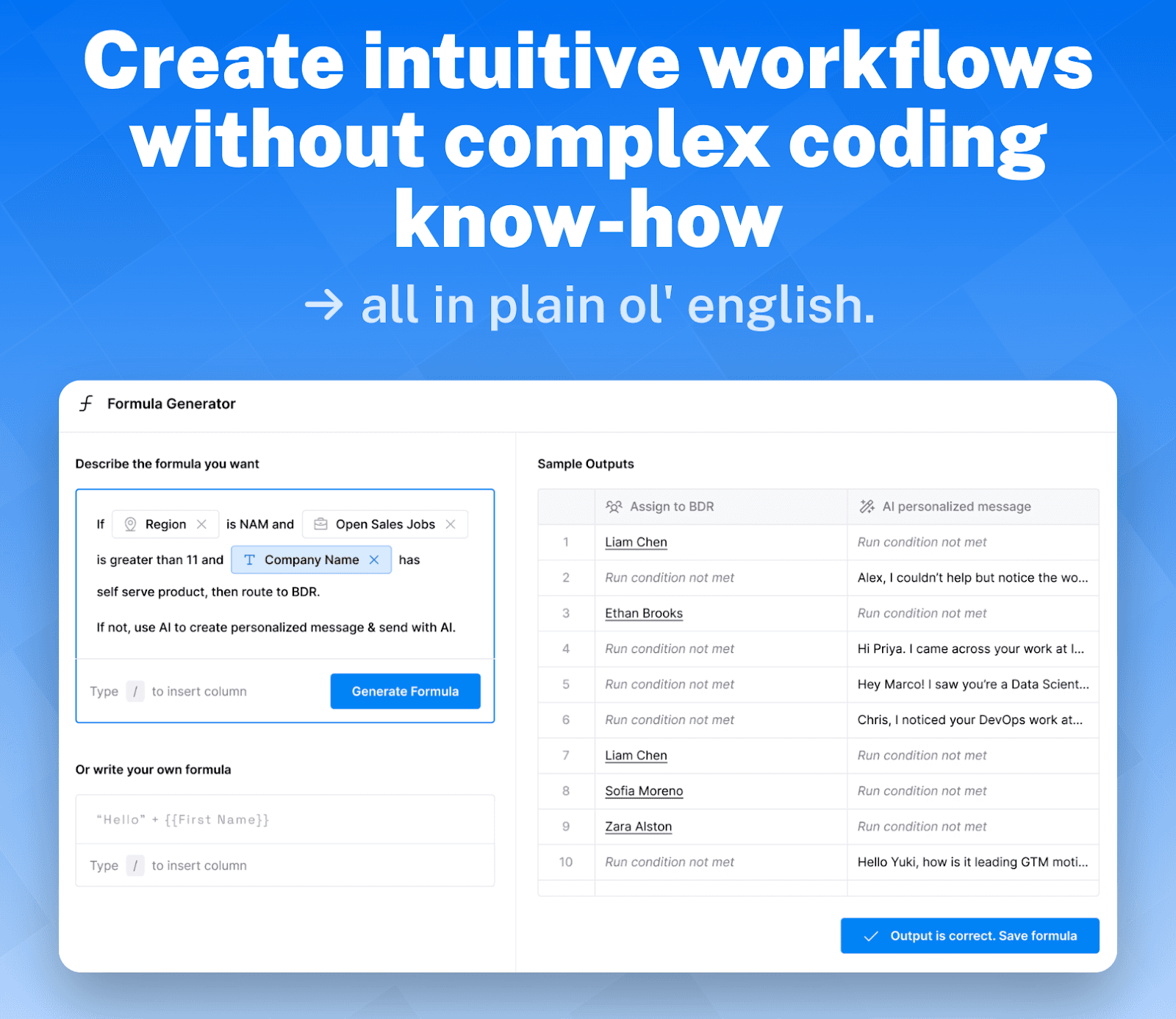
Think of Clay’s AI Formula Generator as the ChatGPT of sales automation — an AI-powered engine designed to streamline workflows and data enrichment. Not only does it save sales teams a ton of time, but it also generates custom code based on simple written instructions. Whether you're tracking down a prospect’s contact information or setting up specific enrichment criteria, Clay’s AI ensures no task is too big or too small.
AI Formula Generator Use Case:
Here we breakdown how to set up and use AI formulas (courtesy of Clay! 🫰😊🫰)
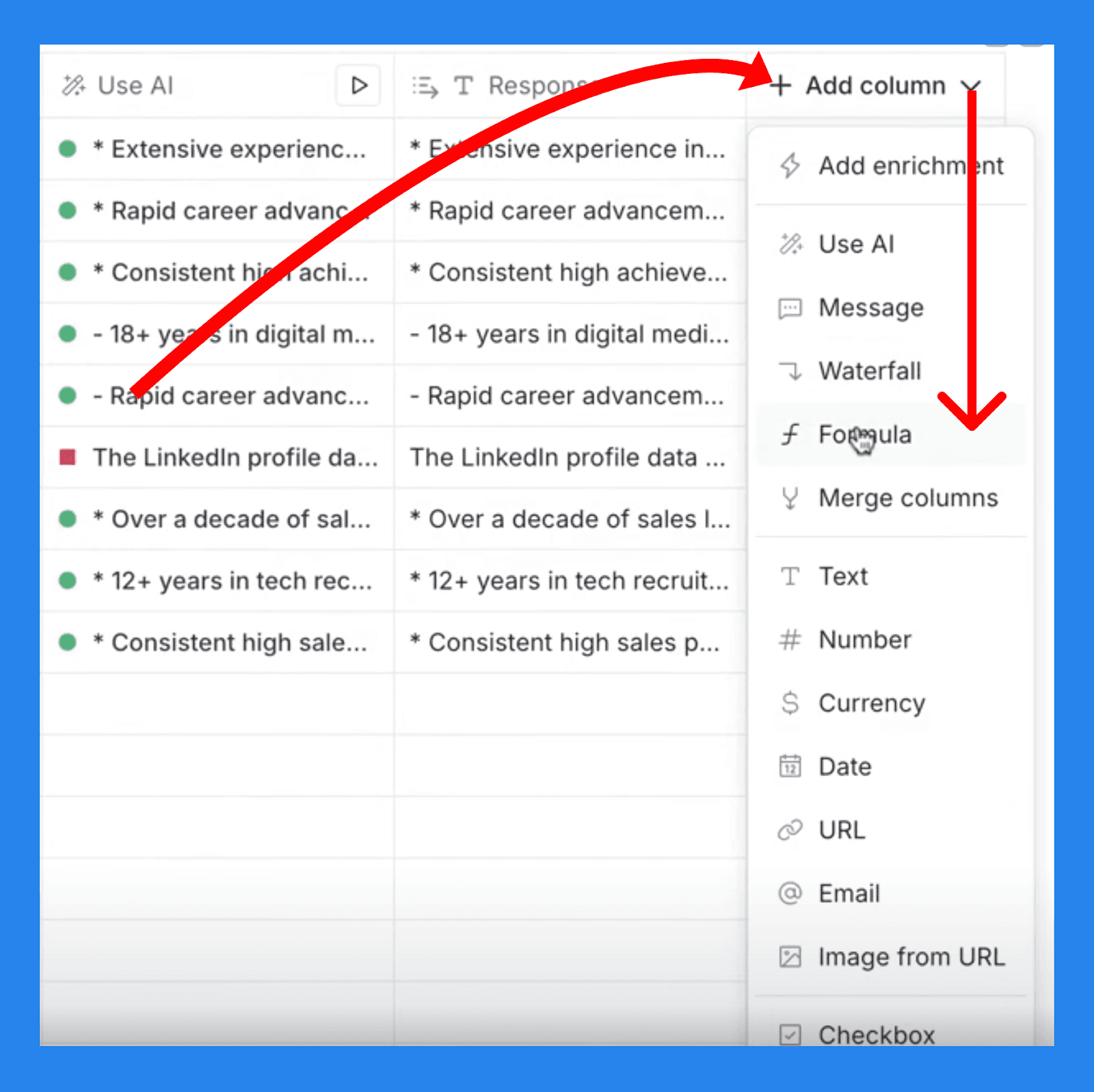
Start by adding a new column and selecting the formulas tab in the drop-down menu.
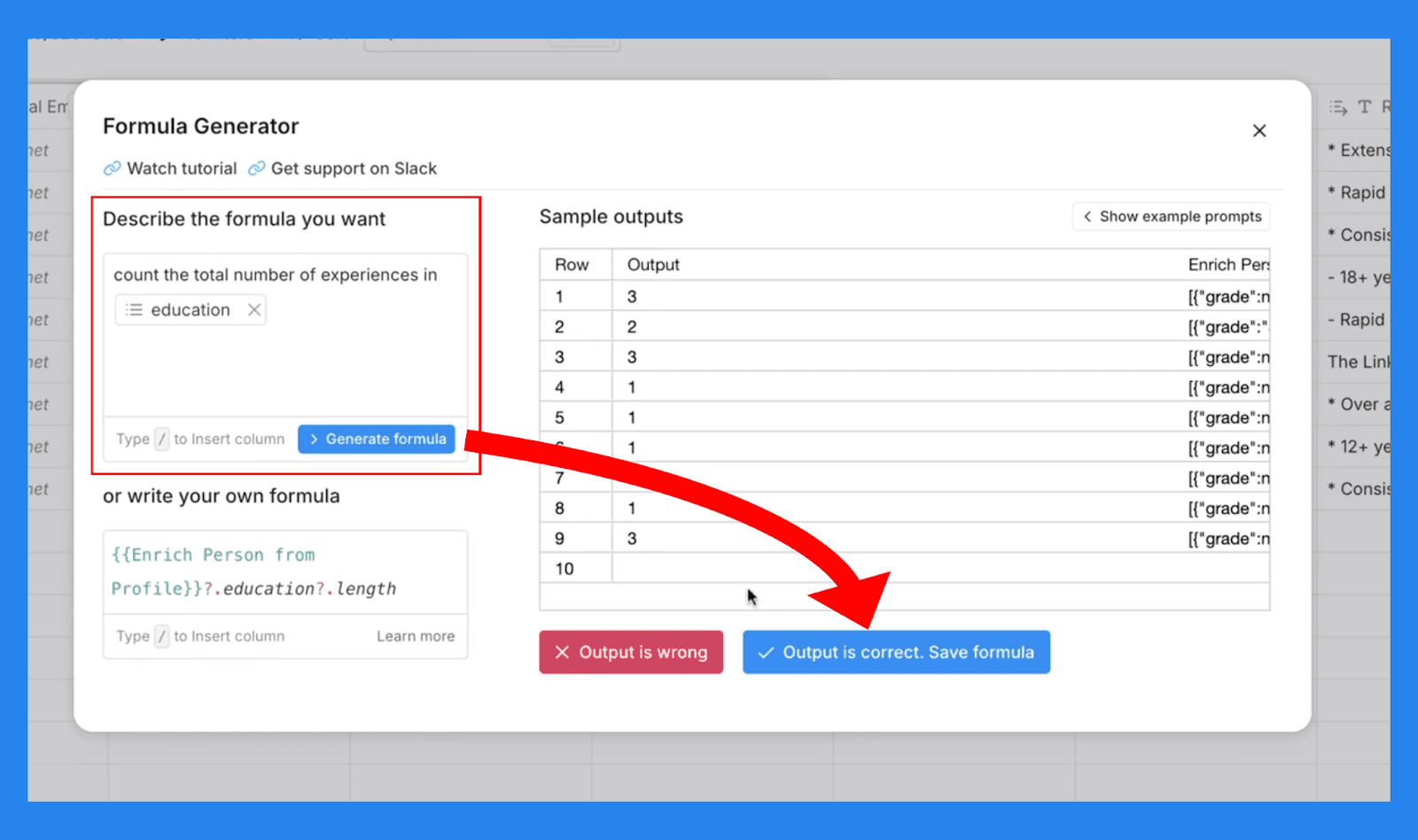
From there a window will popup where you can input your desired formula. Once you’re happy with your instructions, press ‘Generate formula’ and Clay will present a sample output. If the data is correct then you can confirm and watch Clay’s AI seamlessly add the data right into your list.
AI Research Agent (Claygent)
In a nutshell, Clay’s AI Research Agent, or more commonly Claygent, is a tireless and extremely knowledgeable assistant – capable of accessing data points found across the web. Where Claygent truly shines is being able to harness the vast majority of internet data alongside the analytical skills of AI.
There is however, the exception of data points hidden behind paywalls or password-protected areas which Clayagent cannot access.
AI Research Agent (Claygent) Use Case
According to Clay, perfecting the art of AI prompting is the secret to unlocking the full potential of Claygent and we’re here to show you how 😉.
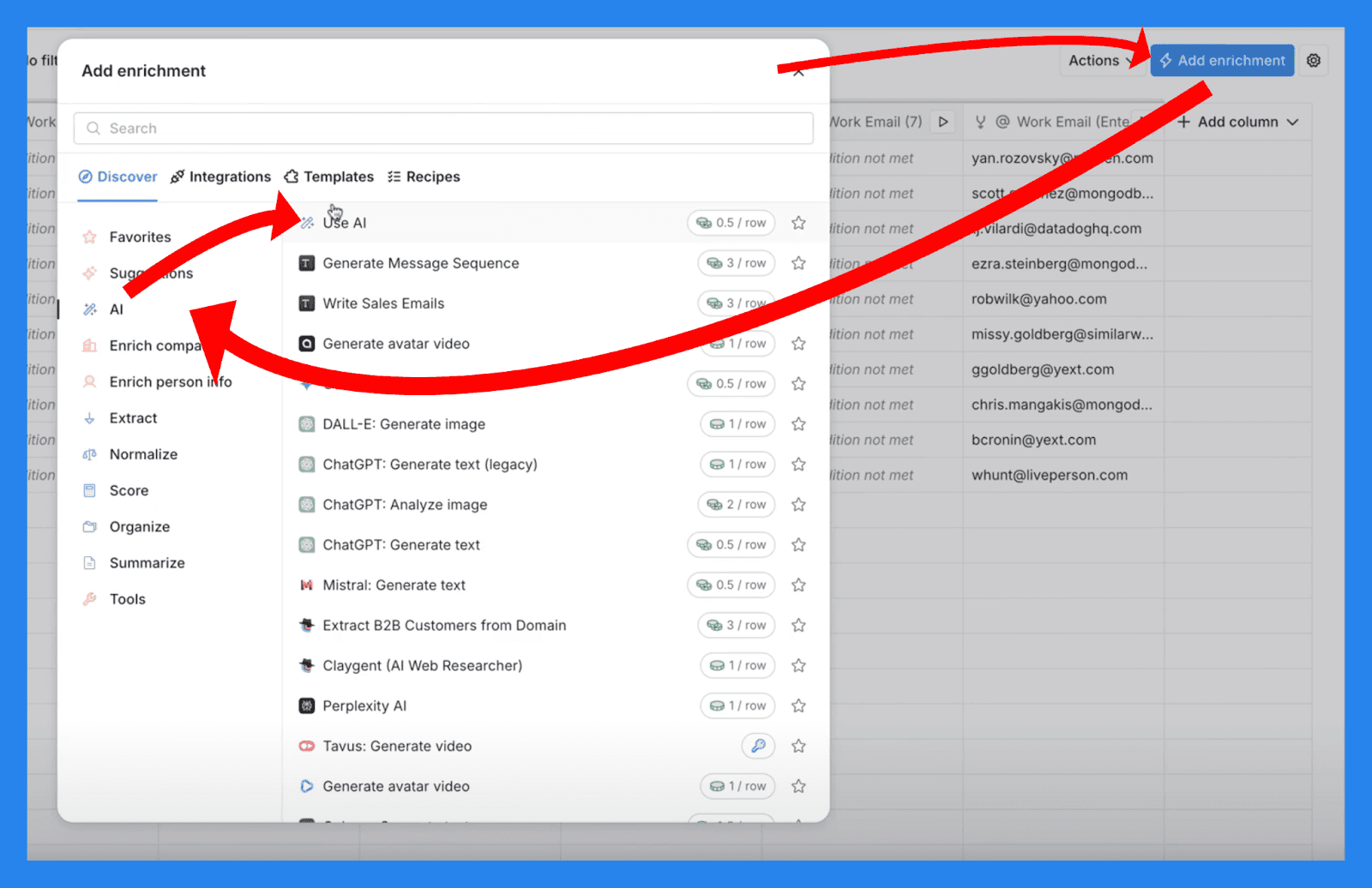
To access the Claygent we first make our way to the ‘Add enrichment’ button in the top right. Select ‘AI’ from the sidebar in the window popup, then click ‘Use AI.’ From there you’ll find the Claygent modal.
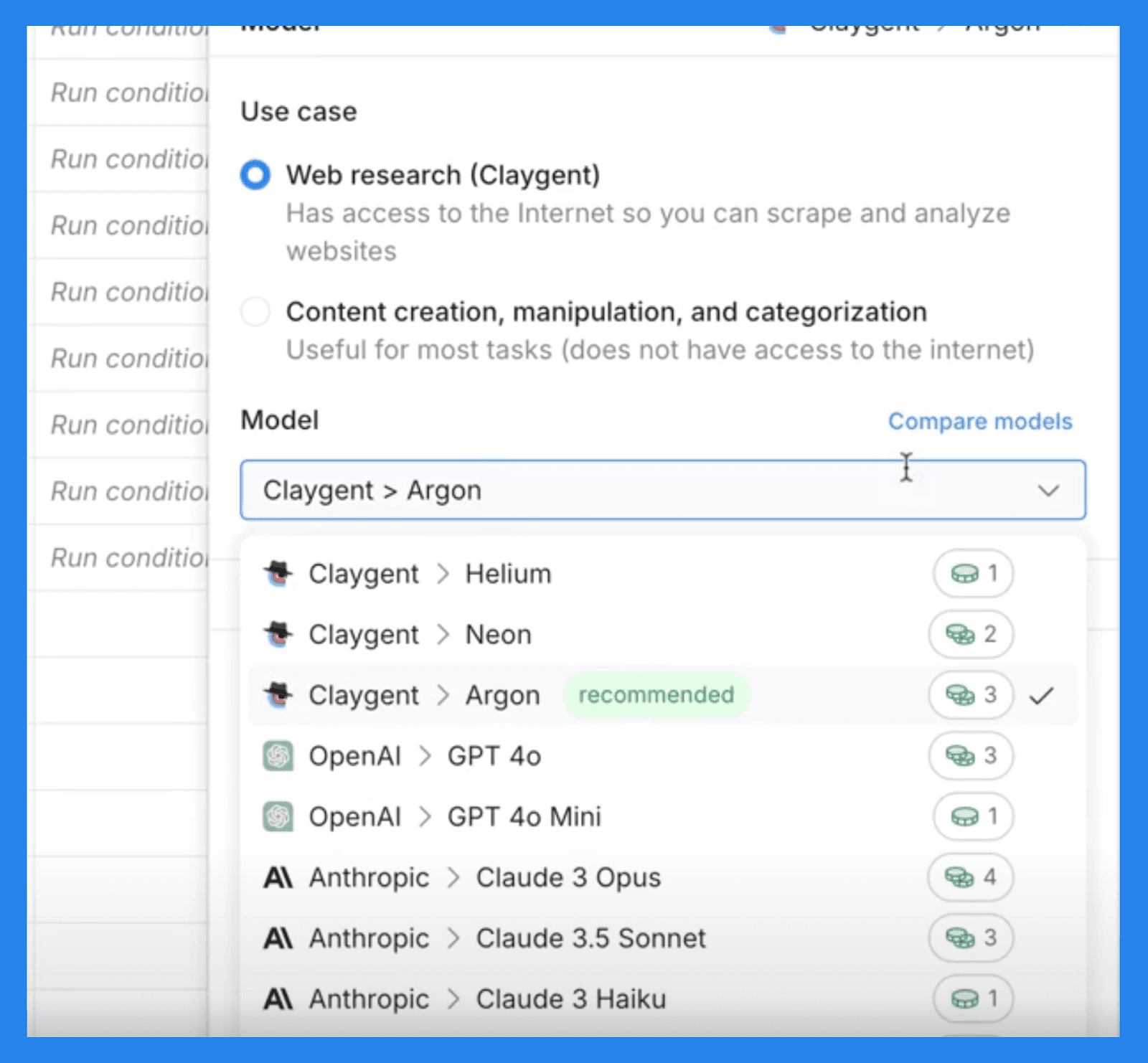
It’s important to note that with Claygent you have the freedom to pick and choose your own AI model:
Claygent Helium: The best model for its price to performance ratio, outperforming Haiku and GPT 4o-Mini.
Claygent Neon: Lacks the same level of reasoning capabilities compared to other models, but excels in answer formatting, data extraction, and complex tasks for a reasonable pricepoint – outperformed Sonnet 3.5.
Claygent Argon: Strongest model for deep research and complex analysis – greatly outperforms Opus and GPT 4o.
GPT-4 and Claude Opus: These models offer enhanced reasoning capabilities. Lacks similar levels of answer formatting as Claygent models – useful for testing data accuracy or handling complex analytical tasks.
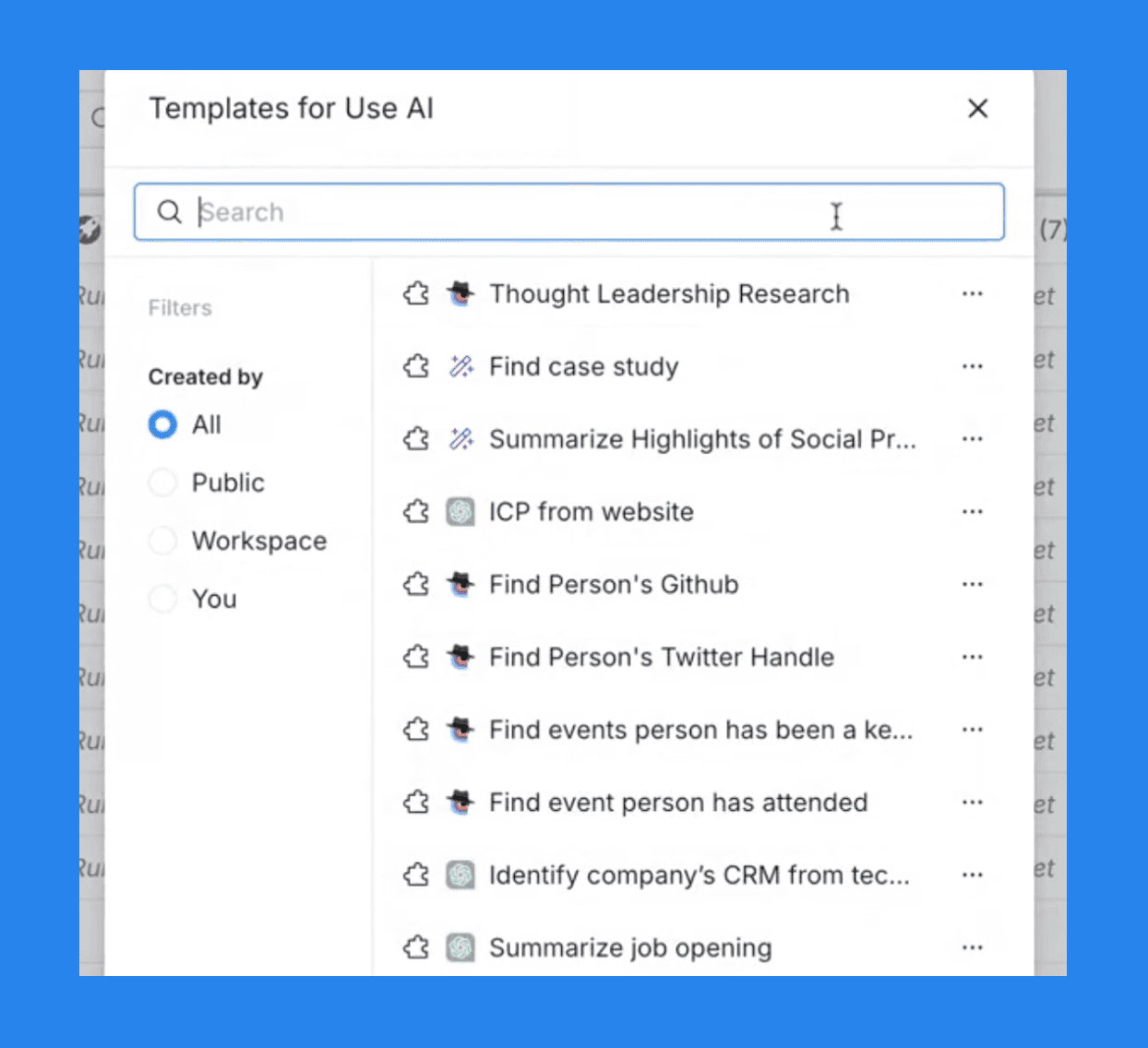
If you’re new to Claygent as a tool/concept, Clay makes sure to provide a library of preset templates for common tasks:
Thought Leadership Report
Finding a company's 10K report
Finding a Person’s Twitter Handle
Identifying a company’s ICP
And much, MUCH more
However, if the templates don’t cut it, then Clay makes it possible for you to create custom Claygent prompts from scratch.
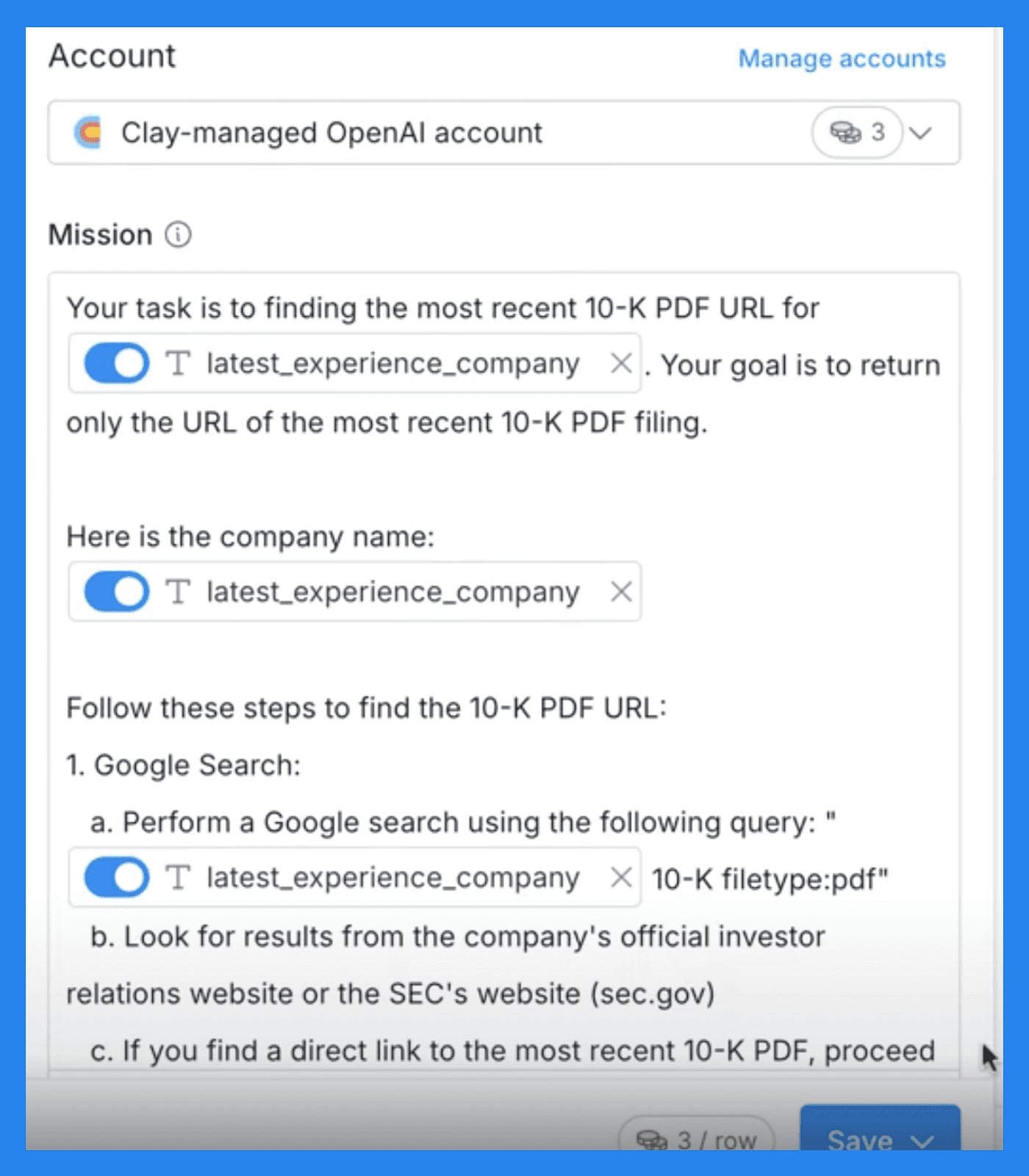
Once you’ve found the template you need, Clay will apply it automatically to the ‘Mission’ section of the menu. Clay does stress that your output configurations are crucial to getting the final results you desire – this is what they mean:
Identify Key Data Point: Specify what data you want Claygent to find.
Define Column Outputs: Highlight where you want the search results to appear.
**Instruct Claygent: **Give Claygent additional instructions on which information you want to send to your desired columns. Ex: “Output the funding stage to the ‘Stage’ field; output the amount raised to the ‘Amount’ field.”
Personalized Copywriting
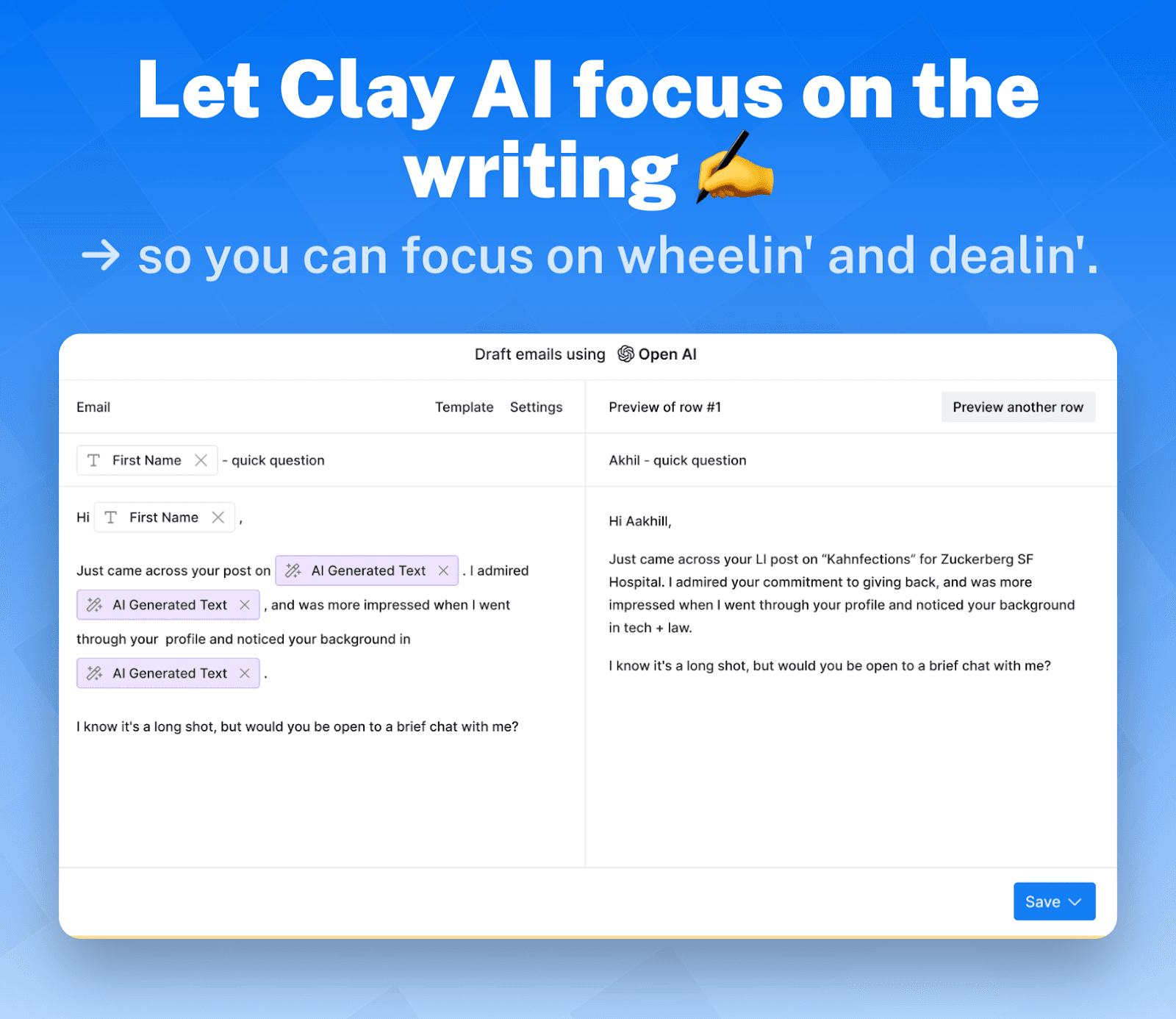
Clay understands that not all sales reps are writers at heart. To keep you from wasting too much time on crafting the PERFECT email/message Clay equips you with an AI message writer to hyper-personalize your outreach at scale.
With OpenAI's ChatGPT natively integrated into the platform, you have everyone’s favorite 👻✏️ (ghostwriter) at your fingertips, ready to assist whenever you need it. Want to learn more about Clay's AI copywriting tool? Check out the video below!
Loading YouTube sends it your IP address and may enable cookies. This applies to this content only.
Integrations
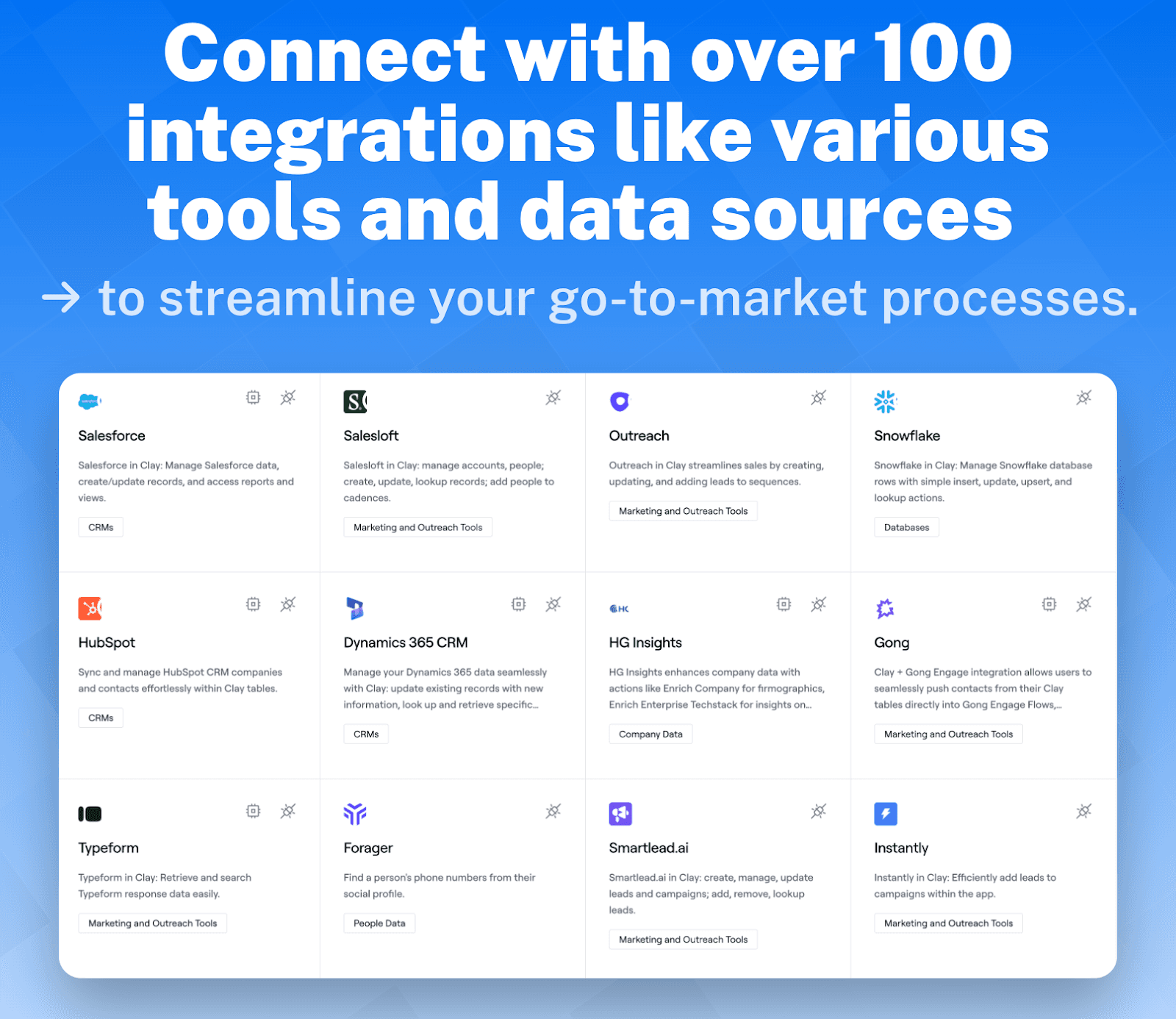
Some will say this is where Clay has made its fame as a powerful sales engagement platform. Clay makes it seamlessly easy to integrate with everything and we mean EVERYTHING. From household CRMs to prospect databases and everything else in between.
Integrations available on Clay: Salesforce, Salesloft, Outreach, Snowflake, Hubspot, Dynamics 365 CRM, Instantly, lemlist, Open AI/GPT, Apollo.io, Notion, Deepseek, Findymail, Reply.io, and much, much more.
Clay Partner Program

Thanks to Clay’s partnership programs, you never have to wonder if Clay is compatible with your tech stack — the real question is whether your tech stack is compatible with Clay.
By becoming an integration partner, you don’t just join an ecosystem of API-savvy, creative GTM professionals — you also get the added bonus of Clay promoting you across their website, support docs, and even product searches.
Honestly, it’s a win-win for everyone involved (but hey, you didn’t hear that from me 👀).
🔥 Killer Clayse Studies 🔥
Over the years Breakcold and Clay have shared many users/customers that helped them find success in their respective fields. Here we provide a real-world example of Clay in action from one of our very own Breakcolders! 🧊🔨
Loading YouTube sends it your IP address and may enable cookies. This applies to this content only.
PSST! If videos aren't your thing, we also have few case studies up on our website too 😉
⭐ Pros & Cons + Ratings
Ratings | |
|---|---|
G2 - 4.9/5 (150) | Capterra - N/A |
Pros | Cons |
Expansive integrations Claygent Freemium plan Powerful data enrichment tool | Expensive pricing plans Steep learning curve Overwhelming for first-time users Action tokens can become costly if not careful |
💰 Clay’s Pricing Plans
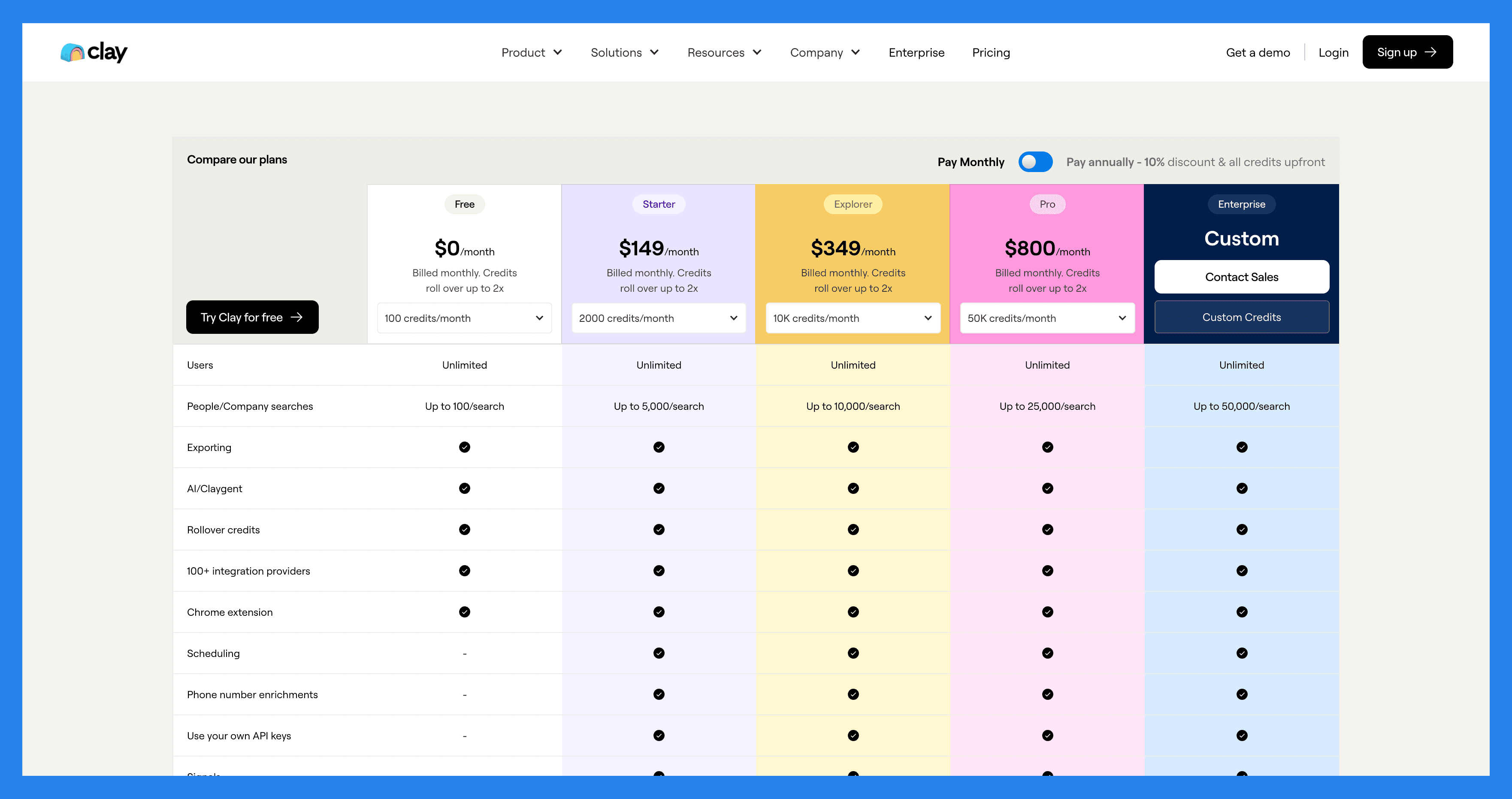
We’ve finally made it to the crux of the review: how much will Clay cost you? Offering a total of FIVE pricing plans here’s how Clay breaks them down below:
Free | Starter $149/mo | Explorer $349/mo | Pro $800/mo | |
|---|---|---|---|---|
Users | Unlimited | Unlimited | Unlimited | Unlimited |
People/Company searches | Up to 100/search | Up to 5,000/search | Up to 10,000/search | Up to 25,000/search |
Exporting | ✅ | ✅ | ✅ | ✅ |
AI/Claygent | ✅ | ✅ | ✅ | ✅ |
Rollover credits | ✅ | ✅ | ✅ | ✅ |
100+ integration providers | ✅ | ✅ | ✅ | ✅ |
Chrome extension | ✅ | ✅ | ✅ | ✅ |
Scheduling | ❌ | ✅ | ✅ | ✅ |
Phone number enrichments | ❌ | ✅ | ✅ | ✅ |
Use your own API keys | ❌ | ✅ | ✅ | ✅ |
Integrate with any HTTP API | ❌ | ❌ | ✅ | ✅ |
Webhooks | ❌ | ❌ | ✅ | ✅ |
Email sequencing integrations | ❌ | ❌ | ✅ | ✅ |
Exclude people/company filters | ❌ | ❌ | ✅ | ✅ |
CRM integrations | ❌ | ❌ | ❌ | ✅ |
Unlimited rows | ❌ | ❌ | ❌ | ❌ |
40 action columns per table AI prompting support | ❌ | ❌ | ❌ | ❌ |
Data engineering (Snowflake) | ❌ | ❌ | ❌ | ❌ |
Dedicated Slack support | ❌ | ❌ | ❌ | ❌ |
Credit reporting analytics | ❌ | ❌ | ❌ | |
SSO | ❌ | ❌ | ❌ | ❌ |
The final plan not shown in this table is Clay’s ‘Custom’ plan. It’s the most feature-rich option they offer and is tailored for enterprises with the financial backing to negotiate a personalized fee — one that unlocks everything listed above and more.
🔄 Alternatives to Clay?
The short answer? Yes. As for the who — we break it down for you below:
1) Freckle.io
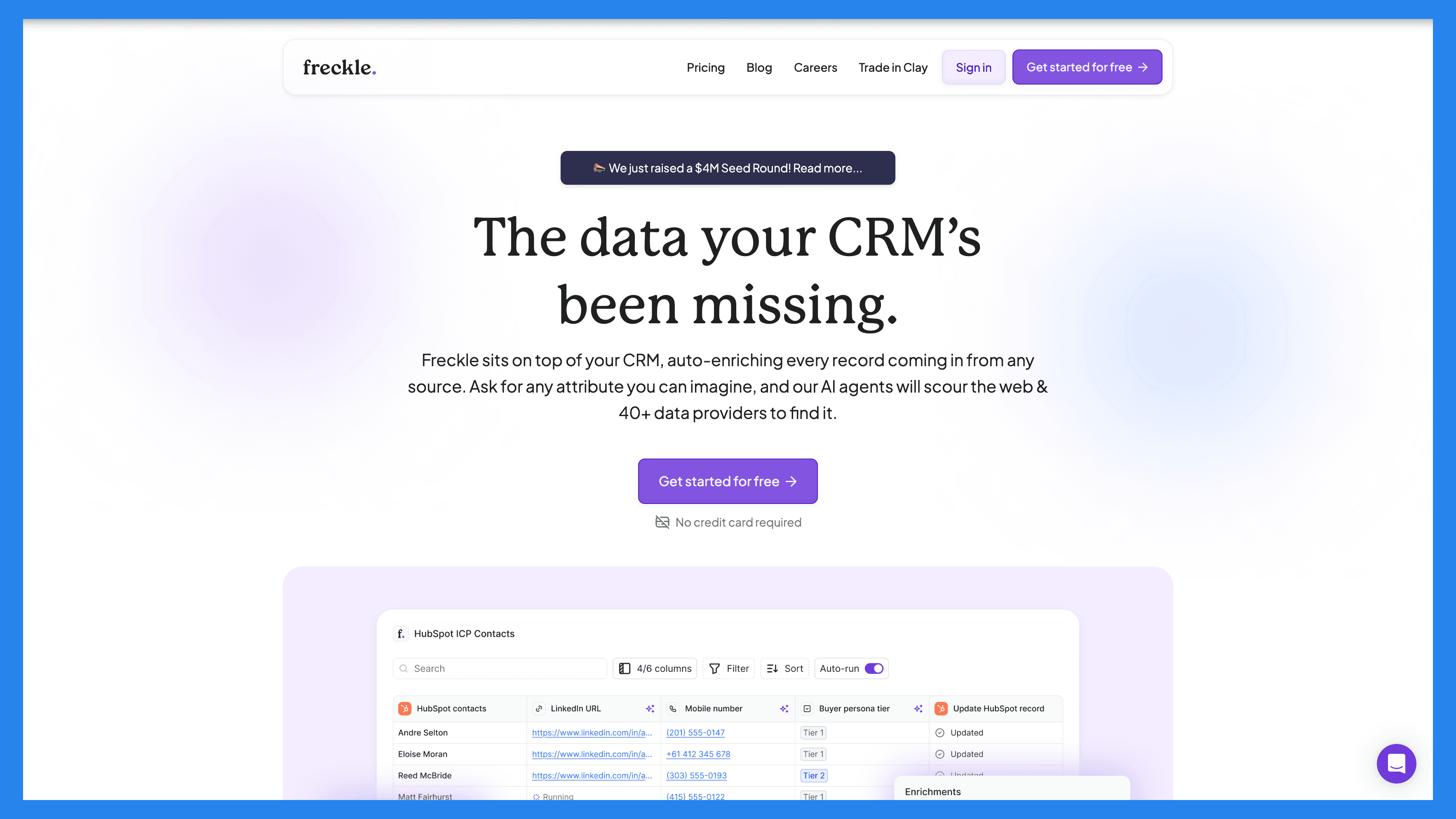
**Overview: **Freckle is a Clay alternative designed for non-technical users who want to automate enrichment research and clean up people and company data without a steep learning curve. It’s ideal for small teams or solo operators who need a lightweight solution to improve lead data quality quickly.
Why choose Freckle:
Simple interface that’s beginner-friendly
Automated workflows for enrichment and data cleanup
Affordable pricing for small teams
Platform Comparison:
Freckle.io | Clay | |
|---|---|---|
Web search & scraping | ✅ | ✅ |
Phone/Email address enrichment | ✅ | ✅ |
Waterfall enrichment | ✅ | ✅ |
Template library | ✅ | ✅ |
Cost-efficient | ✅ | ❌ |
Best For: Teams and solopreneurs looking for affordable, no-code data enrichment without advanced LinkedIn engagement features.
2) Trigify.io
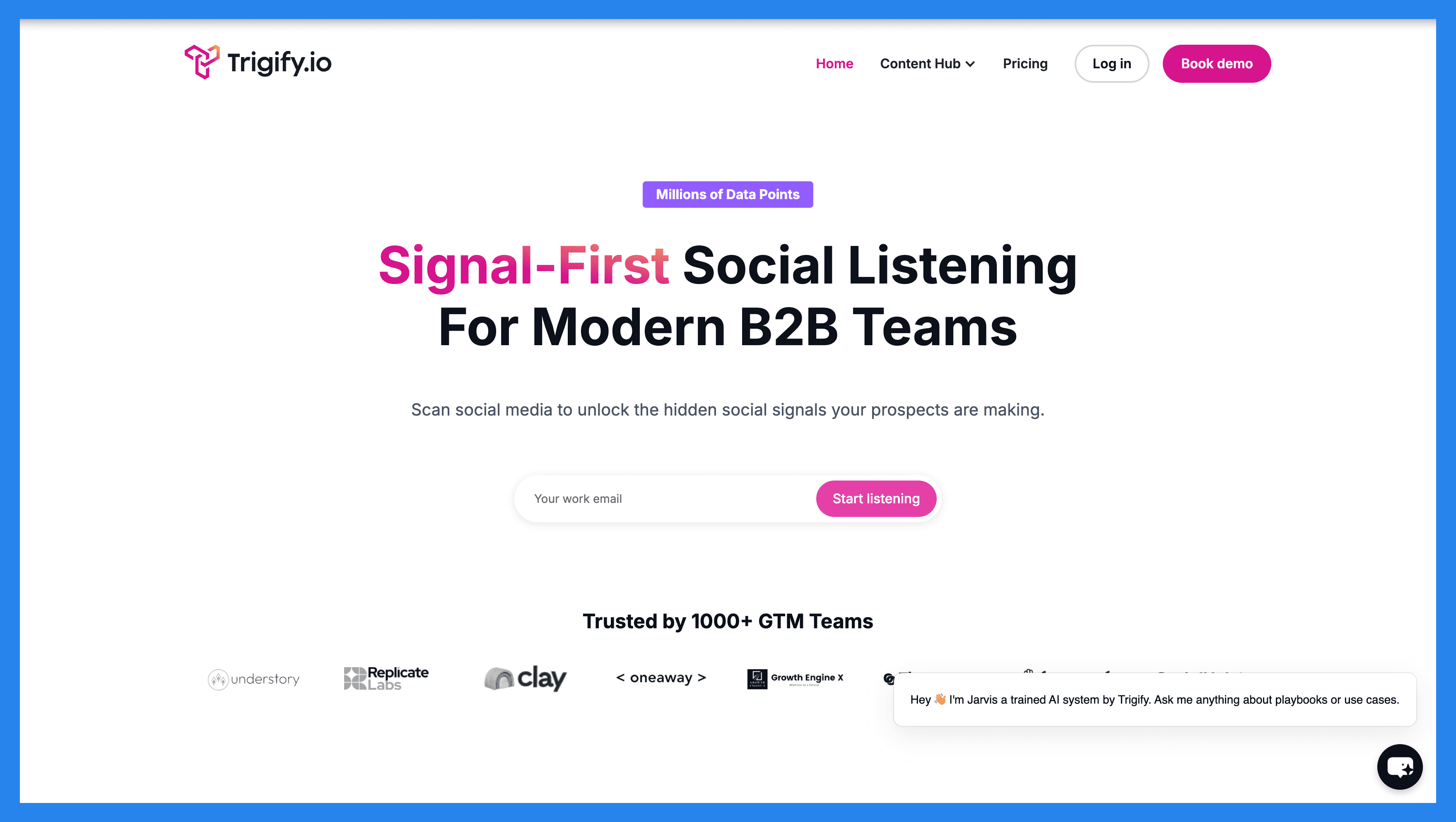
Overview: Trigify is an AI-powered social listening and engagement platform designed to help sales and marketing teams identify high-intent signals across social networks. Beyond just monitoring, Trigify enables LinkedIn selling, letting you engage prospects directly based on real-time insights. It’s perfect for teams looking to combine lead generation with intelligent outreach in a single platform.
Why choose Trigify:
Monitor social networks for leads showing buying intent
Engage prospects with timely, relevant interactions
Supports GTM-focused campaigns and pipeline building
Ideal for teams that rely on social signals to drive revenue
Platform Comparison:
Trigify.io | Clay | |
|---|---|---|
Real-time LinkedIn selling | ✅ | ❌ |
Lead generation | ✅ | ✅ |
Pipeline management | ✅ | ❌ |
GTM (Go-to-Market) focus | ✅ | ❌ |
Best For: Marketing and sales teams that want to leverage AI-powered social insights for smarter prospecting and LinkedIn selling strategies.
💭 Closing Thoughts + Takeaways
Now, you don’t need me to tell you how good Clay is for lead enrichment. In all the cases I’ve presented above, the platform speaks for itself – but does that make it the best platform for you? As always, that depends on a mix of factors: your target audience, budget, and how tech-savvy your team is.
For all the deep, intricate data that Clay can pull, you’re going to need a tech wizard to match. Complex data requires complex inputs – and if you have a team of sales reps that are GREAT at closing and not much else… you’re going to struggle.
It is also worth mentioning that Clay hides all of its best features behind an incredibly steep paywall/pricing plans. If you’re a bootstrapped agency agency or startup, Clay might be an absolute no-go 🙅.
But — if budget and tech skills aren’t a concern, I say go for it. Not many lead enrichment tools can match Clay’s level of precision and depth. And if you’re going to break the bank, you might as well do it for one of the best.
Frequently asked questions

Written by
Arnaud Belinga · Co-Founder & CEO at Breakcold
Arnaud is the Co-Founder & CEO of Breakcold, the AI Native CRM for sales teams of 5 to 30+ people.