
6 Claude Cowork CRM Workflows (2 Went Viral on Reddit)
The 6 sales workflows that ship in the Breakcold Skill for Claude Cowork. Deep dive on the 2 that went viral on r/ClaudeCowork: daily auto-follow-up tasks and weekly multichannel sales reports. Test small, schedule, walk away.
Claude Cowork is the new flavor of Claude that runs on your computer like a colleague. You hand it a job, it works in the background, and it can keep running on a cron schedule even when you are not in the chat. The interesting question stopped being "can Claude touch my CRM?" two months ago. The interesting question now is "what should I have Claude do every morning while I am still in bed?"
This is my answer. Six concrete sales workflows you can hand to Claude Cowork today, all running through Breakcold via the open-source Breakcold Skill. Two of them ended up going viral on r/ClaudeCowork because they replace whole chunks of an SDR's day and they did not need any code to wire up. The other four are quieter but just as load-bearing.
TL;DR: The 6 Claude Cowork Workflows You Can Schedule via Breakcold 🏆
🏆 Auto follow-up tasks: detects stalled conversations across email, LinkedIn, WhatsApp, Telegram and meetings, then writes follow-up tasks named after the actual conversation topic, deep-linked to the thread. Schedule daily at 9am. Viral on r/ClaudeCowork.
🟢 Pipeline auto-movement: reads the same multichannel inbox and proposes stage moves, forward only. Booked meeting moves to Demo Booked. Quiet deal does not get demoted, it gets a follow-up. One-line audit activity left on every record.
🔵 Visual sales reports: branded HTML report with one headline KPI per section. Adapts to your workspace shape (sales team, agency, recruiter, community). Schedule weekly. Viral on r/ClaudeCowork after Opus 4.8 made it 2.5x faster.
🟣 Prospect research: web research that writes back into structured HTML notes on the record (h3 heading, summary, signals, sources). Per-record, idempotent, never duplicated. Same template on the linked Deal for context.
🟢 Inbox to CRM detection: scans your multichannel inbox for people you are clearly engaging with who are not in the CRM yet. Strict 95% confidence rule before creating. No spam records, no duplicates.
🟡 CRM setup from a URL: hand it your website, it builds your full CRM. Object types, custom fields, pipeline stages, views, tag palette. From a blank workspace to a working CRM in one prompt. Replaces a paid CRM consultant.
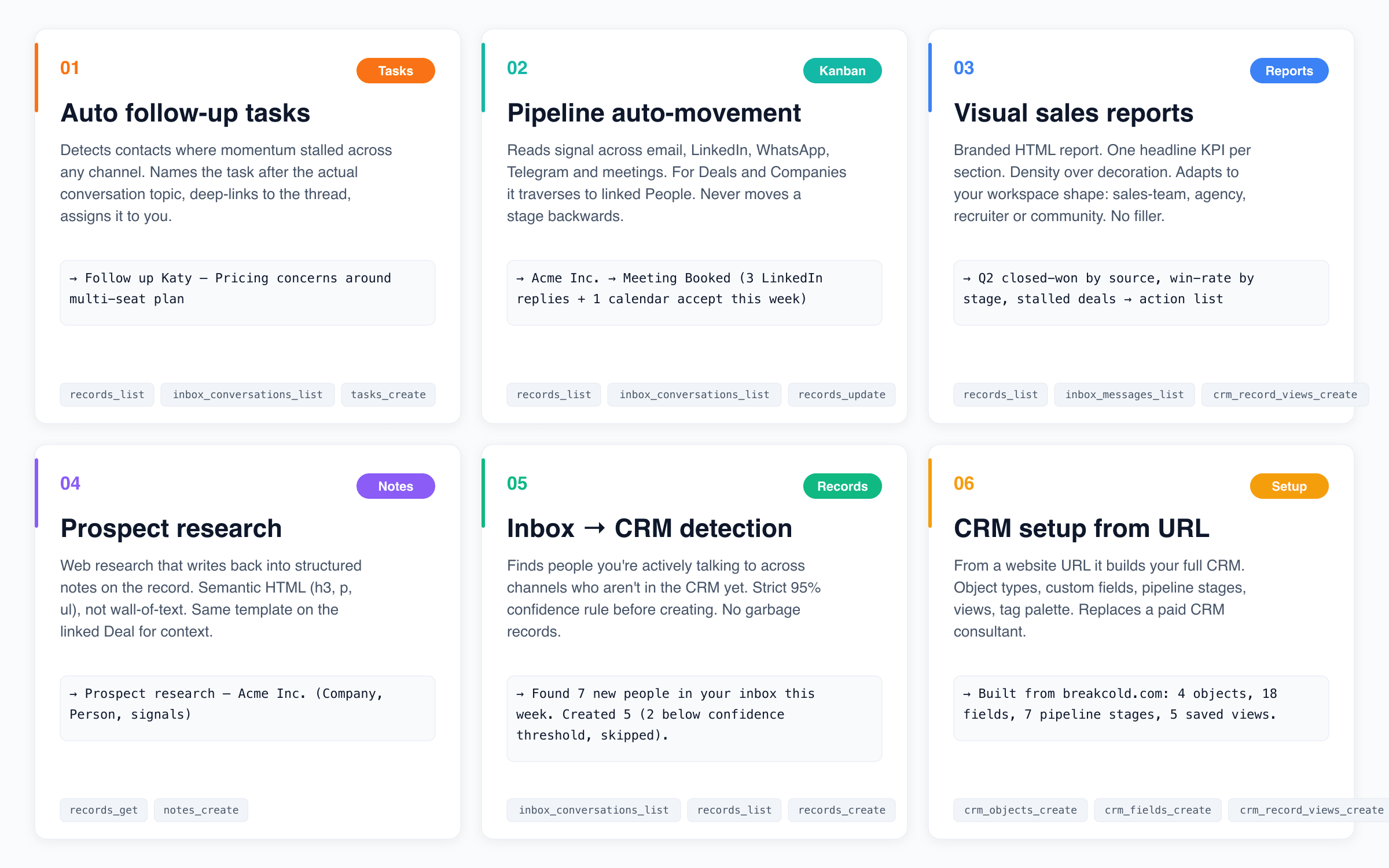
The six workflows that ship in the Breakcold Cowork Skill. Each one is a packaged playbook the agent follows step by step, with guardrails. Not "here are 50 MCP tools, good luck."
Why the Skill matters, not just the MCP 🧠
Every modern CRM with an MCP server can give Claude a tool list. HubSpot does it. Attio does it. Salesforce does it. None of them ship a Claude Skill, which is the bit that tells the agent in what order to call the tools, with which guardrails, and how to recover when something goes wrong. The Breakcold Skill is 14,000 words of "if the user says X, do Y, then Z, and don't ever touch closed-lost." Drop the .skill file into Claude once, every workflow below works the same way every time.
The Skill plus the MCP server together is what makes Claude Cowork land tasks on the right Person record, with the right title, linked to the right LinkedIn or WhatsApp thread, in your language, without duplicates. That is the bar. Anything less and you get the classic AI-CRM bug where the bot creates 47 tasks called "Follow up" and assigns them to nobody.
The six workflows at a glance 🎯
Quick map of what each one does, then I am going to deep-dive the two viral ones because they have the most leverage and the setup is the most worth showing.
🔔 Auto follow-up tasks across every channel. The agent reads your LinkedIn inbox, email, WhatsApp, Telegram and meeting notes, finds the deals where momentum stalled, and writes a follow-up task on the right Person record. Task title is the actual conversation topic, not a generic "follow up 9 days." Deep-link to the thread, assigned to you. Viral on Reddit.
🚦 Pipeline auto-movement on real inbox signals. Reads the same multichannel inbox and proposes stage moves, forward only. Booked meeting? Demo Booked. Signed proposal? Won. Quiet for 14 days? It does not demote, it creates a follow-up. Every move leaves a one-line activity on the record so the next run has memory.
📊 Visual sales reports tuned to your workspace. One prompt, one branded HTML report. It detects whether you are a sales team, an agency, a recruiting shop or a community ops setup, and pulls the right metrics for each. Pipeline velocity, channel attribution, win-rate by stage, stalled-deal action list. Viral on Reddit.
🔍 Prospect research that writes back to the record. Hand it a list. It researches each prospect on the open web and writes structured HTML notes (heading, summary, signals, sources) back into the Notes tab of the Person and the linked Company. Idempotent, per-record, never duplicated.
📥 Inbox-to-CRM contact detection. Scans your multichannel inbox for people you are obviously talking to but who are not in the CRM yet. Strict 95% confidence rule (first name + last name + company recoverable, email or LinkedIn URL verified). Below the threshold it surfaces, above it creates. No spam records.
🏗️ Full CRM setup from a website URL. "Set up my CRM from acme.com." It reads the site, infers the ICP, builds the right object types and custom fields, defines pipeline stages, sets up starter views, applies a sensible tag palette. From a blank workspace to a working CRM in one prompt.
The shape of every Cowork routine 🔁
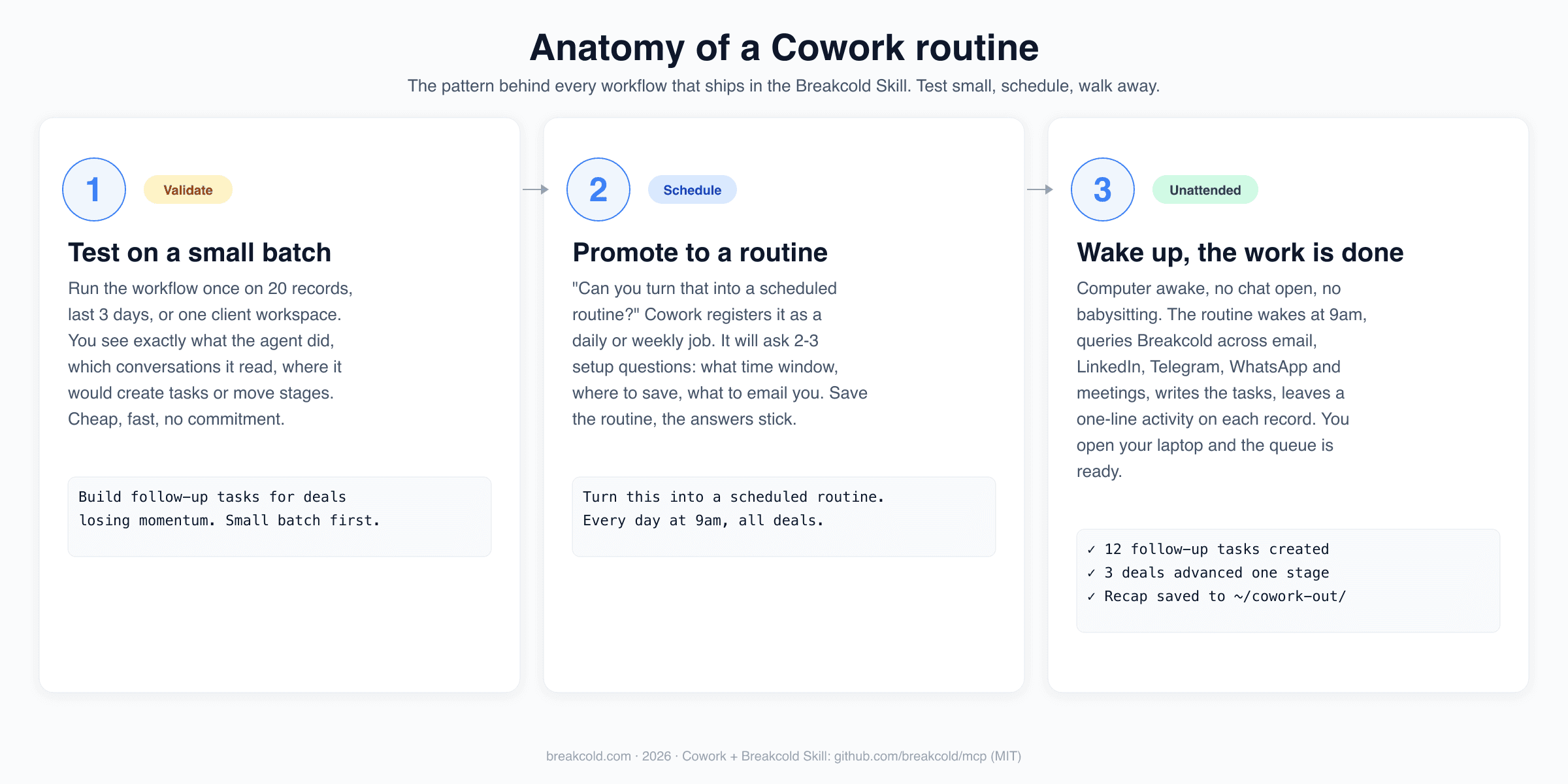
Every workflow follows the same three-step pattern. The deep dives below are concrete versions of this shape.
Two things are easy to get wrong on day one and the Skill encodes the fix for both:
Test small first. Before you schedule anything, run it once on a 3-day window or 20 records. You see what the agent actually did, where it would have made the wrong call, and the cost is one minute of tokens instead of an hour of cleanup. Both viral Reddit posts open with the small-batch test, that is not a coincidence.
Promote, do not rewrite. Once the small batch looks right, you literally just say "turn this into a scheduled routine." Cowork takes the same workflow and registers it. No new prompt, no new scaffolding. Saves the answers to the 2-3 setup questions (time window, where to save, whether to email you) and the routine sticks.
Workflow #1, deep dive: auto follow-up tasks every morning at 9am 🔔
This is the one that went viral. The Reddit post is here. The picture that did the work was a Breakcold task list where every task was named after the actual conversation topic and clicking a task jumped straight to the email thread, LinkedIn thread, WhatsApp or Telegram conversation it was about. All created by Cowork overnight. No human.
Setup, end to end ⚙️
Create your Breakcold account. Sign up at breakcold.com. Once you land in the workspace, connect your accounts: email (Gmail, Outlook), LinkedIn, Telegram, WhatsApp, and your meeting recorder. The whole point of this workflow is multichannel signal, so the more you plug in the better the follow-ups get.
Grab the MCP endpoint. Inside Breakcold go to MCP and API, click MCP docs, pick your region (EU or US). Copy the URL. The European endpoint is
https://http.eu.breakcold.com/mcp/v1, the US one ishttps://http.us.breakcold.com/mcp/v1.Add the connector to Claude. In Claude, Settings → Customize → Connectors → Add custom connector. Name it Breakcold, paste the MCP URL, click Add. OAuth in the browser. Done. The connector now exposes 50+ Breakcold MCP tools to every Claude surface, including Cowork.
Install the Skill. Grab the Skill file from breakcold.com/mcp or the GitHub repo at
github.com/breakcold/mcp. In Claude, Skills → upload → drag the.skillfile in. This is what turns the raw MCP into an actual CRM AI agent that knows what to do, in what order, with which guardrails.Test on a small batch. In Cowork, send this:
"Create me a follow-up task for all my deals where I am losing momentum. Don't create tasks for deals lost. Small batch first to validate." Claude will boot the Skill, qualify the workspace, pick the right one if you have several, figure out your pipeline stages (the Skill knows to skip lost), and surface the first batch of stalled deals. Sonnet 4.6 with adaptive thinking off is the right pick here because the playbook is already in the Skill, the model just executes.
Promote to a routine. If the batch looks right (and it usually does), say:
"Schedule this every day at 9am, no batch limit, all my deals." Cowork registers a daily cron job. When 9am rolls around tomorrow, your laptop awake, no chat open, the routine wakes, queries every channel, writes the tasks, then sleeps until the next day.
What you wake up to 🌅
A task list where every line is specific. Not "Follow up Katy, 9 days." Actual titles like "Follow up Katy on the multi-seat pricing concerns she raised Tuesday on LinkedIn." Clicking the task in Breakcold deep-links to the LinkedIn thread that went quiet. Same logic for email, Telegram, WhatsApp and even meeting transcripts. You stop being the dispatch layer between channels and your CRM, because Cowork is.
Three small details the Skill encodes that you do not have to think about
Conversations live on People. Deals and Companies do not have threads attached, their linked People do. The Skill always traverses to the Person record to find the real signal, and creates the task on the Person so it can link back to the conversation. This single rule kills the #1 false-negative on raw-MCP runs.
Mirrors your language. Talk to Claude in French, the task title is in French. Talk in Spanish, the task is in Spanish. The internal breadcrumb the Skill leaves (so the next run does not duplicate) is in English, so multi-user workspaces stay parseable across languages.
No duplicate tasks. Before creating, the Skill checks whether an equivalent task already exists in the next 7 days. If yes, it skips. The audit trail of "checked, skipped because duplicate" is left on the record so you can see what the routine considered.
Workflow #2, deep dive: visual sales reports as a weekly routine 📊
This is the second viral one and the more useful for managers. The Reddit post is here. It only became possible because Opus 4.8 is roughly 2.5x faster than the previous Opus, which is what unlocks the report use case. Reports are a context-heavy job: the model has to pull a lot of conversations across email, LinkedIn, WhatsApp, Telegram and meetings, then exercise judgment on which signals matter. The new Opus does that without you waiting half an hour for one report.
What a Cowork-generated report actually looks like
Headline KPIs at the top (closed-won, win-rate, deal count). One section per dimension that matters: source attribution, channel performance, pipeline velocity, stalled deals with action list. The Skill is opinionated about density over decoration, so you get one number per section instead of 40 vanity widgets. Branded with the Breakcold palette so it actually looks like something you would forward to a co-founder.
The Skill also detects your workspace shape. If you are running Breakcold as a sales team, you get pipeline-velocity and channel attribution. If you are an agency with multiple client workspaces, you get per-client breakdowns. If you are a recruiting shop, you get pipeline stages tied to roles. Same prompt, different report module catalog. That is the Skill doing the work, not the model improvising.
Setup, end to end ⚙️
Same Breakcold + MCP + Skill setup as workflow #1. If you already did the first one, skip this. If you are starting here, the steps are identical.
Test on a small batch.
"Using the Breakcold Skill, build me a report on why I am winning deals. Cover the last 3 days only to validate." Three days is enough to see whether the model is reading the right channels, scoring sentiment correctly, and pulling LinkedIn DMs and email replies into the same view. Opus 4.8 with the Skill loaded will figure out the deals that closed, even ones with no notes, by reading the conversation tail directly.
Open the report in Google or your browser. The Skill outputs HTML. You see closed-deal breakdown, channel attribution, source mix, signals from the conversation text. A bit of dry humor in the prose, useful insights underneath. If three days produced three wins from three different doors (referral, LinkedIn, SEO), the report says that out loud.
Promote to a weekly routine.
"Turn that into a scheduled routine. Run every 7 days, cover the last 7 days, save the HTML report locally." Cowork asks where to save and whether to email you a copy. Pick whichever flow works for you. From then on, every Friday at 9am, the report drops into the folder you picked and your week-in-review is done before you sit down.
Tip on the time window from running this for a while
The right time window depends on your sale cycle. Fast cycles (SMB, SaaS trials, agency outbound) work great on 7 days. Longer cycles (enterprise, mid-market) want 30 days so the report sees the full motion. You can also use this workflow to analyze the performance of a VA or a sales rep by scoping it to "all activity by user X over the last 7 days." The Skill knows how to filter by assignee.
The other four, briefly 🎬
These do not have viral Reddit posts but they each replace a real chunk of work.
🚦 Pipeline auto-movement. The annoying class of "AI broke my Kanban" bug comes from agents that move deals backwards when a conversation goes quiet. The Skill encodes "stages only move forward, ever" as a hard rule. A quiet deal does not get demoted, it gets a follow-up task. A booked meeting moves to Demo Booked. A signed proposal moves to Won. Every move leaves a one-line audit activity on the record so the next run has memory and you have a paper trail. Schedule it daily, the pipeline stages stay accurate without anyone dragging cards around.
🔍 Prospect research. Hand the agent a list of 30 records and ask "research these and write structured notes." The Skill writes per-record HTML notes (h3 heading, p summary, ul of signals, sources at the bottom) directly into the Notes tab. Same template applied to the linked Deal so the context lives in both places. Next time you open the record in Breakcold the research is already there, no copy-paste from a Claude chat.
📥 Inbox-to-CRM detection. The Skill scans your multichannel inbox for people you are clearly engaging with who are not in the CRM yet. It will only create a record if confidence is above 95%, meaning first name + last name + company recoverable, email or LinkedIn URL verified. Anything below the threshold gets surfaced as a candidate, not auto-created. The output is "found 7 new people, created 5, skipped 2 below threshold." No CRM-pollution, no duplicate hell.
🏗️ CRM setup from a website URL. "Set up my CRM from acme.com." The Skill reads the site, infers your ICP, builds the right object types (Person, Company, Deal, plus any custom objects your business needs), creates fields, defines pipeline stages, sets up starter views, applies a sensible tag palette. From a blank workspace to a working CRM in one prompt. Reorganizing an existing workspace works the same way. This is the workflow that replaces a $2k CRM-setup consultant.
Why this only works on Breakcold today 🥇
Three layers have to be there:
The tools. Most CRMs have this. 50+ MCP tools across records, tasks, notes, custom objects, views, pipelines and inbox.
The context. Without LinkedIn, WhatsApp and Telegram threads in scope, half of the relationship lives outside the CRM and the agent is blind. Breakcold's
inbox_conversations_listreturns email, LinkedIn, Telegram and WhatsApp threads attached to any record. Every other Claude-compatible CRM stops at email and sometimes calls.The playbook. The Skill is the bit that turns 50 tools into 6 workflows. Without it, the agent improvises. With it, the same prompt produces the same result every time. This is what nobody else ships.
The Skill is open source under MIT at github.com/breakcold/mcp. You can read every guardrail, every workflow definition, every edge case the agent handles. You can fork it. You can extend it for your business. That is the model going forward and we are betting on it.
A note on price 💸
Breakcold is $59/month for the full product, 1 seat included. The Skill is free, open source, included with any workspace. Extra seats are +$10/month each, not +$59. A team of 5 lands at $99/month for the entire AI-native CRM, multichannel inbox and unlimited enrichment. No per-integration fees for LinkedIn, Telegram or WhatsApp. The fragmentation tax that every other CRM charges for these is bundled in.
The workflows above burn ~0.5 tokens per CRM action (auto-task, pipeline move, research note, contact creation, report block). 3,000 actions a month at the baseline. Information enrichment is free, unlimited, never costs tokens. Compared to gluing Surfe onto HubSpot, paying $100/user for Sales Hub Pro, and another $100/month for an enrichment add-on, the math is not subtle.
Start in the next 5 minutes 🚀
📦 Grab the latest
breakcold-crm.skillfile from github.com/breakcold/mcp or the marketing page at breakcold.com/mcp.🔗 Connect the MCP endpoint in Claude → Customize → Connectors. US:
http.us.breakcold.com/mcp/v1, EU:http.eu.breakcold.com/mcp/v1. OAuth in the browser on first connect.🧠 Drop the
.skillfile into Claude → Skills → upload.💬 In Cowork, run workflow #1 on a small batch, validate, schedule it daily. Run workflow #3 on 3 days, validate, schedule it weekly. The other four follow the same shape.
Final thought 🎬
There is a difference between an AI that can touch your CRM and an AI that knows what to do with it every morning at 9am. The first one needs you to be the prompt engineer, the project manager and the QA team. The second one needs you to give it a goal once, then walk away. The six workflows above are the second kind. Same model, same tools, completely different outcome.
📚 See the Breakcold Skill · ⭐ Star the repo on GitHub · Start your 14-day Breakcold trial →
Written by Arnaud Belinga