



Claude Integration with LinkedIn: The 4 Tools That Actually Bridge It
No native Claude × LinkedIn connector exists. Here's the bridge stack (CRM, prospecting, enrichment, outreach) that ships LinkedIn data to Claude in 2026.
TL;DR: there is no native Claude × LinkedIn integration. You assemble a stack of bridges. 🏆
🏆 Breakcold (CRM bridge): the AI Native CRM for sales teams of 5 to 30+ people. AI agents handle the admin (move deals, log activity, create tasks), it connects to Claude and ChatGPT via native MCP, and it syncs LinkedIn, email, WhatsApp and Telegram into one pipeline. It is the only CRM whose hosted MCP server returns LinkedIn DMs, profiles and threads to Claude. At 5 seats Breakcold is $139/mo, where a traditional CRM runs $300 to $500/mo.
🟢 Salesforge (prospecting bridge): AI agent that runs multichannel sequences across email and LinkedIn. Claude drives the campaign logic, Salesforge sends.
🟠 Clay (enrichment bridge): resolves a LinkedIn URL into a structured row of contact, headline, employer and email. Claude reads the tables and acts.
🟣 HeyReach (outreach bridge): sends LinkedIn connection requests and follow-ups from real accounts. Claude orchestrates, HeyReach executes.
🔵 Do not glue the APIs yourself: LinkedIn's API is gated behind partnership approval, Sales Navigator costs enterprise money, and scraping breaks every quarter. Buy a bridge.
Every week someone asks me how to connect Claude to LinkedIn. The reason is always the same: they want to prospect, they want to recruit, they want their AI to read the actual conversations that drive their pipeline. And every week the answer is the same: Claude does not have a native LinkedIn integration, and it is not going to get one any time soon.
The reason is structural. LinkedIn keeps its API locked down. Anthropic has no LinkedIn partnership. Claude has no browser of its own. So when people ask "can I connect Claude to LinkedIn?" the honest answer is yes, but never directly. You connect Claude to a bridge tool that already has the LinkedIn relationship, and Claude reads or acts on LinkedIn through that bridge. This article walks through the bridges that actually work in 2026, by job to be done: CRM, prospecting, enrichment, outreach automation.
If you are a salesperson, an agency or a recruiter, this is the one practical guide to wiring Claude to LinkedIn without burning months on a doomed DIY stack.
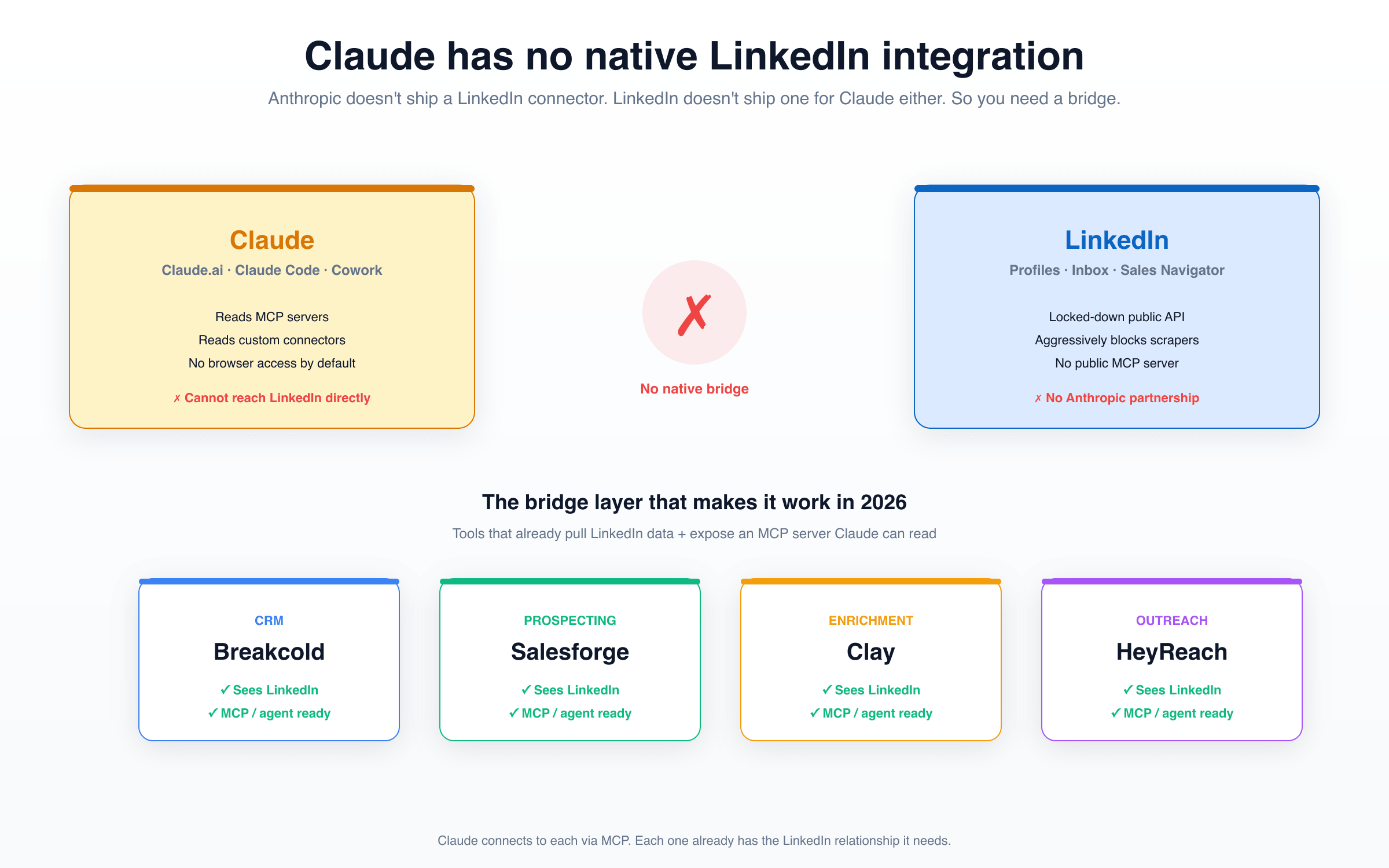
The shape of the problem. Claude reads MCP and custom connectors. LinkedIn does not ship either. You need a tool sitting between them that already has the LinkedIn relationship.
Why people want Claude on LinkedIn in the first place 💼
When someone asks for a Claude LinkedIn integration, nine times out of ten the use case falls into two buckets:
🎯 Sales prospecting: they sell to a buyer who lives on LinkedIn (founders, sales leaders, marketers, freelancers, agencies). Email reply rates are bleeding. The real conversations happen in LinkedIn DMs. They want Claude to read the threads, score the engagement, score the deal stage, and tell them where to push.
🎓 Recruiting: their candidates are on LinkedIn. They want Claude to triage InMails, score candidate fit, write personalized outreach, and surface the warm replies that buried in 200 conversations.
Both jobs share the same primitive: Claude needs to read or act on a LinkedIn conversation, profile or message thread. The hard part is not asking Claude to reason. Claude already reasons fine. The hard part is feeding it the LinkedIn data, because LinkedIn does not give that data away.
Why no native Claude × LinkedIn integration exists (and probably never will) 🔒
A few structural things keep this from happening on the official path:
📜 LinkedIn's API is gated. Reading member messages requires being a Marketing Developer Platform or Talent Solutions partner. Most apps never get those scopes. Sales Navigator API access requires an enterprise contract on top.
🛑 LinkedIn blocks scrapers aggressively. Profile-scraping providers exist (Proxycurl, Bright Data, Phantombuster, etc.) but they sit in a constant cat-and-mouse with LinkedIn's anti-bot stack. Anything you build on them is fragile.
🤝 No Anthropic × LinkedIn partnership. Anthropic ships connectors and MCP support, but LinkedIn does not publish an MCP server, and there is no signed deal. There is nothing for Claude to point at directly.
🌐 Claude has no default browser. Claude.ai can use tools, Claude Code can run agents, but neither one casually loads linkedin.com and logs in for you. The model is not the issue. The plumbing is.
So the real question is not "when will Claude integrate with LinkedIn." It is: "which tools already have the LinkedIn relationship I need, and which of them expose it to Claude through an MCP or agent layer?" That is the practical search.
The DIY route: technically possible, never reasonable 🛠️
Before getting into the bridges, the question I always get is: can I just glue the APIs together myself? Yes. Should you? No. Here is what the DIY stack actually looks like.
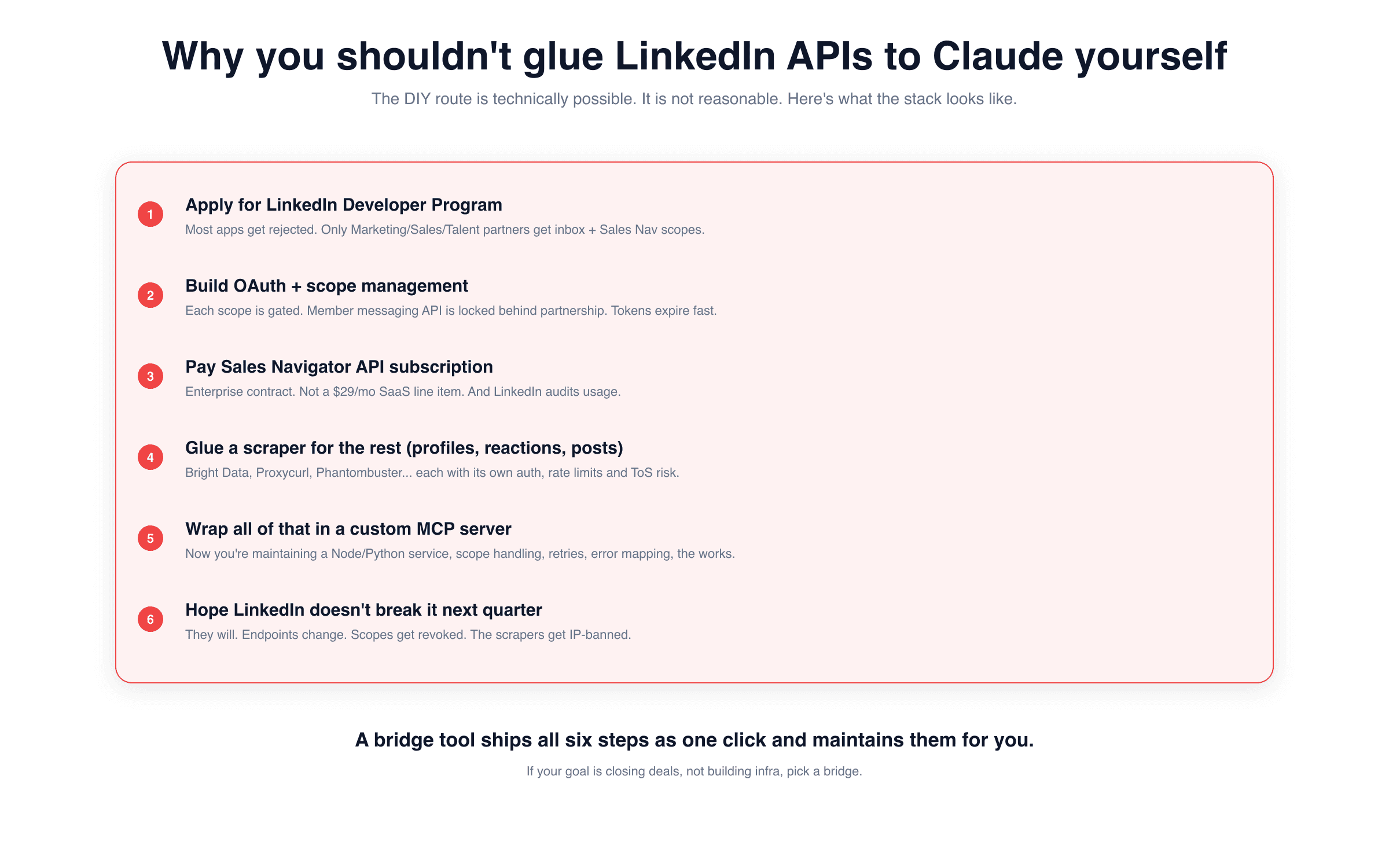
Six steps, each one a project of its own, all of them maintenance-heavy. If your goal is closing deals, not building infrastructure, the DIY route is a tax you do not need to pay.
The shortest version: you would apply for LinkedIn's developer program (most apps get rejected on first pass), pay for Sales Navigator API access, layer a profile scraper for everything else, wrap the whole thing in a custom MCP server, and accept that LinkedIn will break some part of it every quarter. A bridge tool ships all six of those steps as one click. They maintain the relationship for you. They eat the breakage. That is what you are paying them for. The point of using AI is to spend more time selling, not more time gluing APIs.
The bridges: four categories, four tools 🌉
Here is the practical shape of the stack in 2026. Four jobs to be done, one tool per job. You probably do not need all four, just the one that matches what you are actually trying to do with Claude.
🥇 CRM bridge: Breakcold
If the reason you want Claude on LinkedIn is to understand and act on your sales conversations, the CRM bridge is where you start, and Breakcold is the one I would point at. Full disclosure: this is my product. I am also genuinely the right answer for this job, because we are the only LinkedIn CRM whose MCP server returns LinkedIn DMs and threads alongside email, Telegram and WhatsApp.
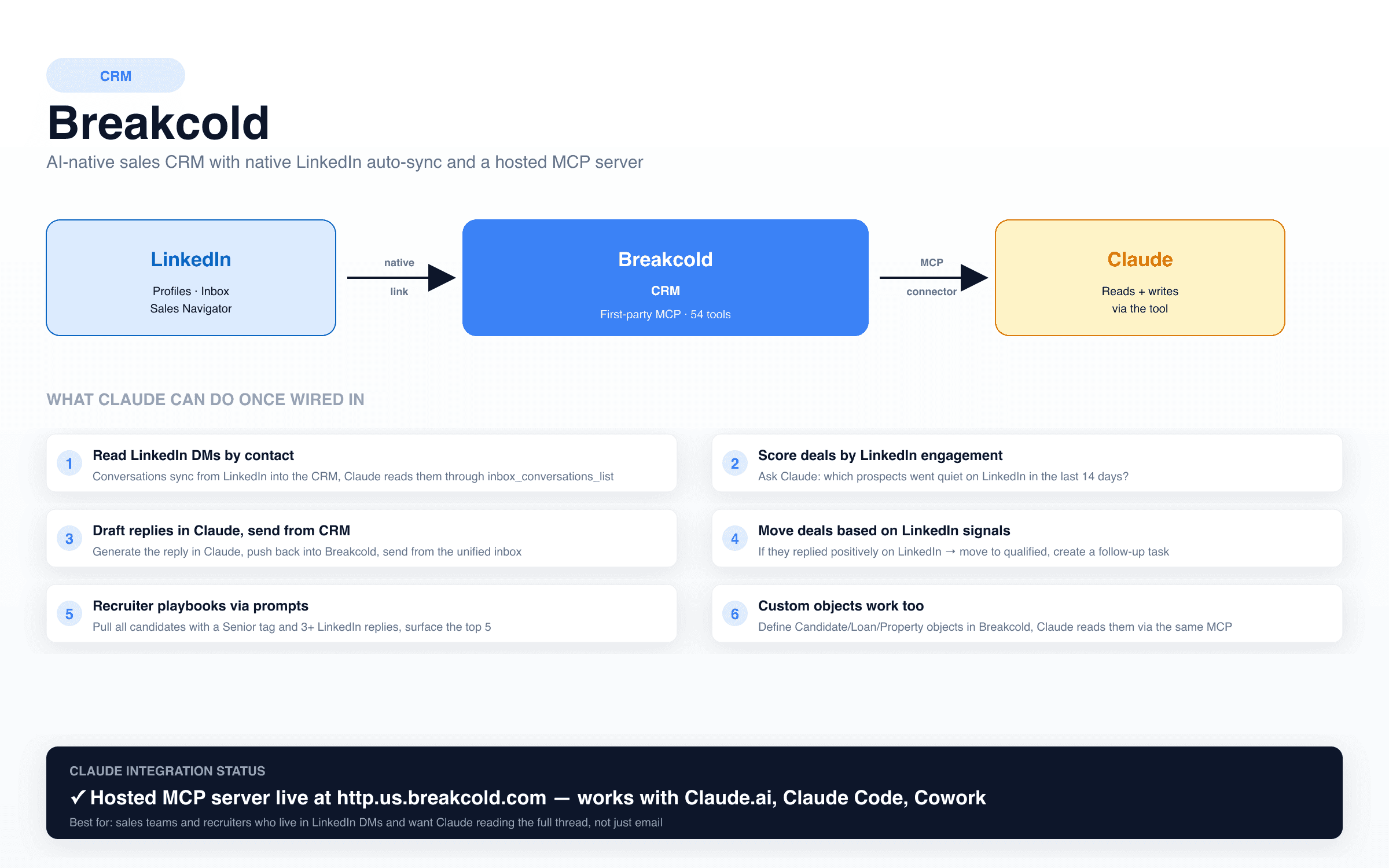
Breakcold's MCP exposes the multichannel inbox to Claude. The LinkedIn thread is in the CRM, Claude reads it directly, no scraping, no broken middleware.
The mechanic: Breakcold auto-syncs your LinkedIn conversations into the CRM (via a Chrome extension and native integrations). The hosted MCP server at http.us.breakcold.com/mcp/v1 exposes 54 tools including inbox_conversations_list, which returns LinkedIn, email, Telegram and WhatsApp threads attached to any record. You connect Breakcold to Claude.ai under Settings → Customize → Connectors, or to Claude Code with claude mcp add, or at the org level via Claude Cowork. Once connected, Claude can do things like:
📥 Read the LinkedIn DM thread with any contact in your CRM, without you exporting anything.
📊 Score deals by LinkedIn engagement asymmetry: "which prospects went quiet on LinkedIn in the last 14 days, are they at the right pipeline stage?"
✍️ Draft a reply in Claude, push it back into Breakcold, send from the unified inbox without leaving the CRM.
🎯 Move deals automatically when LinkedIn signals fire (positive reply, profile view, post engagement).
🎓 Recruiter playbooks: "pull every candidate tagged Senior with 3+ LinkedIn replies, surface the top 5 with the strongest engagement."
The bigger context: Breakcold is an AI-native CRM with native multichannel auto-sync. Most of the other tools below assume you already have a CRM. If you are starting from scratch, the CRM bridge is the load-bearing one, because it is the one that captures the conversation history Claude needs to reason over later. See the companion piece on the 6 CRMs with a real Claude integration for the deeper CRM ranking.
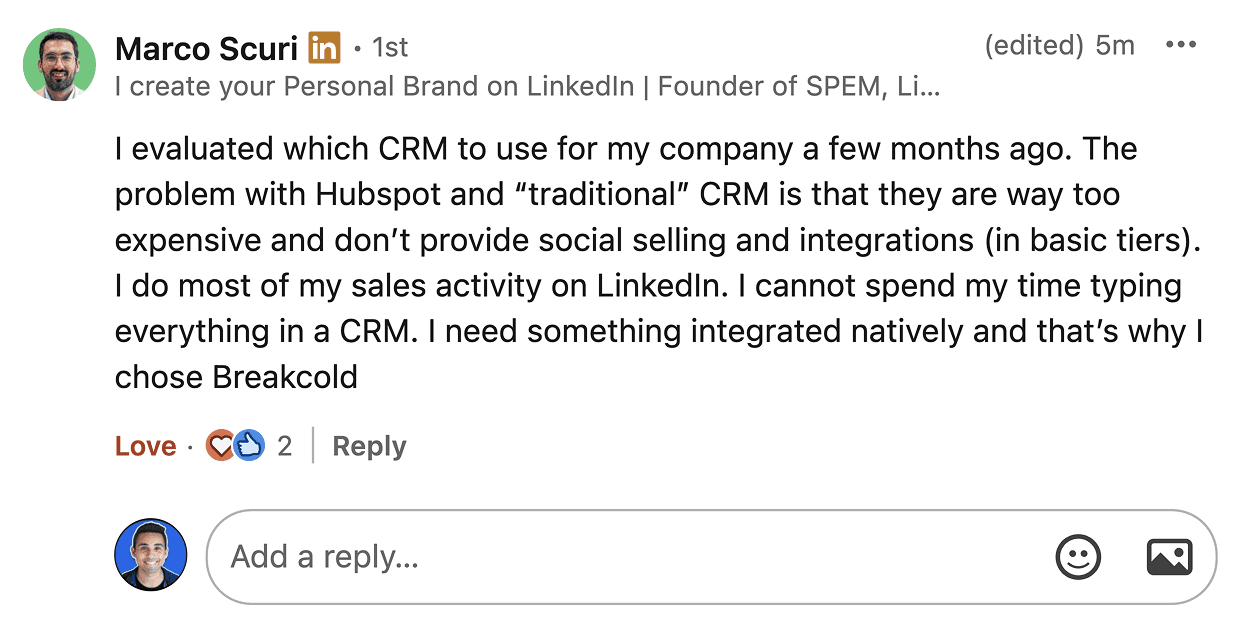
Marco's reason for picking Breakcold is the same reason this article exists: sales happens on LinkedIn, but traditional CRMs treat it like a footnote. The CRM has to read the LinkedIn thread natively, otherwise Claude is reading half the room.
🟢 Prospecting bridge: Salesforge
If the reason you want Claude on LinkedIn is to run cold outbound campaigns, the prospecting bridge is the one. Salesforge is built around AI agents that orchestrate multichannel sequences across email and LinkedIn at scale. The MCP and agent-driven layer is where Claude plugs in.
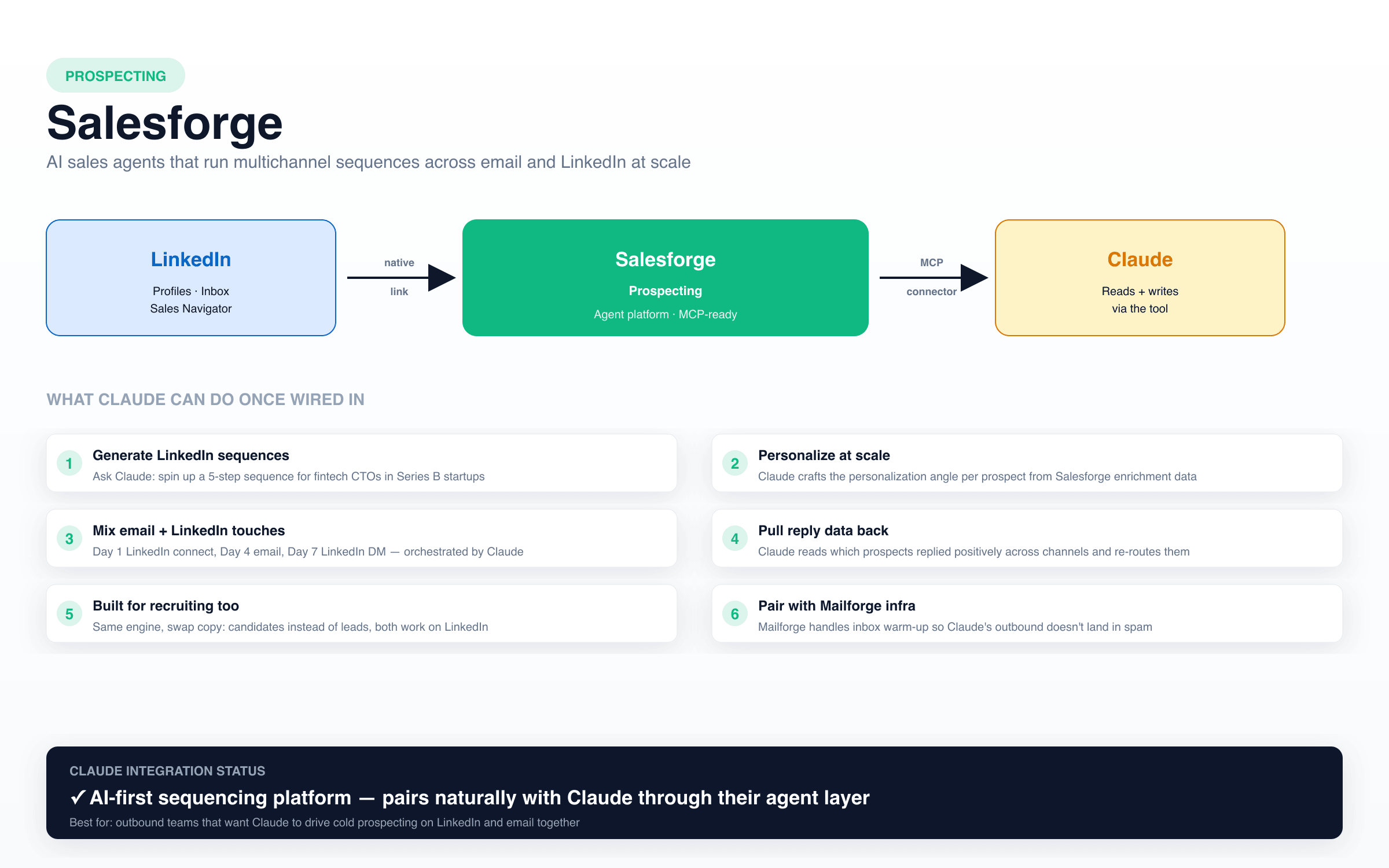
The Salesforge mechanic is the inverse of a CRM. The CRM reads what already happened. The prospecting bridge makes new things happen, and Claude is the brain behind which prospect gets which touch.
The mechanic: you give Salesforge a list of prospects with LinkedIn URLs. The platform sends a sequence (Day 1 LinkedIn connect, Day 4 email, Day 7 LinkedIn DM, etc.). Claude sits one level up: it picks the angle per prospect, drafts the personalization, decides which prospect should get which sequence variant. The Mailforge family handles the sending infra (inbox warm-up, deliverability) so Claude's outbound does not land in spam.
Where Salesforge shines:
🎨 Personalization at scale: Claude crafts the angle, Salesforge sends it across 200 prospects without you copy-pasting.
📨 Email + LinkedIn together: most "AI prospecting" tools default to email-only. Salesforge mixes both, which matches how outbound actually works.
🎯 Reply routing: when a prospect replies, Claude reads the response, decides whether it is a buying signal, a "later" or a "no", and routes accordingly.
🎓 Recruiting variant: same engine works for candidate outreach. The wording changes, the workflow does not.
Pair Salesforge with Breakcold and Claude is reading reply intent from one tool and looking at history from another. That is where the "stack" framing actually starts to compound.
🟠 Enrichment bridge: Clay
If the reason you want Claude on LinkedIn is to turn raw LinkedIn URLs into structured contact data (emails, phones, titles, headlines, employer info, recent posts), the enrichment bridge is the one. Clay is the standard here.
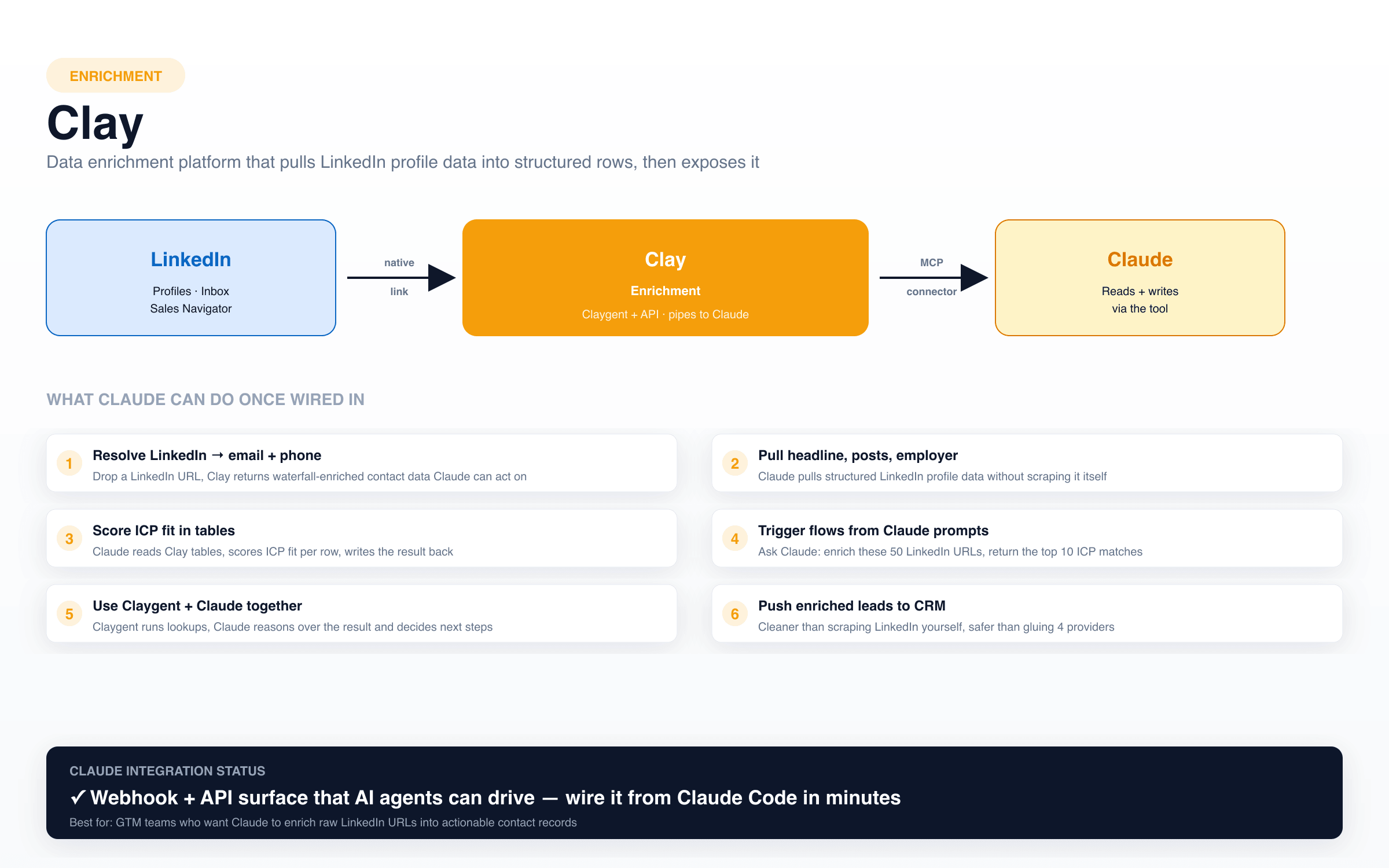
Clay is the spreadsheet of the AI era. Drop a LinkedIn URL in, get back a row that Claude can actually reason over.
The mechanic: you feed Clay a list of LinkedIn URLs or domains. Clay runs a waterfall of providers under the hood (LinkedIn data, email finders, phone enrichers) and returns a structured row. Claygent (their built-in AI agent) can run lookups directly, and the platform's API plus webhooks mean Claude Code can drive enrichment flows on demand.
Where Clay shines for the Claude × LinkedIn use case:
🔍 Resolve LinkedIn URL → working email + phone at scale, without you signing up to Apollo, Hunter, ZoomInfo and BetterContact separately.
📊 Score ICP fit in a table: Claude reads each row, scores it against your ICP rules, writes the result back. The table becomes the working memory.
⚡ Trigger from a Claude prompt: "enrich these 50 LinkedIn URLs, return the top 10 ICP matches with a 3-line personalization angle each."
🔁 Push enriched leads to CRM: Clay → Breakcold (or whoever your CRM is) so the structured data ends up where the conversation will happen.
Use Clay when the question is "I have URLs, give me structured contacts." Use Salesforge when the question is "I have contacts, give me a sequence." Use Breakcold when the question is "I have conversations, give me intelligence."
🟣 Outreach automation bridge: HeyReach
If the reason you want Claude on LinkedIn is to actually send connection requests, follow-ups and InMails at volume from real LinkedIn accounts, the outreach automation bridge is the one. HeyReach is the cleanest LinkedIn-only player here.
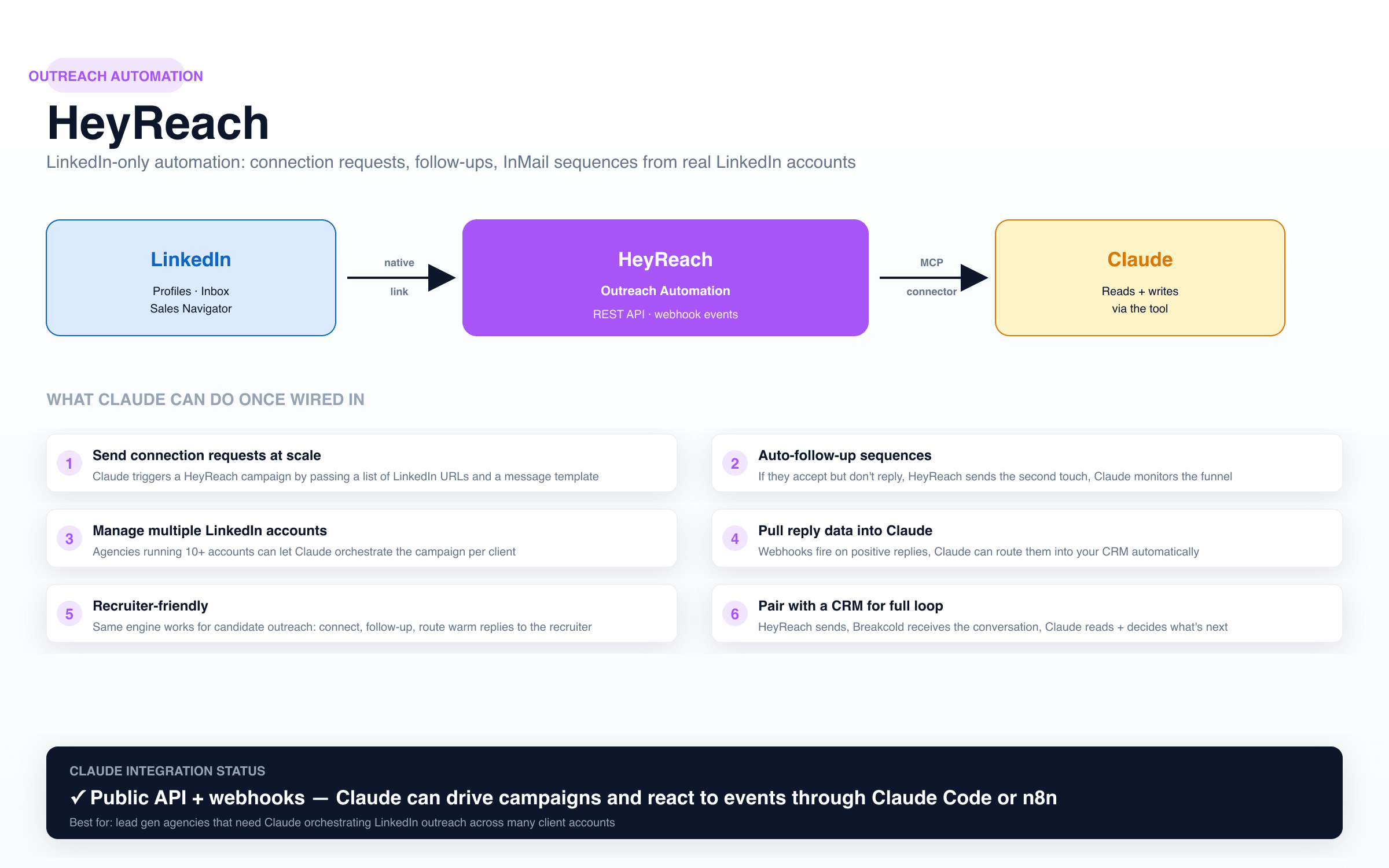
HeyReach is the action layer. Salesforge thinks "what to send," HeyReach handles "send it on LinkedIn safely without getting accounts flagged."
The mechanic: HeyReach connects to one or more real LinkedIn accounts and runs campaigns through them (connection requests, follow-up DMs, InMails). The public API plus webhooks let Claude Code (or any agent framework) trigger campaigns programmatically and react to events. So Claude becomes the operator, HeyReach is the hands.
Where HeyReach shines:
🤖 Trigger campaigns from Claude: pass a list of LinkedIn URLs and a message template, HeyReach starts the connect-and-follow-up sequence.
🧑🤝🧑 Multi-account orchestration: lead gen agencies managing 10+ LinkedIn accounts can let Claude pick which account sends what.
🚨 Webhook into Claude or your CRM: positive reply fires a webhook, Claude reads it, routes the prospect into Breakcold as a qualified deal.
👔 Recruiter-friendly: candidate outreach is the same loop. Connect, follow up, route the warm replies to the recruiter, Claude does the triage.
If Salesforge is the strategist that decides what gets sent and where, HeyReach is the LinkedIn-only execution layer. Many agencies use both: Salesforge for the email side, HeyReach for the LinkedIn side, Claude orchestrating from above.
How the four bridges sit together 🧩
The cleanest way to see it: one tool per job, Claude on top, LinkedIn at the bottom, each bridge already owning its slice of the LinkedIn relationship.
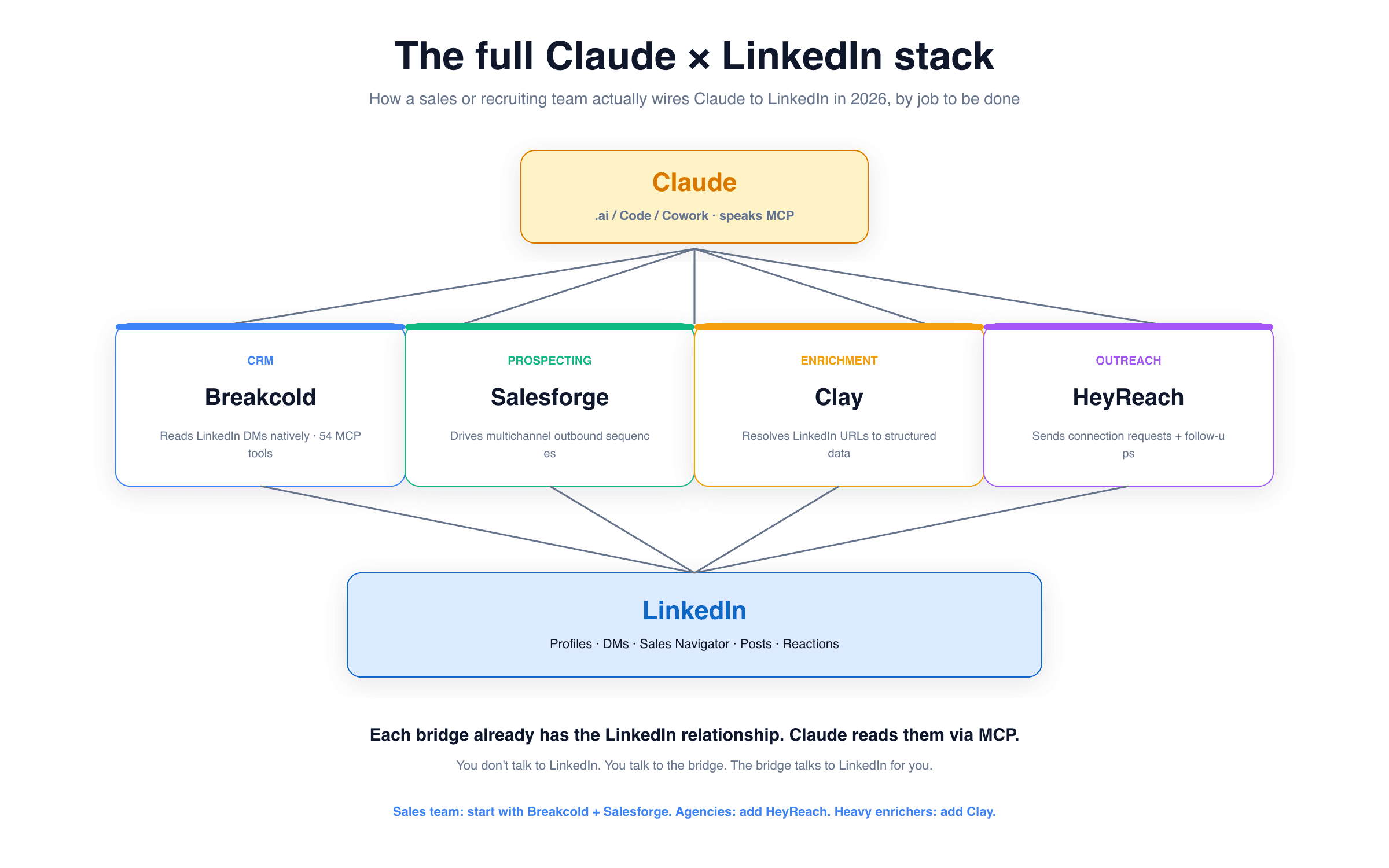
The whole picture. You don't talk to LinkedIn. You talk to the bridge, the bridge talks to LinkedIn. Claude reads them all via MCP.
In practice, you do not need to install all four on day one. Match the bridge to the job you are doing today:
🧠 You sell or recruit on LinkedIn and want Claude reading your threads → Breakcold. The CRM is the load-bearing piece. Everything else stacks on top.
🚀 You run cold outbound and want Claude designing sequences → Salesforge. Add Breakcold when you start landing replies and need a CRM to manage them.
📋 You have lists of LinkedIn URLs and need structured contact data → Clay. Pipe the output into Breakcold for the conversation phase.
🏢 You run an agency sending from 10+ LinkedIn accounts → HeyReach for execution + Breakcold for the multichannel inbox per client.
So, can you connect Claude to LinkedIn? 🎯
Yes. Within strict limits, and only through a bridge. To summarize the practical truth:
❌ No native Claude × LinkedIn integration. Anthropic does not ship one, LinkedIn does not ship one for Claude, and there is no signal a partnership is coming.
❌ Gluing LinkedIn APIs yourself is not reasonable. Gated developer program, Sales Navigator enterprise contracts, fragile scrapers, custom MCP servers to maintain. It is a project, not a weekend.
✅ The bridge route works today. Pick a tool per job (CRM, prospecting, enrichment, outreach), each one already has the LinkedIn relationship, each one exposes data to Claude through an MCP or agent layer.
✅ The CRM bridge is the load-bearing one. If you only pick one, pick the CRM, because that is where the conversation history lives. Breakcold is the only one currently returning LinkedIn DMs through MCP, which is why I keep pointing people to it. The deeper ranking is in the best CRMs with an MCP server piece, and the dedicated Breakcold MCP page covers the technical setup.
The other related reads if you want to keep going: AI CRMs with a LinkedIn integration, CRMs that sync LinkedIn messages automatically, and the LinkedIn selling software roundup if your motion is LinkedIn-first.
Final thought 🚀
Most of the "Claude + LinkedIn" articles you will find online either over-promise (claiming Claude can magically log into LinkedIn) or under-promise (claiming nothing works yet). Neither is true. The honest 2026 answer is: Claude can do astonishing things with LinkedIn data, but only because a small handful of tools have taken on the maintenance burden of keeping that LinkedIn relationship alive. Pick the bridge that fits the job, wire Claude into it, and your AI gets the LinkedIn context it needs without you having to babysit a fragile scraper stack.
If you are starting from zero and you want the shortest path to "Claude reads my LinkedIn conversations and helps me act on them," start with the CRM bridge. The rest stacks on top.
📚 Set up the Breakcold MCP with Claude · Start your 14-day Breakcold trial →
Frequently asked questions

Written by
Arnaud Belinga · Co-Founder & CEO at Breakcold
Arnaud is the Co-Founder & CEO of Breakcold, the AI Native CRM for sales teams of 5 to 30+ people.