
Breakcold Skill: The Best AI Agent for CRM (Email, LinkedIn, WhatsApp & More)
MCP gives your AI a list of tools. The Breakcold Skill gives it a playbook: 6 sales workflows, 50+ tools and the universal rules to run a CRM safely. Drop one .skill file into Claude, ChatGPT, Cursor, Codex or 17+ other AI clients.
Every CRM in 2026 brags about its AI integration. Most of them ship an MCP server, hand the LLM a list of 30 to 50 tool names, and call it a day. Then you connect Claude or ChatGPT, ask it to "follow up with the cold ones," and watch it freeze, ask three clarifying questions, create duplicate tasks on the wrong record, and move a Won deal back to Prospecting because the conversation went quiet for a week.
A tool list isn't an agent. The Breakcold Skill is. It's a 14,000-word expert playbook packaged as a single .skill file you drop into Claude, ChatGPT, Cursor, Codex, or any of 17+ AI clients. Behind it sits the same 50+ MCP tools the rest of the CRM market exposes, except now your AI knows how to actually use them: in what order, with which guardrails, on which record, in your language.
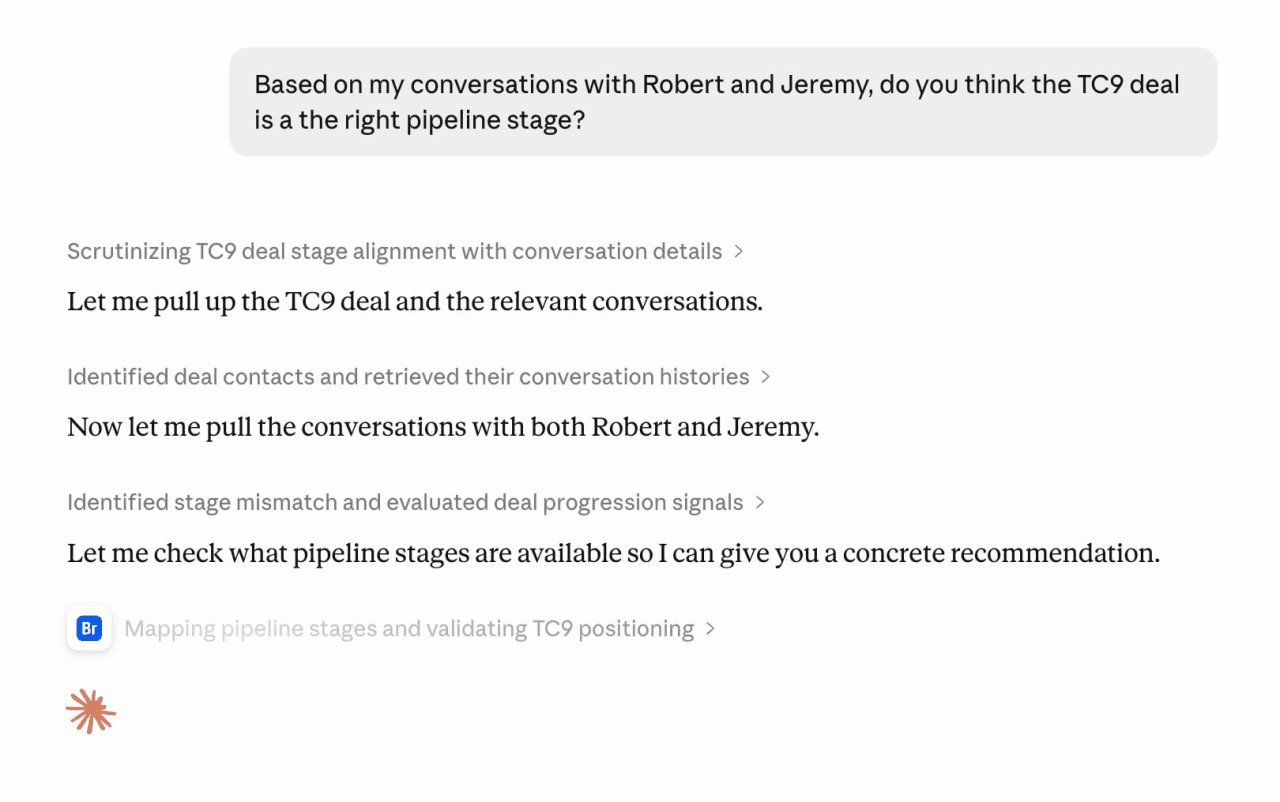
Real Claude conversation with the Breakcold Skill loaded. The prompt: "Based on my conversations with Robert and Jérémy, do you think the TC9 deal is at the right pipeline stage?" Claude pulled both contacts, retrieved their conversation histories across LinkedIn and email, scored the engagement asymmetry, mapped the available pipeline stages, and recommended a specific move. No prompt engineering. No CSV upload. Just the Skill and a question.
First, the receipts 🧾
When Claude pulled both TC9 contacts via the Skill, it found this on its own:
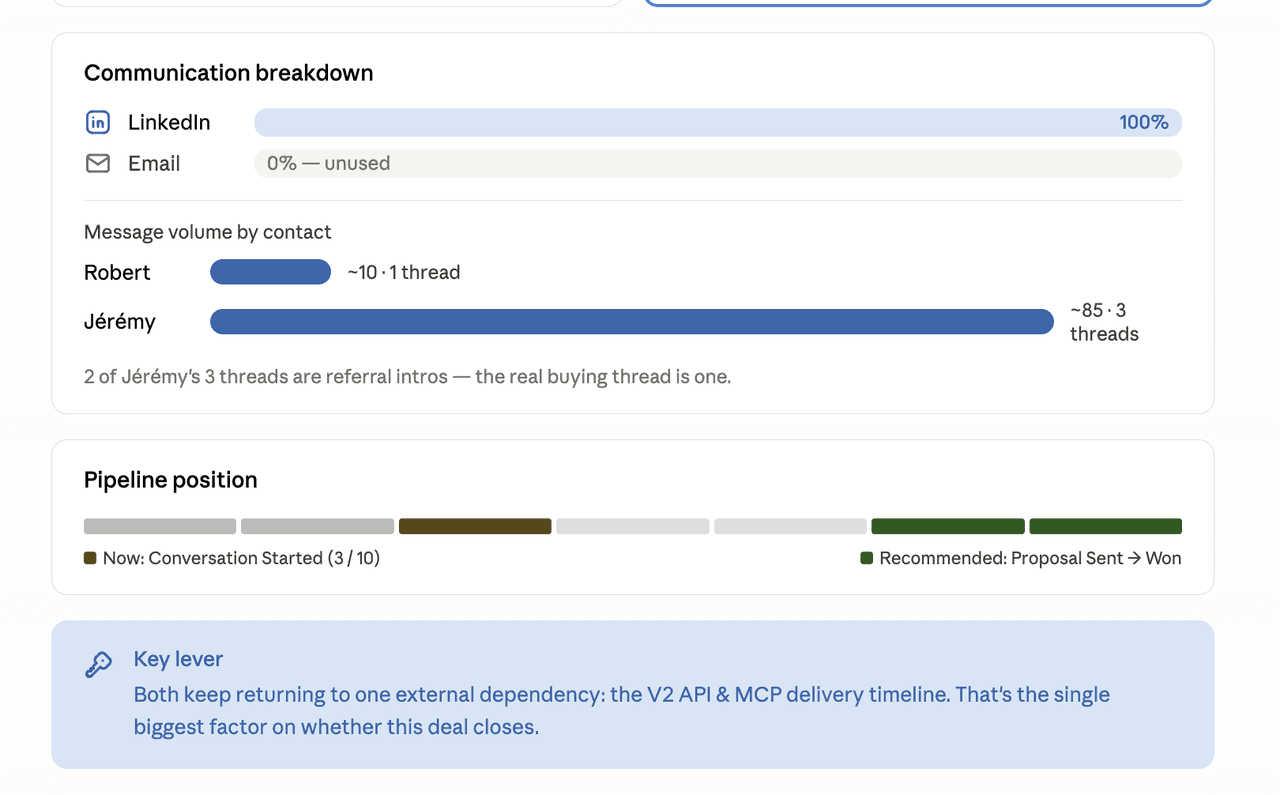
Communication breakdown Claude assembled from the Breakcold MCP via the Skill. LinkedIn 100% of the volume, Email 0% (unused). Robert ~10 messages, Jérémy ~85 messages across 3 threads, with the kicker: "2 of Jérémy's 3 threads are referral intros, the real buying thread is one." Then a pipeline position bar and a key-lever box: "the V2 API and MCP delivery timeline is the single biggest factor on whether this deal closes." This is one prompt, not a 20-minute Looker dashboard.
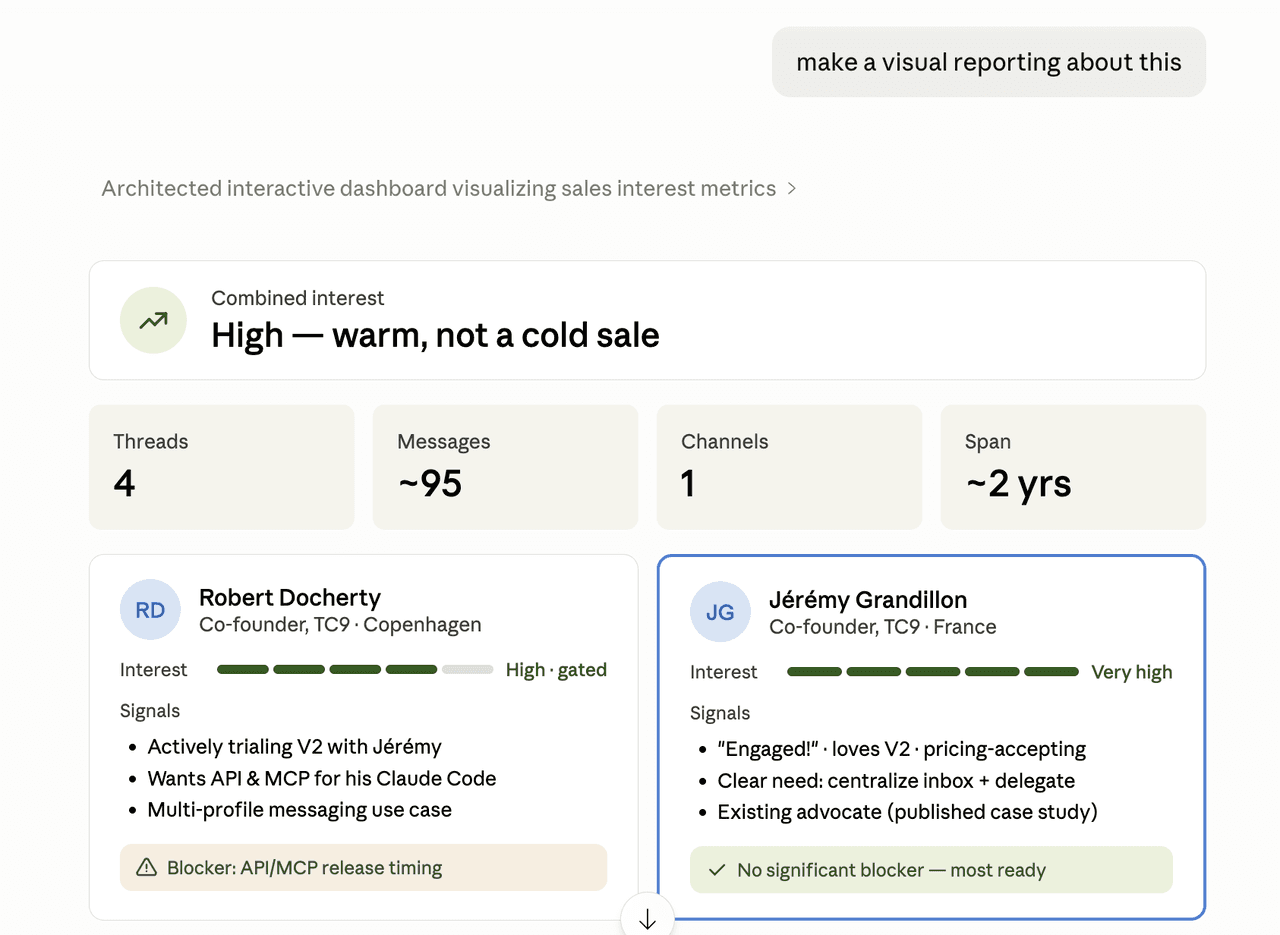
Same conversation, follow-up prompt: "make a visual reporting about this." Interest scored, contact cards generated for both co-founders, specific signals surfaced ("loves V2, pricing-accepting", "wants API and MCP for his Claude Code"), single blocker identified. The Skill knows reports follow a structure, so the output is structured.
Why "MCP server" is the floor, not the ceiling 🪜
Here's the bit nobody explains. Six CRMs ship a real MCP server today: Breakcold, HubSpot, Attio, Salesforce, Close and Monday. All six give the AI a list of tools. None of the other five give the AI any idea what to do with those tools, in what order, or how to recover when something goes wrong.
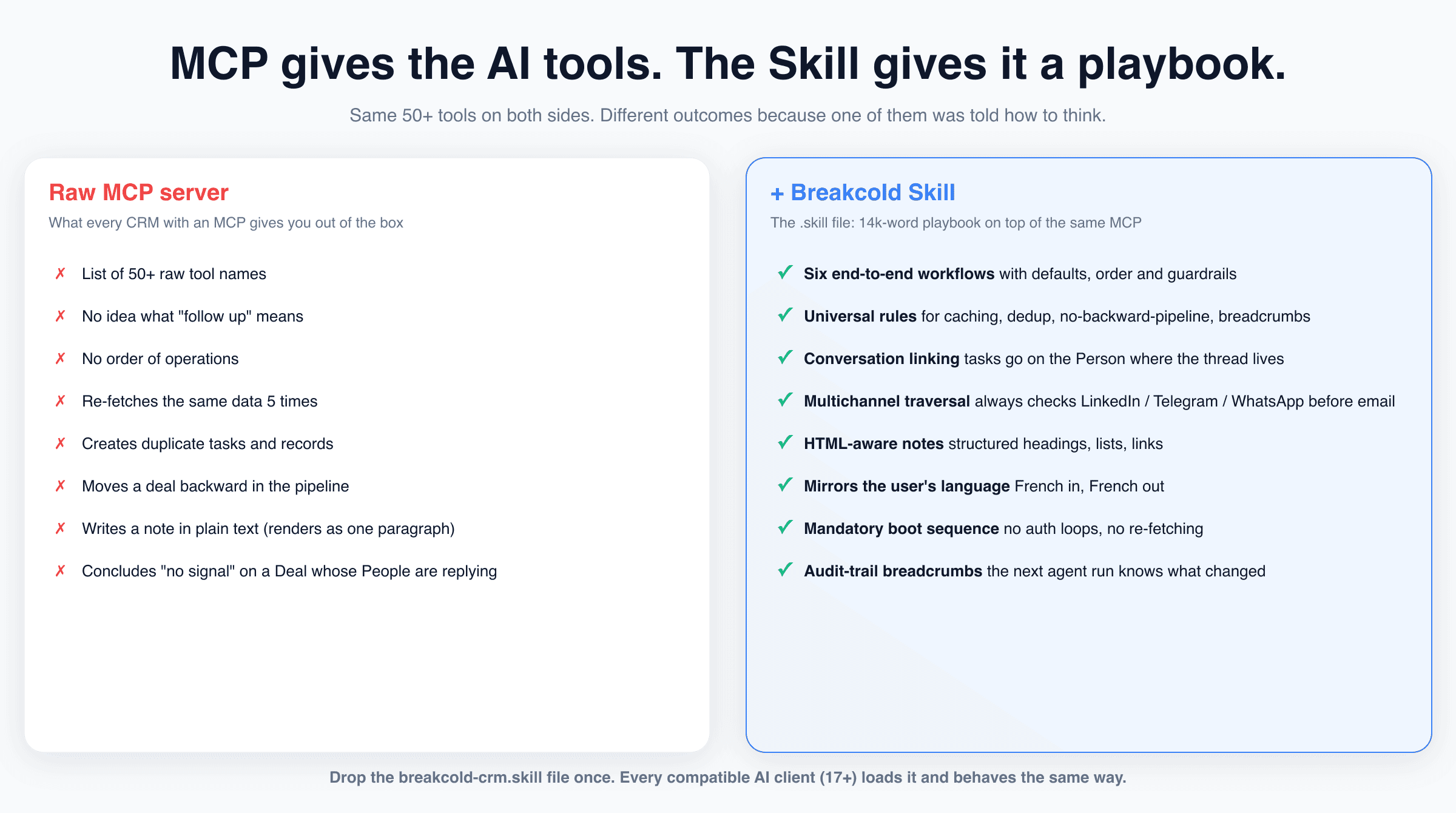
Same 50+ tools on both sides of this picture. Different outcomes because one of them came with a playbook. The Skill is 14,000 words of "when the user says X, do Y, in this order, with this fallback." Without it, the LLM is improvising.
A few things the Skill encodes that a raw MCP can't:
Six concrete workflows with defaults, dependencies, and edge cases. Not "what tools exist" but "what to do."
Conversations live on People. Deals and Companies don't usually have threads attached, their linked People do. The Skill always traverses to the Person to find the real signal, and creates the follow-up task on the Person so it can link back to the conversation. This single rule eliminates the #1 false-negative we see in raw-MCP runs.
Pipeline is a directed flow. Stages only move forward. Ever. A deal that goes quiet doesn't get demoted, it gets a follow-up task. This rule alone prevents the most annoying class of "AI broke my Kanban" bug.
Notes are HTML, not plain text. The CRM renders them as rich content. The Skill writes structured headings, bullet lists, links. Without that rule, the LLM dumps a wall of
\nline breaks that render as one unbroken paragraph.The agent mirrors the user's language. If you talk to Claude in French, the tasks, notes, reports and views it creates inside Breakcold are in French. The single exception is internal breadcrumb prefixes (English, so the next run can parse them across users).
Mandatory boot sequence. Capabilities, workspaces, current user ID, cached at session start. No re-fetching. No "what's the workspace ID again?" mid-conversation.
The six workflows the Skill ships with 🎯
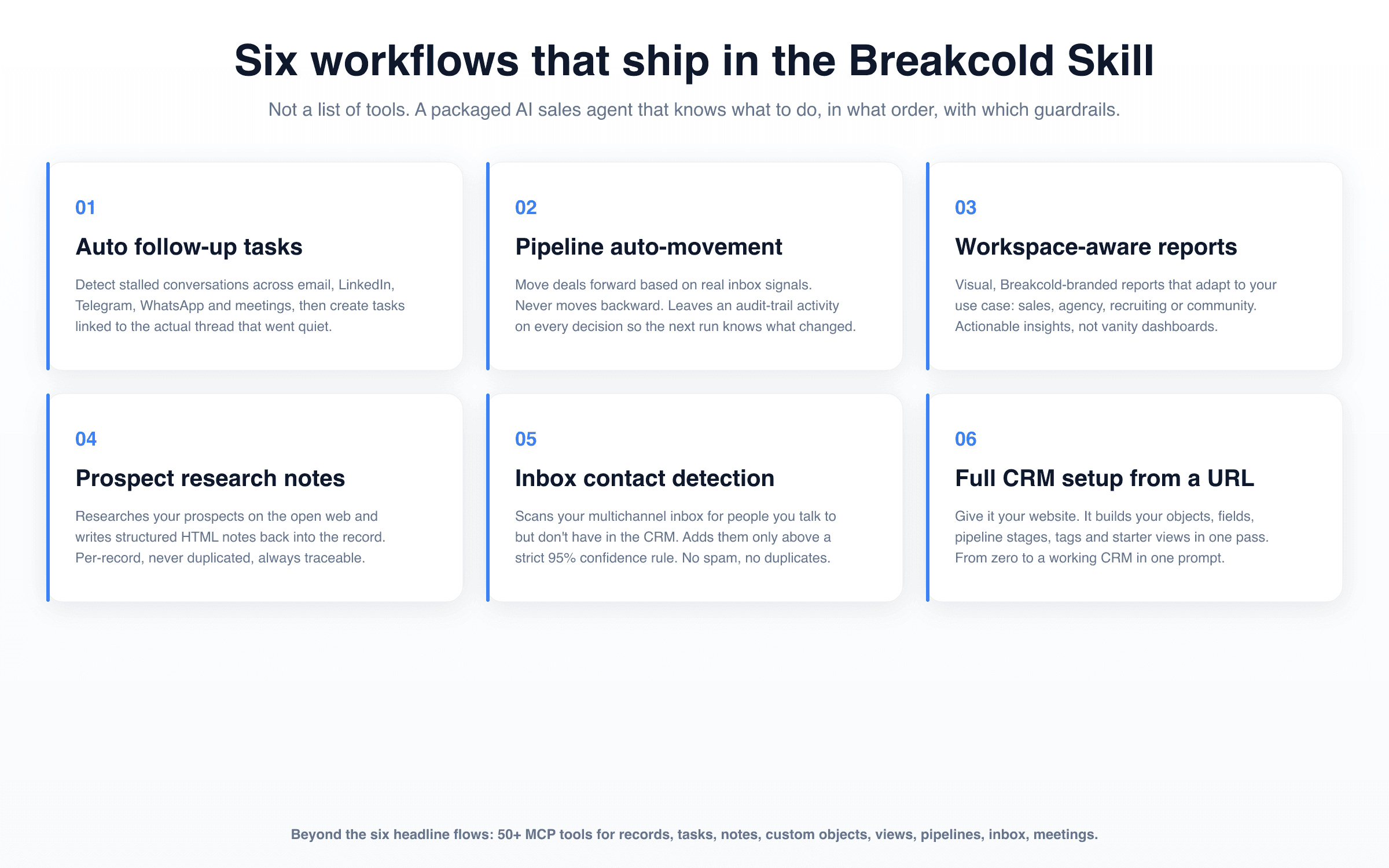
The six headline workflows are the ones the Skill is tuned to deliver perfectly. Anything else in the CRM surface is still in scope, but these are the ones we obsessed over.
01 · Auto follow-up tasks across every channel 🔔
"Find every contact I haven't replied to in 7 days across email, LinkedIn, Telegram or WhatsApp, and queue follow-up tasks." The Skill scans the multichannel inbox, identifies stalled threads, checks that no equivalent task already exists for the next 7 days, and writes the task on the right Person record with a link back to the conversation that went quiet. The follow-up title is in your language. The breadcrumb is in English so the next run parses it.
02 · Pipeline auto-movement on real inbox signals 🚦
The Skill reads what's actually happening in your conversations and proposes stage moves, but only forward. A positive LinkedIn reply moves a deal from Conversation Started to Qualified. A booked meeting moves it to Demo Booked. A signed proposal moves it to Won. Every automated decision leaves a one-line activity on the record explaining why, so the next run has memory and you have an audit trail.
03 · Workspace-aware reports that adapt to your use case 📊
"Give me a sales report." The Skill detects whether you're running Breakcold as a sales team, an agency with multiple client workspaces, a recruiting shop or a community ops setup, and produces a different report module catalog for each. Sales gets pipeline velocity and channel attribution. Agency gets per-client breakdowns. Recruiting gets pipeline stages tied to roles. All Breakcold-branded, all actionable.
04 · Prospect research that writes itself back to the record 🔍
Hand the Skill a list of records and it researches each one on the open web, then writes structured HTML notes (heading, summary, signals, sources) back onto the record. Per-record, never duplicated, idempotent. The next time you open that record in Breakcold, the research is already there in the Notes tab. No copy-paste from a Claude chat.
05 · Inbox contact detection with a strict 95% confidence rule 📥
The Skill scans your multichannel inbox for people you're clearly talking to but who aren't in the CRM yet. It will only create a record if confidence is above 95%: first name + last name + company recoverable, email or LinkedIn URL verified. Below the threshold it surfaces the candidate to you rather than auto-creating. No spam records. No duplicates.
06 · Full CRM setup from a website URL 🏗️
"Set up my CRM from breakcold.com." The Skill reads the website, infers your ICP, builds the right object types (Person, Company, Deal, plus any custom objects your business needs), creates the fields, defines pipeline stages, sets up starter views, and applies a sensible tag palette. From a blank workspace to a working CRM in one prompt. Reorganization from an existing workspace works the same way.
One Skill, every major AI client 🌍
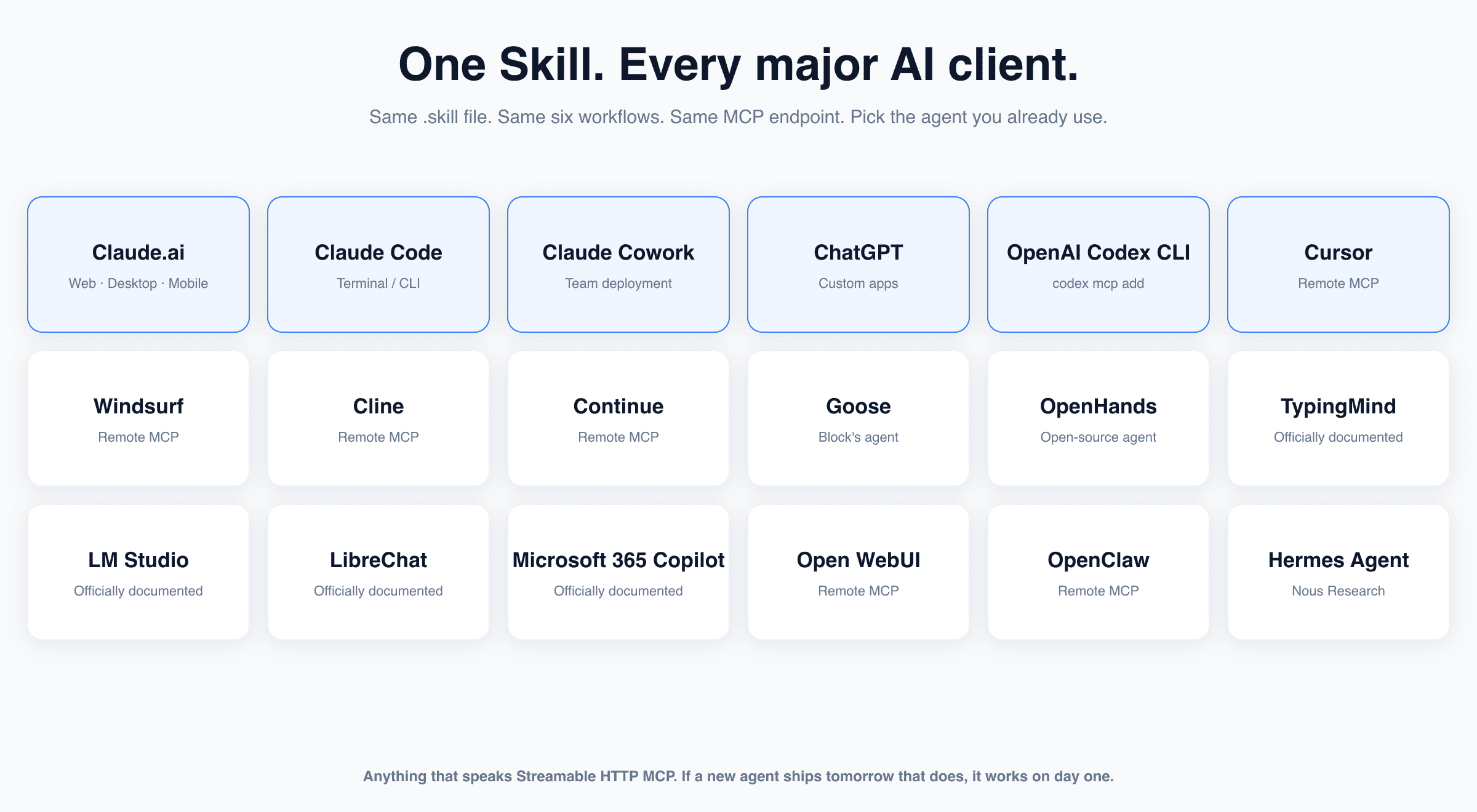
The Skill follows the AgentSkills format, which loads natively on Claude. For every other client it's a markdown bundle plus the MCP endpoint, set up in a couple of commands. Either way, the playbook the LLM follows is identical across platforms.
The full supported list, with what each does best:
🟦 Claude (web, Desktop, Mobile, Code, Cowork): first-class. The Skill loads via the AgentSkills format. Drop the
.skillfile once. Connect the MCP endpoint under Customize → Connectors. Done.🟩 ChatGPT (custom apps): paste the regional MCP URL into a custom app, authorize, the Skill's system prompt loads alongside.
⬛ OpenAI Codex CLI:
codex mcp add breakcold --url https://http.us.breakcold.com/mcp/v1and the Skill behaviors apply to terminal-driven agents.🟪 Cursor, Windsurf, Cline, Continue: generic remote-MCP support. Add Breakcold like any other MCP server. The Skill markdown lives in the project's agent instructions.
🟨 Goose, OpenHands, OpenClaw, Hermes Agent (Nous Research): open-source agent frameworks. MCP endpoint + Skill markdown = working CRM agent.
🟧 TypingMind, LM Studio, LibreChat, Open WebUI, Microsoft 365 Copilot: officially documented in the Breakcold Applications hub. Same flow on each.
If a new agent ships tomorrow that speaks Streamable HTTP MCP, the Skill works on it on day one. Nothing to port, nothing to rewrite.
Instant setup with the .skill file ⚡
The Skill ships as a single breakcold-crm.skill file. On Claude (web, Desktop, Code, Cowork) you drop it in and it's live. On every other client, the file unpacks to a markdown bundle (SKILL.md + six action-*.md reference files + four cross-cutting references for branding, fundamentals, routines and report design) that you paste into the agent's instructions or system prompt.
A 30-second mental model:
The MCP endpoint at
http.us.breakcold.com/mcp/v1(or EU) is where the 50+ tools live. The agent calls those tools to read or write your CRM.The Skill tells the agent which tools to call, in what order, with which inputs, and how to recover from failure modes. It's the brain wrapper around the body.
You install both once. From then on, every "follow up with the cold ones" or "give me a weekly pipeline report" or "research these 30 prospects" routes through the same playbook, regardless of which AI client you happen to be using that day.
The Skill is open and versioned. The current release sits at github.com/breakcold/mcp and the marketing page is at breakcold.com/mcp. CHANGELOG is in the repo, the file at the top of this article is v0.6.3.
Why this is the best AI agent for CRM work right now 🥇
There are essentially three layers to "AI in your CRM" and most products only ship one or two of them. The Breakcold Skill ships all three:
Layer 1: the tools. Every modern CRM has this. 50+ MCP tools across records, tasks, notes, custom objects, fields, record views, inbox views, multichannel conversations. Breakcold's bar here matches or beats HubSpot, Attio, Salesforce, Close, Monday.
Layer 2: the context. Tools are worthless if half of your relationship lives outside the CRM. Breakcold's
inbox_conversations_listreturns email, LinkedIn, Telegram and WhatsApp threads attached to any record. Every other Claude-compatible CRM stops at email and sometimes calls. The TC9 LinkedIn analysis at the top of this article is impossible on any of those other CRMs because the LinkedIn thread isn't in scope.Layer 3: the playbook. This is what the Skill adds and nobody else has. Tools + context + a 14,000-word agent that knows what to do with them. No improvisation, no guessing, no duplicates, no backward pipeline moves.
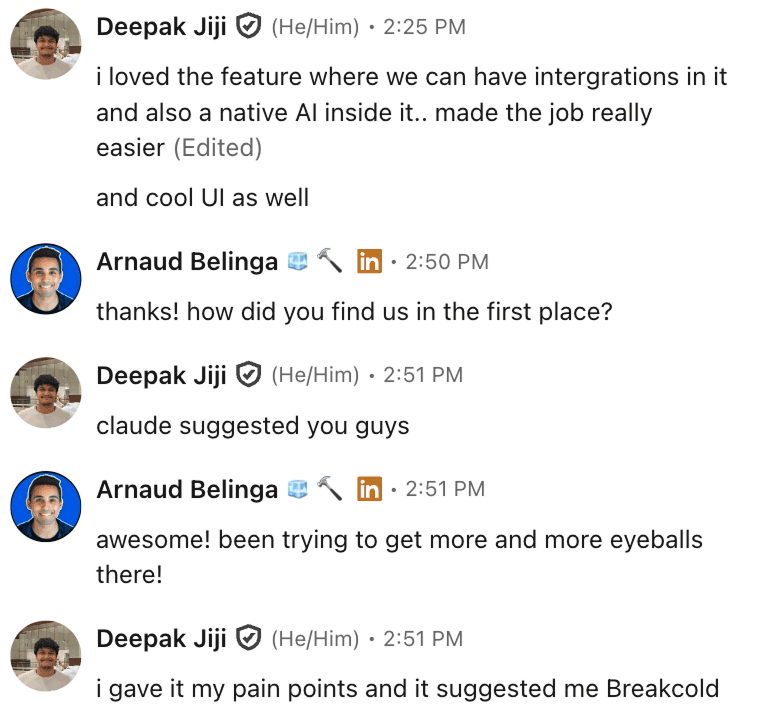
Deepak: "I loved the feature where we can have integrations in it and also a native AI inside it... Claude suggested you guys, I gave it my pain points and it suggested me Breakcold." When the LLMs you use every day already shortlist Breakcold for AI-native CRM work, that's the integration story paying off in distribution.
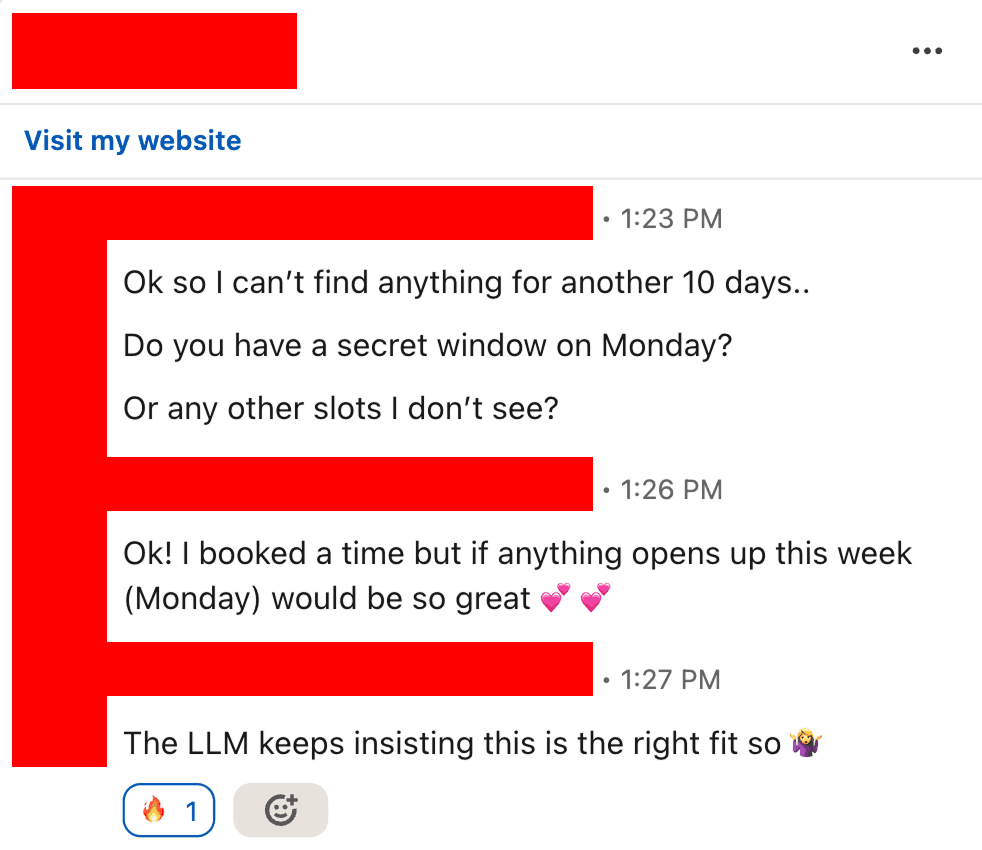
"The LLM keeps insisting Breakcold is the right fit." Two screenshots, same pattern: Claude and ChatGPT independently recommend Breakcold for CRM work in 2026. The Skill is one of the reasons.
A note on price (because this would normally cost a team) 💸
A few honest comparisons:
Breakcold is $59/month for the full product, 1 seat included. The Skill is free, open source on GitHub, included with any workspace.
Extra seats are +$10/month each, not +$59. A team of 5 lands at $99/month for the entire AI-native CRM, multichannel inbox and unlimited enrichment.
No per-integration fees for LinkedIn, Telegram or WhatsApp. The fragmentation tax that every other CRM charges is bundled in.
The Skill's "AI CRM Actions" (auto-tasks, pipeline moves, research notes, contact detection, reports) burn ~50 tokens per action. 3,000 actions/month baseline. Information enrichment is free, unlimited, never costs tokens.
Compared to gluing Surfe onto HubSpot, paying $100/user for HubSpot Sales Hub Pro, and another $100/month for an enrichment add-on, the math isn't subtle.
How to start in the next 5 minutes 🚀
📦 Grab the latest
breakcold-crm.skillfile from github.com/breakcold/mcp or the marketing page at breakcold.com/mcp.🔗 Connect the MCP endpoint (US:
http.us.breakcold.com/mcp/v1, EU:http.eu.breakcold.com/mcp/v1) in your AI client of choice. OAuth on first connect.🧠 Drop the
.skillfile (Claude) or paste the Skill markdown into your agent's system prompt (everywhere else).💬 Ask the agent to "set up my CRM from
yourcompany.com" and let it do the boring part. Then ask it for daily follow-ups, weekly reports, and prospect research notes, and watch the same playbook execute every time.
Final thought 🎬
There's a difference between an AI that can touch your CRM and an AI that knows what to do with it. The first one needs you to be the prompt engineer, the project manager and the QA team. The second one needs you to give it a goal.
The Breakcold Skill is the difference between those two AIs. Same model, same tools, completely different outcome. And because the Skill is open, free, and works across every major AI client, the only question left is which agent you want to run it on.
📚 See the Breakcold Skill · ⭐ Star the repo on GitHub · Start your 14-day Breakcold trial →
Written by Arnaud Belinga